ASL Assist (American Sign Language Assistant) is an Android mobile application that utilizes machine learning and computer vision written in Python to let users use their personal phone camera to recognize and communicate the American sign language alphabet.
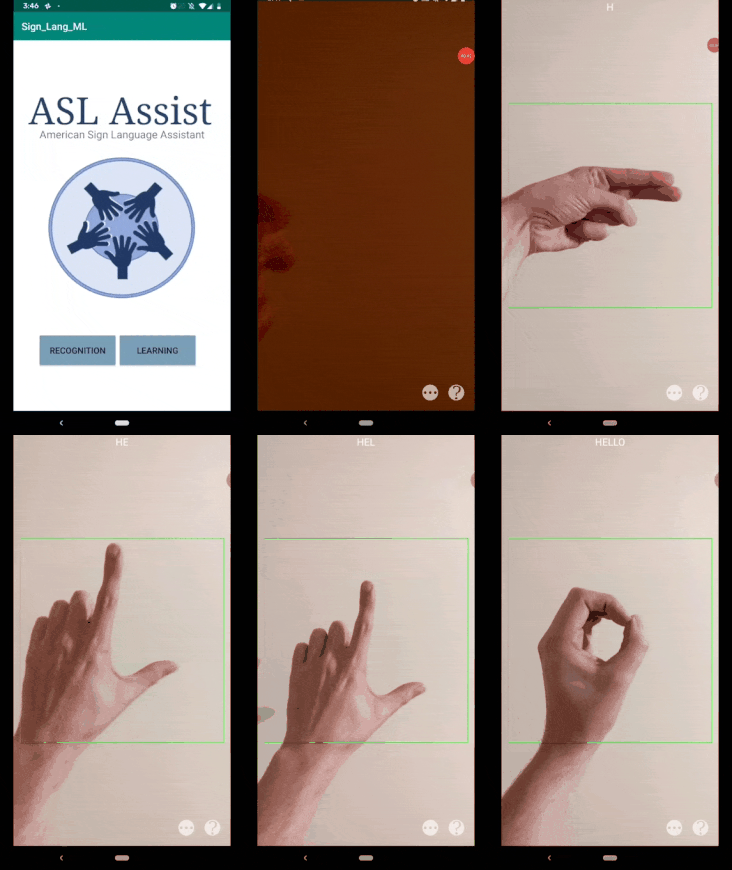
- ASL Assist Android Mobile App
- Table of Contents
- Installation
- Mobile Application Reference
- Machine Learning Model Reference
- Meet the Authors
To get started, let's clone the Python model repository.
The Python model repository comes packed with many different useful features. The repository allows you to create, train, and test a machine learning model from scratch or easily import a pre-existing model. The repository also allows you to generate your own dataset or import a pre-existing dataset.
To clone repository:
git clone https://github.com/jbentleyh/ASL-Machine-Learning
To install dependencies:
pip install -r requirements.txt
Please see the readme for more instructions on creating, training, and testing a machine learning model.
Note: If using your own model, you need to convert your model to .tflite before installing the mobile application.
To get started, let's clone the application repository.
To clone repository:
git clone https://github.com/jbentleyh/ASL-Assist-Android-Mobile-App.git
Next, open Android Studio.
From the project source navigate:
SignLangML > app > assets
In this folder, place your .tflite model file.
To open the cloned repository, navigate File > Open Project. Find the working folder and select the cloned repository as the project.
Once the project is open and synced. Click the build hammer as seen below.

Once the project has successfully built, run the app.


ASL Assist uses TensorFlow Lite for Android. TensorFlow Lite is used to bridge the gap between the machine learning model and the mobile application.
For more information, see the TensorFlow Lite Android quickstart guide.
ASL Assist uses OpenCV 3.4.8 for Android. OpenCV is used to open and control the user's phone camera for frame analysis from the machine learning model.
For more information on OpenCV, see the documentation.
Mobile application source code.

ASL Assist uses TensorFlow + Keras to power a Keras Sequential model. TensorFlow and Keras interface seemlessly, allowing for quick iteration, training, and testing models.
For more information on TensorFlow + Keras for Python, see the official documentation. For more information on the Keras Sequential model, see the Keras documentation.
Machine learning model source code.
Jeffrey Files GitHub
Jansen Howell GitHub
Joseph Daughdrill GitHub