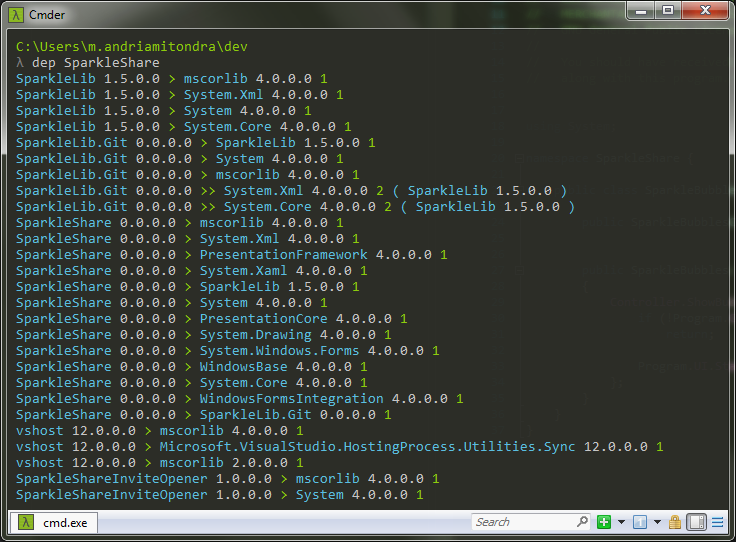
dep.exe is a command line tool which dumps all the dependencies of .NET assemblies (*.dll or *.exe files) to the standard output in a parsable format. It shows direct dependencies and indirect ones. If A depends on B and B depends on C, dep.exe will output
- A depends on B with a distance of 1
- B depends on C with a distance of 1
- A depends on C with a distance of 2
dep.exe has been designed to focus on a single task and be combinable with other command line tools like grep or awk.
Have a look at the examples below for more info.
The latest ready to use binary is available here: dep.exe
Download dep.exe first.
dep [ file-path | dir-path ]
This will recursively search for assemblies in the given path and output all the parent-child dependencies of assemblies.
If the argument is ommited, the tool will start at the current folder . .
The format of the output is
assembly1-version1 dependency1-version1 distance [intermediate-dep1] [intermediate-dep2]
assembly1 is an assembly which depends on dependency1 which is another assembly.
The distance between assembly1 and dependency1 is the minimum number of direct dependencies to follow to go from assembly1 to dependency1 using the dependency graph of the folder.
Hello world example
> dep

dep 1.0.0.0 > mscorlib 4.0.0.0 1
dep 1.0.0.0 > System 4.0.0.0 1
vshost32 12.0.0.0 > mscorlib 4.0.0.0 1
vshost32 12.0.0.0 > Microsoft.VisualStudio.HostingProcess.Utilities.Sync 12.0.0.0 1
vshost32 12.0.0.0 > mscorlib 2.0.0.0 1
Combine it with other tools
> dep myproject/bin | grep -i reactive

myproject 1.0.0.0 >> Reactive.Core 2.2.5.0 2 ( Reactive.Linq 2.2.5.0 )
myproject 1.0.0.0 > Reactive.Linq 2.2.5.0 1
Reactive.Linq 2.2.5.0 Reactive.Core 2.2.5.0 1
Go Berserk! and detect assemblies in more than one version
> dep | awk '{ print $1 " " $2; print $4 " " $5 }' | awk '{ if (length(first[$1]) == 0) first[$1] = $2; if (first[$1] != $2) errors[$1] = $1; }  END{ for(e in errors) print e } '

System.Web.Http.WebHost
System.Web.Http
System
| Step | Status |
|---|---|
| Compilation | |
| Unit tests |
git clone https://github.com/manitra/dependency-reader.git
cd dependency-reader
nuget restore src/DependencyReader.sln
msbuild src/DependencyReader.slngit clone https://github.com/manitra/dependency-reader.git
cd dependency-reader
mono nuget restore src/DependencyReader.sln
xbuild src/DependencyReader.slnThe output is the 'bin/[ Configuration ]' folder
Here some feature/bugfix to implement
- use multiple threads
- handle multiple version of the same assembly
- [DONE 0.2.0] show indirect dependency (and add a third column for the path of the dependency)