- What is MongoDB
- What MongoDB can Manage
- NoSQL Databases
- NoSQL Behind History
- Basic Terminology
- Sample JSON Object
- MongoDB Default ID
- Advantages
- Where to use MongoDB?
- MongoDB Edition
- Install MongoDB
- MongoDB Data Modeling
- Embeded Data Model
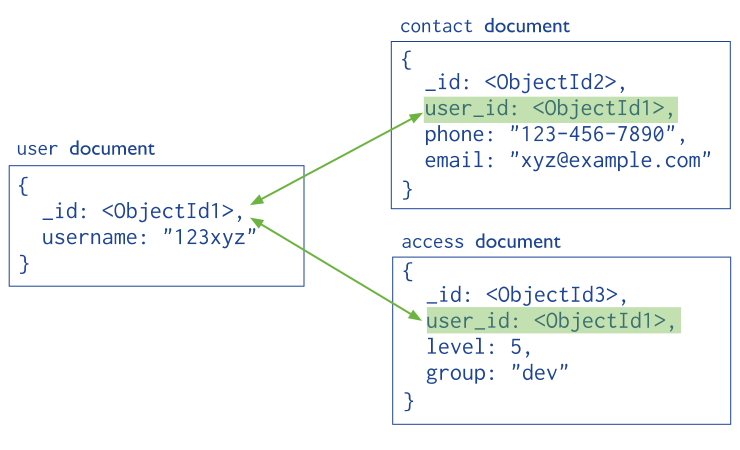
- Normalized Data Model
- Data Type
- MongoDB Shell
- MongoDB Help
- MongoDB Statistics
- Show Database Names
- Create Database
- Show Collections in Database
- Drop Database
- Single Document Insert
- Multiple Documents Insert
- Find Single Document
- Find All Documents
- MongoDB Projection
- Projection
- Query Operators Usage
- Logical Operators
- Limit Records
- Sort Records
- Update One Document
- Update Documents
- Delete Document
- Beautify JSON Output
MongoDB is a cross-platform, document oriented database.
- Provides high performance
- High availability
- Easy scalability
- It is no SQL
- written in C++
- Structured data
- Semi structured data
- Un structured data
NoSQL Database is used to refer a non-SQL or non-relational database.
- No table
- No row
- No complex join
- In the early 1970, Flat File Systems are used, that time there was no standard, no format difficult to manage and share.
- In 1970 Computer scientist Edgar F. Codd proposed a database model to resolve this problem, known as relational database model
- But later relational database also get a problem that it could not handle big data, due to this problem there was a need of database which can handle every types of problems.
- The initial development of NoSQL database MongoDB began in 2007 by 10gen, the the company name changed with new name MongoDB Inc.
- Later in 2009, it is introduced in the market as an open source database server
- The first ready production of MongoDB has been considered from version 1.4 which was released in March 2010.
| RDBMS | MongoDB |
|---|---|
| Database | Database |
| Table | Collection |
| Tuple/Row | Document |
| column | Field |
| Table Join | Embedded Documents |
| Primary Key | Primary Key (Default key _id provided by MongoDB itself) |
{
	_id: Objectld(7df78ad8902c)
	title: 'value',
	tags: ['value','value','value'],
	likes: 100,
	comments: [
		{
			user: 'value' ,
			message: 'value',
			dateCreated: new Date(2011,1,20,2,15),
			like:0
		},
		{
			user: 'value' ,
			message: 'value' ,
			datecreated: new Date(2011,1,25,7,45),
			like:5
		}
	]
}- As you see, in the example of a MongoDB document the _id field is called Object ID. MongoDB uses ObjectIds as the default value of _id field of each document, which is generated during the creation of any document.
- Object ID is treated as the primary key within any MongoDB collection. It is a unique identifier for each document or record.
Syntax:
ObjectId(<hexadecimal>). - An ObjectId is a
12-byte BSON type hexadecimal stringhaving the structure as shown in the example below. Example: ObjectId("6009c0eee65f6dce28fb3e50") - The first
4 bytes are a timestamp value, representing the ObjectId’s creation, measured in seconds since the Unix epoch. Next 5-bytes represent a random value.
| 7df7 | 8ad | 89 | 02c |
|---|
- First 4 bytes = current timestamp
- Next 3 bytes = machine id
- Next 2 bytes = process id
- Last 3 bytes = incremental VALUE
- Schema less
- single object
- No complex joins
- Deep query-ability
- Tuning
- Ease of scale-out
- Uses internal memory for storing
- Big Data
- Content Management and Delivery
- Mobile and Social Infrastructure
- User Data Management
- Data Hub
- MongoDB Community Server
- MongoDB Enterprise Server
- MongoDB Atlas
- Download MongoDB Community Server
- Install MongoDB Community Server on the local machine
- Download MongoDB Shell
- Extract Shell document
- cut
mongoshfile and pest it toC:\Program Files\MongoDB\Server\6.0\bin - Download MongoDB Compass
- Install MongoDB Compass
- Connect MongoDB With Compass Application
MongoDB provides two types of data models
- Embedded Data Model
- Normalized Data Model
In this model, you can have (embed) all the related data in a single document, it is also known as de-normalized data model.
{
	_id: ,
	Emp_ID: "10025AE556"
	Personal_details : {
		First_Name: "Radhika" ,
		Last_Name: "Sharma" ,
		Date_Of_Birth:"1995-09-26"
	},
	Contact: {
		e-mail: "radhika_sharma.123@gmail.com",
		phone : "9848622358",
	},
	Address:{
	city : "Hyderabad" ,
	Area : "Madapur" ,
	State: "Telangana"
	}
}In this model, you can refer the sub documents in the original document.
Data Types |
Description |
|---|---|
String |
String is the most commonly used datatype. It is used to store data. A string must be UTF 8 valid in mongodb. |
Integer |
Integer is used to store the numeric value. It can be 32 bit or 64 bit depending on the server you are using. |
Boolean |
This datatype is used to store boolean values. It just shows YES/NO values. |
Double |
Double datatype stores floating point values. |
Min/Max Keys |
This datatype compare a value against the lowest and highest bson elements. |
Arrays |
This datatype is used to store a list or multiple values into a single key. |
Object |
Object datatype is used for embedded documents. |
Null |
It is used to store null values. |
Symbol |
It is generally used for languages that use a specific type. |
Date |
This datatype stores the current date or time in unix time format. It makes you possible to specify your own date time by creating object of date and pass the value of date, month, year into it. |
- The mongo shell is similar to the mysql in MySQL, psql in PostgreSQL, and SQL*Plus in Oracle Database.
- The mongo shell is an interactive JavaScript interface to MongoDB.
- The mongo shell is included in the MongoDB installation by default.
	> Math.max(10,20,55,15)
	50
	> function Sum(num1,num2){
	...return num1+num2
	...}
	> sum(10,15)
	25
To see the list of command you need to use the help() function
db.help()To get stats about MongoDB server, type the command db.stats() in MongoDB client. This will show the database name, number of collection and documents in the database.
db.stats() show dbsSuppose we wantto create a database that doesn't exists at all. Then you have to to use database by a name and have to insert atleast one data belongs to that db's collection
	use schools
db.students.insert({name:"Tanim",city:"Dhaka"}) show collectionsIn Order to delete a database switch to that database then you can dropDatabase()
	use schools
	db.dropDatabase()
If we want to create new collection belongs to an existing Database then you have to use createCollection() method
db.createCollection("teachers")If requires to delete an existing collection use drop() method
db.teachers.drop() db.students.insertOne({name:"Tahmid",city:"Dhaka"}) db.students.insertMany([{name:"Mehrab",city:"Donia"},{name:"Namita",city:"Comillah"},{name:"Hafiz",city:"Rajbari"}]) db.students.findOne({name:"Namita"}) db.studetns.find()projection means selecting only the necessary data rather than selecting whole of the data of a document.
db.students.find({},{_id:0,name:1})- It shows the projected column.
- Projection uses boolean number.
0 for skip column&1 for select column
- $eq : Equal To Operator
- $lt : Less Than Operator
- $lte : Less Than or Equal To Operator
- $gt : Greater Than Operator
- $gte : Greater Than or Equal To Operator
- $ne : Not Equal To Operator
- $in : In Operator
- $nin : Not In Operator
db.Products.find({price:{$eq:"1000"}})
db.Products.find({price:{$lt:"1000"}})
db.Products.find({price:{$lte:"1000"}})
db.Products.find({price:{$gt:"1000"}})
db.Products.find({price:{$gte:"1000"}})
db.Products.find({price:{$ne:"1000"}})
db.Products.find({price:{$in:["100","200","3000"]}},{price:1})
db.Products.find({price:{$nin:["100","200","3000"]}},{price:1})- $and : Logical AND Opeartor
- $or : Logical OR Operator
	db.products.find({$and:[{price:{$eq:"100"}},{special_price:{$eq:"NA"}}]},{price:1,special_price:1,category:1})

	db.products.find({$or:[{price:{$eq:"100"}},{special_price:{$eq:"NA"}}]},{price:1,special_price:1,category:1})
To Select Specific number of records use limit method
db.students.find().limit(5)(Ascending: 1, Descending: -1)
	db.students.find().sort({name:1,city:-1})
db.products.find({},{name:1}).sort({name:-1}) db.students.updateOne({id:100,{$set:{name:"Anwar",city:"Dhaka"}}})db.COLLECTION_NAME.update(SELECTION_CRITERIA, UPDATED_DATA)
db.students.update({id:100},{$set:{name:"Jahid",city:"Dhaka"}}) db.students.remove({name:"Jahid",city:"Dhaka"})pretty()
db.students.find().pretty()