A Tamagotchi-style terminal pet whose mood reflects your git repository health!
git-pet is an adorable animated dog that lives in your terminal. Its mood and health are tied to your coding habits - frequent commits, clean working trees, and good practices make your buddy happy!
- Adorable ASCII Art Dog - Cute animated pet with wagging tail, blinking eyes, and expressive moods
- Dynamic Animations - Watch your pet walk around, sniff, scratch, roll over, chase their tail, and more!
- 5 Evolution Levels - Watch your puppy grow from a tiny ball of fluff to a Legendary Doge with a crown!
- Smart Dog Tricks - Your pet performs real git commands as tricks (fetch, status, branch, log, and more!)
- Repository Health Tracking - Monitors commit frequency, working tree cleanliness, and more
- Visual Heatmap - GitHub-style contribution heatmap showing your last 4 weeks of activity
- Focus Mode - Built-in Pomodoro timer to help you stay productive
- Smart Commits - AI-assisted commit message suggestions
- Achievements System - Unlock achievements for coding milestones
- XP & Leveling System - Earn XP through good coding habits and watch your pet evolve
- Persistent State - Your pet remembers you between sessions!
# Run directly with npx (no install needed!)
npx git-pet

# Or install globally
npm install -g git-pet
git-pet- Navigate to any git repository
- Run
npx git-pet - Name your new pet companion
- Watch them react to your repository's health!
| Key | Action |
|---|---|
F |
Feed - Scan for TODOs, FIXMEs, and console.logs |
P |
Play - Smart dog tricks (git commands) |
L |
Level - View detailed level, HP & XP info |
S |
Stats - Stats dashboard with heatmap |
C |
Commit - Smart commit message generator |
T |
Timer - Focus/Pomodoro mode |
A |
Awards - View achievements |
R |
Refresh - Re-scan repository health |
H |
Help - Show help screen |
E |
Exit - Save and exit |
X |
Reset - Reset game (delete pet) |
Your pet can perform real git commands as tricks! Press P to see available tricks:
| Trick | Command | Unlock Level |
|---|---|---|
| Fetch | git fetch --all |
Level 1 |
| Sniff | git status --short |
Level 1 |
| Roll Over | git branch -a |
Level 2 |
| Bury Bone | git stash list |
Level 2 |
| Sit & Show | git log --oneline -10 |
Level 2 |
| Point | git diff --stat |
Level 3 |
| Howl | git remote -v |
Level 3 |
| Pack Call | git shortlog -sn |
Level 4 |
| Play Dead | Your recent commits | Level 4 |
| Shake | git remote prune origin --dry-run |
Level 5 |
| Level | XP Required | Name | Special |
|---|---|---|---|
| 1 | 0 | Puppy | Small and extra cute! |
| 2 | 100 | Young Dog | Unlocks more tricks |
| 3 | 300 | Adult Dog | Gets spotted coat |
| 4 | 600 | Cool Dog | Gets sunglasses! |
| 5 | 1000 | Legendary Doge | Crown and sparkles! |
Your pet has a variety of idle animations based on their mood:
Happy/Playful:
- Walking left and right
- Sniffing the ground
- Scratching behind ear
- Stretching
- Rolling on back
- Chasing tail
- Looking around
Sad/Sick:
- Whimpering
- Head down
- Slow walking
- Occasional tears
Press S to see the combined stats screen with:
- Pet Progress - Level, HP bar, XP bar, days together
- Git Heatmap - Visual 4-week commit activity grid
- Git Stats - Total commits, today's commits, streak info
- Activity - Total feeds, plays, and scans
The heatmap shows your commit intensity:
░(gray) - No commits▒(green) - 1 commit▓(bright green) - 2-3 commits█(bold green) - 4+ commits
Press T to start a focus session:
- Choose duration: 15, 25, 45, or 60 minutes
- Your pet cheers you on while you work
- Earn bonus XP for commits made during focus
- Press
Spaceto pause/resume - Press
Xto end early
GitBuddy monitors several aspects of your repository:
- Commit Frequency (30%) - How often you commit (10+/week = great!)
- Commit Streak (15%) - Consecutive days with commits
- Working Tree (20%) - Clean tree = happy dog
- Test Files (15%) - Having tests shows you care!
- README (5%) - Documentation matters
- Recent Activity (15%) - When was your last commit?
Your buddy's mood changes based on repository health:
- Excited (90-100 HP) - Bouncy, sparkles, maximum tail wags
- Happy (70-89 HP) - Wagging tail, big smile
- Neutral (50-69 HP) - Calm, small smile
- Sad (25-49 HP) - Droopy ears, tears
- Sick (0-24 HP) - Shivering, needs help!
- Sleeping - After 60 seconds of inactivity (zzz...)
- Commit frequently (aim for at least 1 commit per day)
- Keep your working tree clean
- Add test files to your project
- Include a README.md
- Address TODOs and FIXMEs
- Remove console.log statements from production code
- Use focus mode to stay productive!
- Node.js 18 or higher
- A git repository
- A terminal that supports Unicode and colors
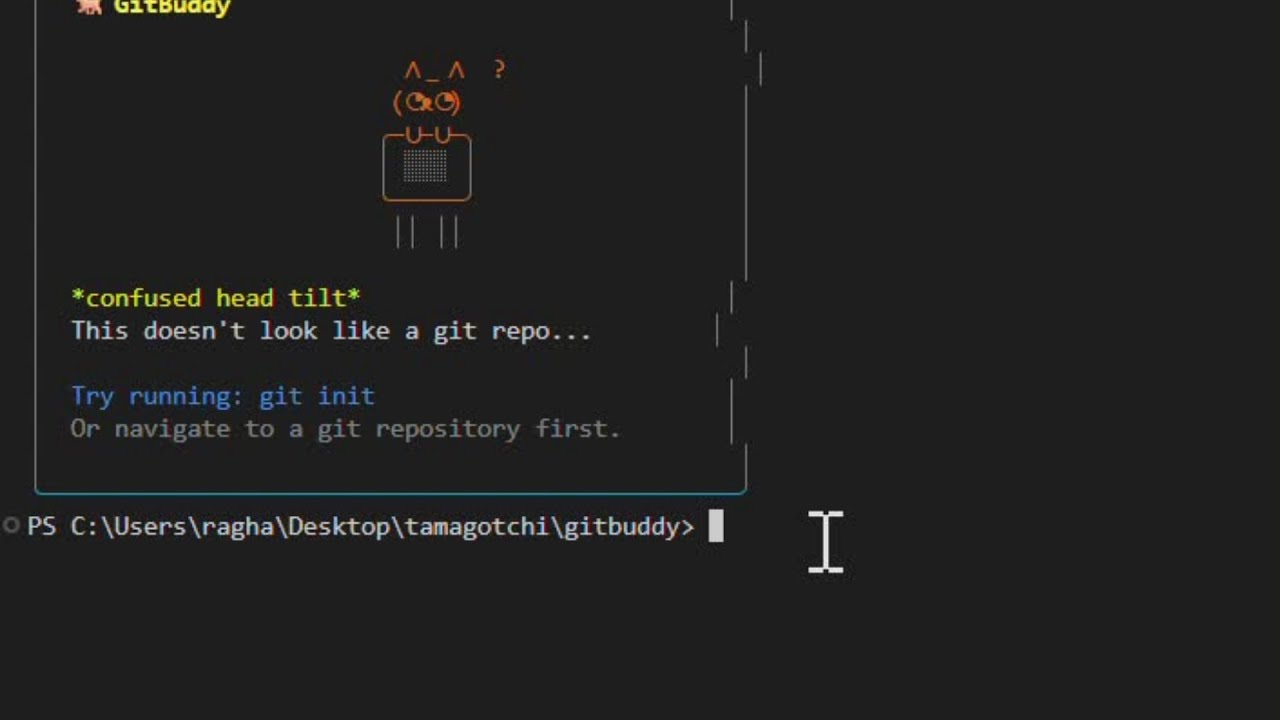
 Run git-pet outside a git repository and it will let you know!
 Name your new companion when you first start
 Your pet greets you with a welcome message
 The main interface showing your pet, HP/XP bars, mood, and repository health checks
 Watch your pet perform cute animations like stretching
 View your pet's level progression and upcoming unlocks
 Comprehensive stats with GitHub-style commit heatmap
 Complete daily challenges for bonus XP
 Feed your pet by scanning for code issues (TODOs, FIXMEs)
 Choose your focus session duration
 Pomodoro timer keeps you productive while your pet cheers you on
 Unlock achievements as you improve your coding habits
 Your pet performs git commands as tricks - here fetching from remotes
 Smart commit assistant helps you write meaningful commit messages
Contributions are welcome! Feel free to submit issues and pull requests.
MIT
Give your terminal a friend!