Releases: pakhandi-zz/Bit-Castle---Game
Bit Castle : V-2.2.5

Bit-Castle---Game (V-2.2.5)
A Python (PyGame) based basic game
This is a simple game made using Python-2.7.9 (32-bit), PyGame and Tkinter. The application is for Windows System only.
INDEX
- Rules & Controls
- Windows Smart-Screen
- Requisites
- Fixes
- Installation & Execution
- Technology Used
- Testing
- Working & GamePlay-Video
1. Rules & Controls:
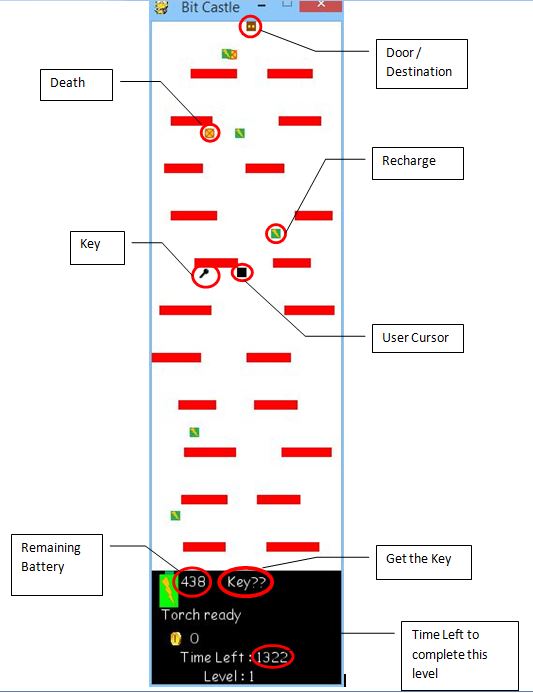
- Goal of the game is to reach the door in each level.
- Each level is completed only when the player REACHES THE GATE WITH THE KEY.
- THE MORE BATTERY YOU SAVE, THE MORE YOU SCORE.
- You have got a torch, it'll make it possible for you to see the objects in a level.
- The torch can be turned OFF or ON using SPACE-BAR and cursor is moved using ARROW-KEYS.
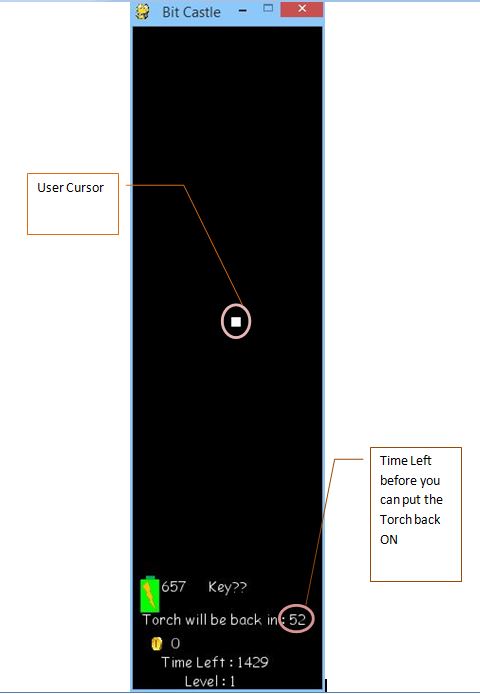
- When the torch is OFF, you can only see yourself and nothing else.
- If the battery of the torch runs out, the torch is put-off automatically.
- If you decide to put OFF the torch, the torch can be put back ON after a certain amout of time ONLY.
- There are some 'red' colored crosses, touching them will kill you instantaneously.
- There are some 'green' colored batteries, touching them will recharge your torch batteries a little.
- You have to REACH THE GATE IN A CERTAIN AMOUNT OF TIME, else the Game Is Over.
- After every level, you can visit the store and buy some boosts to help you in coming levels.
- The left-over battery charge will be converted to coins at the end of any level.
- Press Z to PAUSE.
- Images used :
 --> Door
  --> Key
  --> Recharge
  --> Death
2. Windows Smart Screen
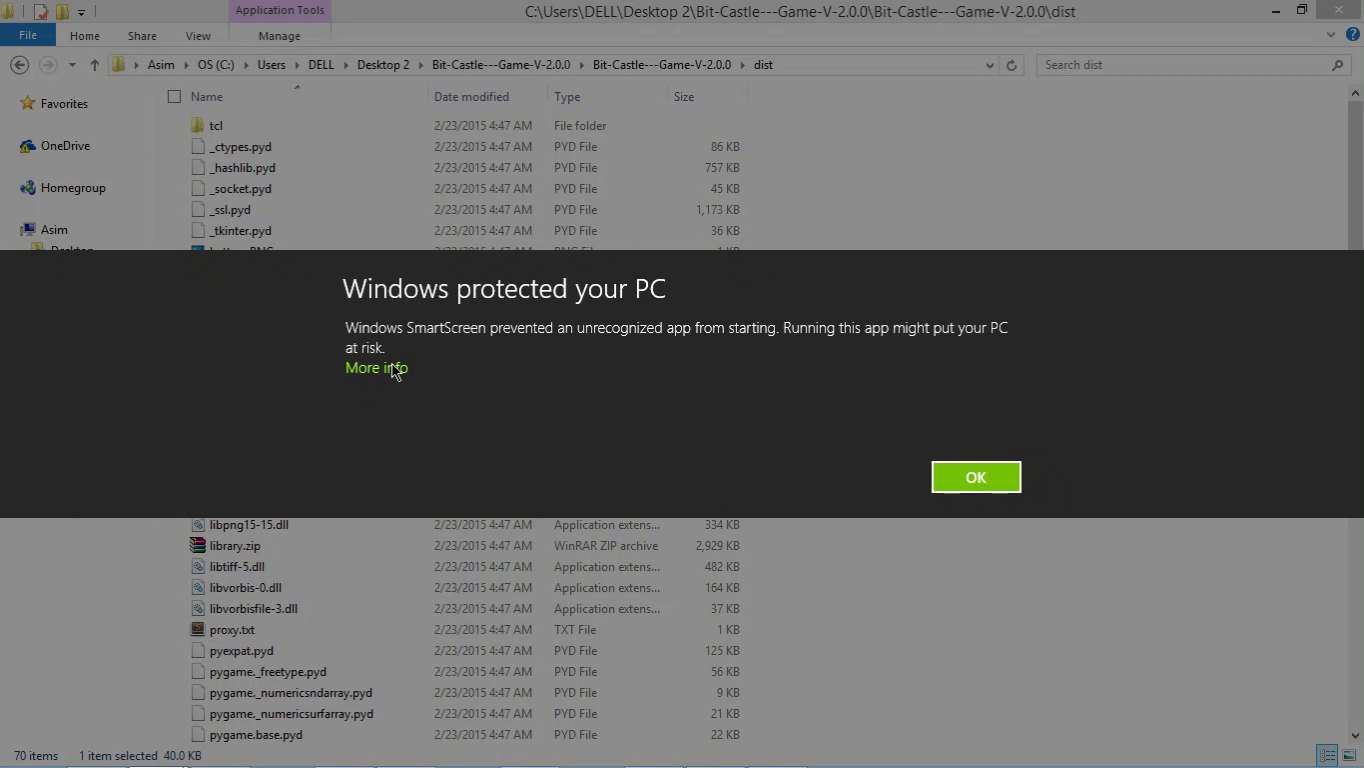
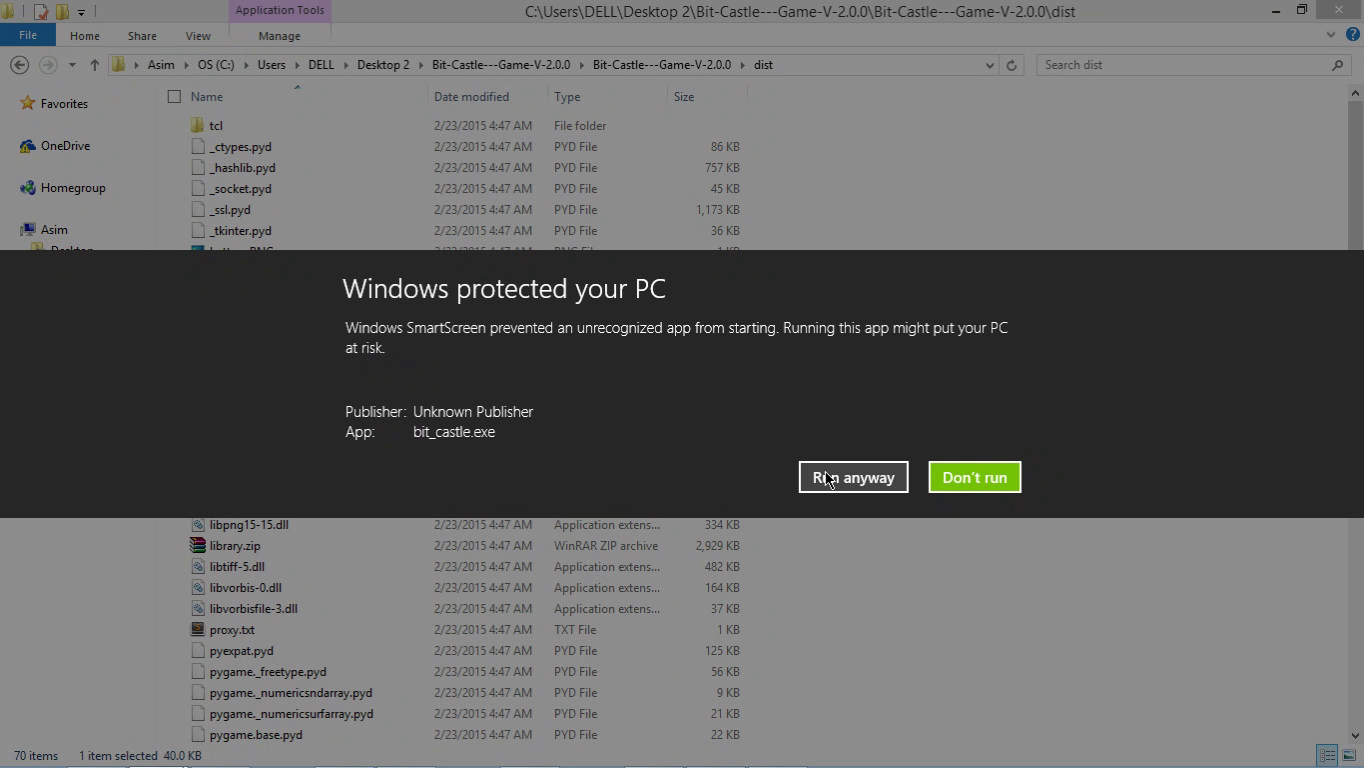
To run the bit_castle.exe file you may need to bypass windows smartscreen warning.
3. Requisites
- 64-bit Windows System
- Internet Connection
4. Fixes
- Supports proxy connection for leaderboard updation (dist/proxy.txt)
- Fixed png-chunk-length error
5. Execution :
- Download all the files from here.
- Execute the bit_castle.exe file in the dist folder
- If you are working behind proxy
- Open dist/proxy.txt
- Delete all the contents of the file and add your proxy with the following format
username:password@proxy:port
- Execute the bitcastle.exe file in the dist folder
6. Technology Used
- The game is made in Python-2.7.9
- Pygame and Tkinter libraries
- Executables were made using py2exe
7. Testing
The program has been tested on Windows-8.1(64-bit) and Windows-8.0(64-bit)..
8. Working
GamePlay - Video
When the Torch is ON :
When the Torch is OFF :
The working of the application is explained here.
For Hugs & Bugs, drop a mail at asimkprasad@gmail.com
Bit Castle : V-2.2.4
Bit-Castle---Game (V-2.2.4)
A Python (PyGame) based basic game
This is a simple game made using Python-2.7.9 (32-bit), PyGame and Tkinter. The application is for Windows System only.
INDEX
- Rules & Controls
- Windows Smart-Screen
- Requisites
- Fixes
- Installation & Execution
- Technology Used
- Testing
- Working & GamePlay-Video
1. Rules & Controls:
- Goal of the game is to reach the door in each level.
- Each level is completed only when the player REACHES THE GATE WITH THE KEY.
- Without taking the key, the level won't be over.
- You have got a torch, it'll make it possible for you to see the objects in a level.
- The torch can be turned OFF or ON using SPACE-BAR and cursor is moved using ARROW-KEYS.
- When the torch is OFF, you can only see yourself and nothing else.
- If the battery of the torch runs out, the torch is put-off automatically.
- If you decide to put OFF the torch, the torch can be put back ON after a certain amout of time ONLY.
- There are some 'red' colored crosses, touching them will kill you instantaneously.
- There are some 'green' colored batteries, touching them will recharge your torch batteries a little.
- You have to REACH THE GATE IN A CERTAIN AMOUNT OF TIME, else the Game Is Over.
- After every level, you can visit the store and buy some boosts to help you in coming levels.
- The left-over battery charge will be converted to coins at the end of any level.
- Press Z to PAUSE.
- Images used :
- --> Door
- --> Key
- --> Recharge
- --> Death
2. Windows Smart Screen
To run the bit_castle.exe file you may need to bypass windows smartscreen warning.
3. Requisites
- 64-bit Windows System
- Internet Connection
4. Fixes
- Supports proxy connection for leaderboard updation (dist/proxy.txt)
- Fixed png-chunk-length error
5. Execution :
- Download all the files from here.
- Execute the bit_castle.exe file in the dist folder
- If you are working behind proxy
- Open dist/proxy.txt
- Delete all the contents of the file and add your proxy with the following format
username:password@proxy:port
- Execute the bitcastle.exe file in the dist folder
6. Technology Used
- The game is made in Python-2.7.9
- Pygame and Tkinter libraries
- Executables were made using py2exe
7. Testing
The program has been tested on Windows-8.1(64-bit) and Windows-8.0(64-bit)..
8. Working
GamePlay - Video
When the Torch is ON :
When the Torch is OFF :
The working of the application is explained here.
For Hugs & Bugs, drop a mail at asimkprasad@gmail.com
Bit Castle : V-2.2.0
Bit-Castle---Game (V-2.2.0)
A Python (PyGame) based basic game
This is a simple game made using Python-2.7.9 (32-bit), PyGame and Tkinter. The application is for Windows System only.
INDEX
- Rules & Controls
- Windows Smart-Screen
- Requisites
- Fixes
- Installation & Execution
- Technology Used
- Testing
- Working & GamePlay-Video
1. Rules & Controls:
- Goal of the game is to reach the door in each level.
- Each level is completed only when the player REACHES THE GATE WITH THE KEY.
- Without taking the key, the level won't be over.
- You have got a torch, it'll make it possible for you to see the objects in a level.
- The torch can be turned OFF or ON using SPACE-BAR and cursor is moved using ARROW-KEYS.
- When the torch is OFF, you can only see yourself and nothing else.
- If the battery of the torch runs out, the torch is put-off automatically.
- If you decide to put OFF the torch, the torch can be put back ON after a certain amout of time ONLY.
- There are some 'red' colored crosses, touching them will kill you instantaneously.
- There are some 'green' colored batteries, touching them will recharge your torch batteries a little.
- You have to REACH THE GATE IN A CERTAIN AMOUNT OF TIME, else the Game Is Over.
- After every level, you can visit the store and buy some boosts to help you in coming levels.
- The left-over battery charge will be converted to coins at the end of any level.
- Press Z to PAUSE.
- Images used :
- --> Door
- --> Key
- --> Recharge
- --> Death
2. Windows Smart Screen
To run the bit_castle.exe file you may need to bypass windows smartscreen warning.
3. Requisites
- 64-bit Windows System
- Internet Connection
4. Fixes
- Supports proxy connection for leaderboard updation (dist/proxy.txt)
- Fixed png-chunk-length error
5. Execution :
- Download all the files from here.
- Execute the bit_castle.exe file in the dist folder
- If you are working behind proxy
- Open dist/proxy.txt
- Delete all the contents of the file and add your proxy with the following format
username:password@proxy:port
- Execute the bitcastle.exe file in the dist folder
6. Technology Used
- The game is made in Python-2.7.9
- Pygame and Tkinter libraries
- Executables were made using py2exe
7. Testing
The program has been tested on Windows-8.1(64-bit) and Windows-8.0(64-bit)..
8. Working
GamePlay - Video
When the Torch is ON :
When the Torch is OFF :
The working of the application is explained here.
For Hugs & Bugs, drop a mail at asimkprasad@gmail.com
Bit-Castle : V-2.0.0
Bit-Castle---Game (V-2.0.0)
A Python (PyGame) based basic game
This is a simple game made using Python-2.7.9 (32-bit), PyGame and Tkinter. The application is for Windows System only.
Rules & Controls:
- Goal of the game is to reach the door in each level.
- Each level is completed only when the player reaches the gate with the Key.
- Without taking the key, the level won't be over.
- You have got a torch, it'll make it possible for you to see the objects in a level.
- The torch can be turned OFF or ON using Space-Bar.
- When the torch is OFF, you can only see yourself and nothing else.
- If the battery of the torch runs out, the torch is put-off automatically.
- If you decide to put OFF the torch, the torch can be put back ON after a certain amout of time ONLY.
- There are some 'red' colored crosses, touching them will kill you instantaneously.
- There are some 'green' colored batteries, touching them will recharge your torch batteries a little.
- You have to reach the gate in a certain amount of time, else the Game Is Over.
- After every level, you can visit the store and buy some boosts to help you in coming levels.
- The left-over battery charge will be converted to coins at the end of any level.
- Press Z to PAUSE.
- Images used :
- --> Door
- --> Key
- --> Recharge
- --> Death
Windows Smart Screen
To run the bit_castle.exe file you may need to bypass windows smartscreen warning.
Requisites
- 64-bit Windows System
- Internet Connection
Execution :
- Download all the files from here.
- Execute the bit_castle.exe file in the dist folder
- If you are working behind proxy
- Open dist/proxy.txt
- Delete all the contents of the file and add your proxy with the following format
username:password@proxy:port
- Execute the bitcastle.exe file in the dist folder
Technology Used
- The game is made in Python-2.7.9
- Pygame and Tkinter libraries
- Executables were made using py2exe
Testing
The program has been tested on Windows-8.1(64-bit) and Windows-8.0(64-bit)..
Working
When the Torch is ON :
When the Torch is OFF :
The working of the application is explained here.
For Hugs & Bugs, drop a mail at asimkprasad@gmail.com
Bit Castle
Bit Castle : V-1.0.0
A Python (PyGame) based basic game
This version has all the basic functionalities..
This is a simple game made using Python-2.7.9 (32-bit), PyGame and Tkinter. The application is for Windows System only.
Rules & Controls:
- Goal of the game is to reach the door in each level.
- Each level is completed only when the player reaches the gate with the Key.
- Without taking the key, the level won't be over.
- You have got a torch, it'll make it possible for you to see the objects in a level.
- The torch can be turned OFF or ON using Space-Bar.
- When the torch is OFF, you can only see yourself and nothing else.
- If the battery of the torch runs out, the torch is put-off automatically.
- If you decide to put OFF the torch, the torch can be put back ON after a certain amout of time ONLY.
- There are some 'red' colored crosses, touching them will kill you instantaneously.
- There are some 'green' colored batteries, touching them will recharge your torch batteries a little.
- You have to reach the gate in a certain amount of time, else the Game Is Over.
- After every level, you can visit the store and buy some boosts to help you in coming levels.
- The left-over battery charge will be converted to coins at the end of any level.
- Press Z to PAUSE.
- Images used :
- --> Door
- --> Key
- --> Recharge
- --> Death
Requisites
- 64-bit Windows System
Execution :
- Download all the files from here.
- Execute the .exe file in the dist folder
Technology Used
- The game is made in Python-2.7.9
- Pygame and Tkinter libraries
- Executables were made using py2exe
Testing
The program has been tested on Windows-8.1(64-bit) and Windows-8.0(64-bit)..
For Hugs & Bugs, drop a mail at asimkprasad@gmail.com