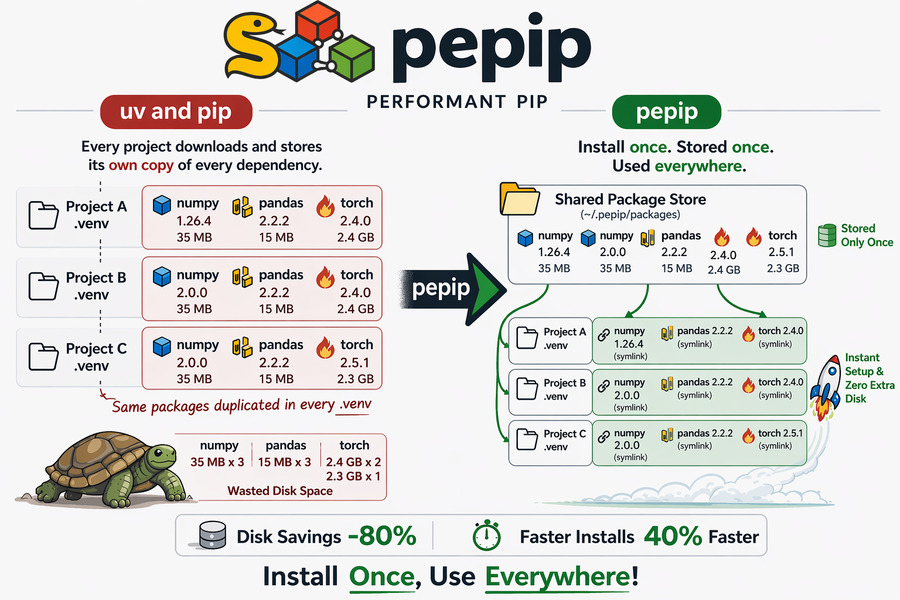
uv and pip, but shared. Install packages once. Use them everywhere.
pepip is the pnpm of Python — a drop-in alternative to pip / uv that stores each resolved package version once in a shared store and wires your project .venv to it via symlinks. No more downloading torch and transformers five times across experiments. It internatly uses uv for package resolution and venv management, so you get all the same features and compatibility, but with a fraction of the disk usage and faster installs for subsequent projects.
Built for package-heavy Python workflows, pepip is especially useful for AI/ML projects that repeatedly create envs for model prototyping, training, and inference.





Every Python project gets its own virtual environment. That means every project downloads and stores its own copy of every dependency — including the big ones.
project-a/.venv/  →  numpy 1.0 (34 MB)  torch 2.4 (2.2 GB)
project-b/.venv/  →  numpy 2.0 (35 MB)  torch 2.4 (2.2 GB)
project-c/.venv/  →  numpy 2.0 (35 MB)  torch 2.5 (2.3 GB)
                                         ↑ stored 3× for no reason
pepip keeps an immutable shared package-version store and symlinks each project's .venv back to the exact versions it resolved. Same Python import behaviour. A fraction of the disk usage.
~/.pepip/packages/  →  numpy 1.9 (34 MB) numpy 2.0 (35 MB) torch 2.4 (2.2 GB)
                        torch 2.5 (2.3 GB)  ← stored once per version

project-a/.venv/  →  numpy 1.0 (symlink)  torch 2.4 (symlink) → ~bytes
project-b/.venv/  →  numpy 2.0 (symlink)  torch 2.4 (symlink) → ~bytes
project-c/.venv/  →  numpy 2.0 (symlink)  torch 2.5 (symlink) → ~bytes
| Feature | uv / pip | conda | pepip |
|---|---|---|---|
| Shared package store | ❌ | ✅ | ✅ |
| Disk usage (multi-project) | 🔴 | 🟢 | 🟢 |
| Install speed (repeat packages) | 🟡 | 🟡 | 🟢 |
| Virtual env compatibility | ✅ | ❌ | ✅ |
| Multiple versions for each env | ✅ | ❌ | ✅ |
| Tool installation size | 🟢 | 🔴 | 🟢 |
Key differences:
- Speed and download size: While uv and conda cache helps, they still copy packages. If cache is cleared, they redownload. pepip only downloads once per version, then symlinks for every project, allowing instant installs for subsequent projects.
As pepip is based on uv, it has same advantages as uv, without the repeated download and storage cost.
pip install pepipRequirements: Python 3.8+ · uv (auto-installed) · Linux / macOS / Windows
On Windows, creating symlinks typically requires Developer Mode or an elevated shell. pepip now raises a clear error if the OS blocks symlink creation.


pepipsupports Linux, macOS, and Windows.- Shared-store reuse works across projects on the same machine/OS, while each OS keeps its own compatible store layout.
# Install one or more packages
pepip install numpy pandas

# AI/ML stack example
pepip install torch transformers accelerate datasets

# Install from a requirements file
pepip install -r requirements.txt

# Use a custom local venv path (default: .venv)
pepip install numpy --venv /path/to/my-env
Then activate and use your .venv exactly as you normally would:
# macOS / Linux
source .venv/bin/activate
python -c "import numpy; print(numpy.__version__)"
# Windows PowerShell
.venv\Scripts\Activate.ps1
python -c "import numpy; print(numpy.__version__)"uvx pepip install numpy pandasThis can be executed without installing pepip or creating a virtual environment, as long as uv is installed.
PEPIP_HOME=/shared/team-env pepip install torchThis is handy for sharing a global store across a whole team on a shared machine.
~/.pepip/
├── global-venv/                         ← build interpreter for uv installs
└── packages/
    └── cpython-312-linux-x86_64/
        ├── numpy-1.0/
        │   ├── numpy/                   ← real files, stored once
        │   └── numpy-1.0.dist-info/
        ├── numpy-2.0/
        │   ├── numpy/                   ← real files, stored once
        │   └── numpy-2.0.dist-info/
        ├── torch-2.4/
        │   ├── torch/                   ← real files, stored once
        │   └── torch-2.4.dist-info/
        └── torch-2.5/
            ├── torch/                   ← real files, stored once
            └── torch-2.5.dist-info/

my-project-1/
└─ .venv/
    └─ lib/
       └─ python3.12/
          └─ site-packages/
             ├─ numpy  ───→  ~/.pepip/packages/.../numpy-2.0/numpy   (symlink, ~bytes)
             └─ pandas ───→  ~/.pepip/packages/.../pandas-2.2/pandas (symlink, ~bytes)
my-project-2/
└─ .venv/
    └─ lib/
       └─ python3.12/
          └─ site-packages/
             ├─ torch  ───→  ~/.pepip/packages/.../torch-2.4/torch   (symlink, ~bytes)
             └─ numpy  ───→  ~/.pepip/packages/.../numpy-1.0/numpy   (symlink, ~bytes)
- First install of a package version — downloads once into the shared store, then symlinks.
- Every subsequent project using the same package version — symlinks only. Near-instant, zero extra disk.
- Different projects can use different versions — for example, one project can link to
numpy==1.0while another links tonumpy==2.0. Each version is stored once, and projects link to the version they resolved.
The eval/benchmark.py script measures installation latency and disk usage across N projects compared to a plain uv workflow.
# 5 projects, mixed real-world packages
python eval/benchmark.py --projects 5 --packages tomli packaging requests numpy pandas

# Keep temp directories for manual inspection
python eval/benchmark.py --no-cleanup| Metric | uv (baseline) | pepip | Improvement |
|---|---|---|---|
| ⏱ Latency | 0.56 s | 0.33 s ★ | −41.3 % |
| 💾 Disk usage | 475.19 MB | 95.22 MB ★ | −80.0 % |
⏱ pepip saved 0.23 s of install time across 5 projects. 💾 pepip saved 379.97 MB of disk space across 5 projects.
- Storage savings are consistent from project one: each package version lives exactly once in the global store, so local
.venvdirectories contain only tiny symlinks (dozens of bytes each) instead of full copies. - Latency savings grow with project count: the first project pays the same download cost as plain
uv. Every additional project only needs venv creation + symlink creation, which is nearly instant. For large packages liketorchortransformers(GBs in size), these savings per extra project are proportionally enormous. - Best fit for AI iteration loops: if you spin up multiple repos for finetuning runs, eval pipelines, or inference services,
pepipavoids repeatedly materializing the same heavy dependencies.
# Clone and install in editable mode
git clone https://github.com/perf-pip/pepip
cd pepip
pip install -e .

# Run tests
pip install pytest
pytestpepip is primarily designed for local machine workflows where multiple projects can reuse one shared store over time. In Docker, images are usually ephemeral and already layer-cached, so the benefit is smaller.
That said, pepip can still be useful in Docker when you want to share one package store across repeated container runs (for example during local development).
FROM python:3.12-slim

# uv is required by pepip
RUN pip install --no-cache-dir uv pepip

WORKDIR /app
COPY requirements.txt .

# Creates /app/.venv and links packages from /root/.pepip
RUN pepip install -r requirements.txtBind your host's ~/.pepip into the container's default pepip path (/root/.pepip):
docker run --rm \
    -v "$PWD":/app \
    -v "$HOME/.pepip":/root/.pepip \
    -e PEPIP_HOME=/root/.pepip \
    -w /app \
    python:3.12-slim \
    sh -lc "pip install -q uv pepip && pepip install -r requirements.txt"
This attaches the host-level pepip store directly, so both local and container workflows reuse the same resolved package versions.
pnpm — the Node.js package manager that pioneered content-addressable, symlink-based shared stores. pepip brings the same idea to the Python ecosystem.
- uv — used for venv management, package resolution, and shared download caching.
Made with ❤️ for developers tired of downloading torch over and over again.