iHand is a real-time hand gesture-controlled input system built with Python, Mediapipe, PyQt5, and pynput. This application transforms hand gestures into keyboard inputs, enabling touchless computer interaction for various use cases such as gaming, media control, and productivity tasks. Users can easily customize gestures to match specific key mappings, making iHand highly adaptable to different applications.
Watch the iHand demo in action:
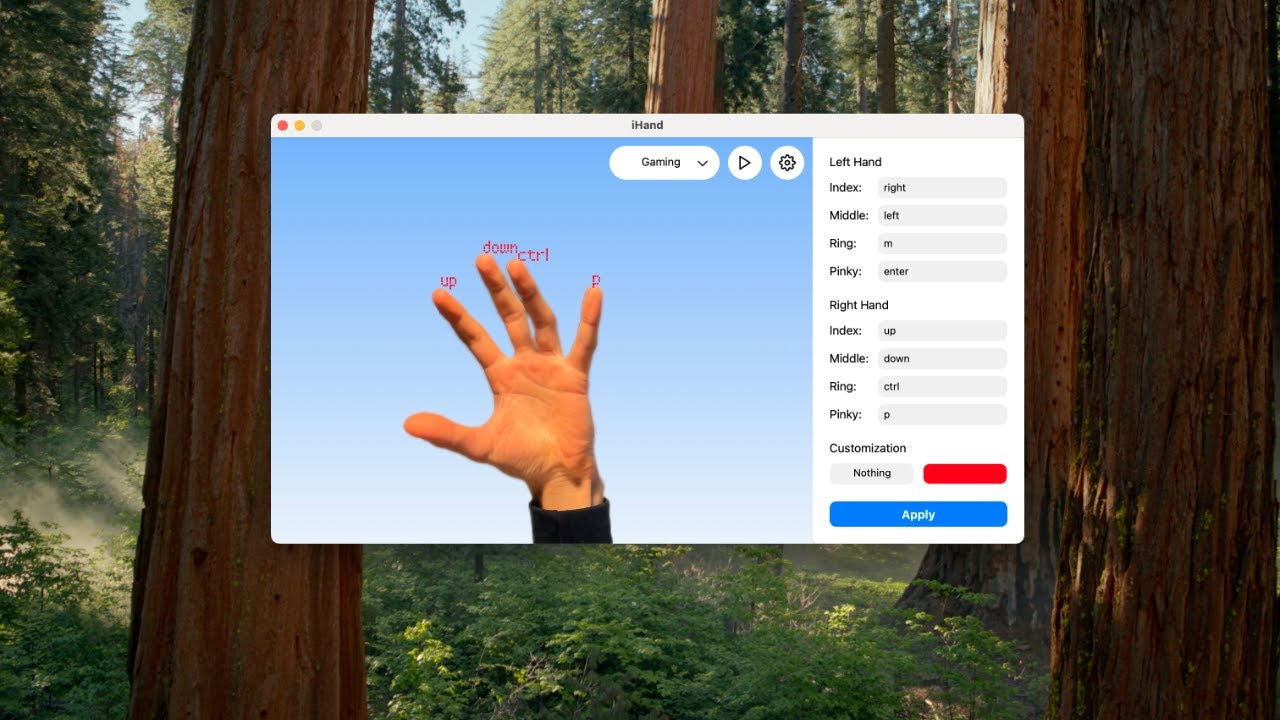
- Touchless Interaction
Use intuitive hand gestures to control your computer without any physical contact. - Versatile Use Cases
- Media Control: Adjust system volume or control playback using hand gestures.
- Gaming: Map gestures to game actions like shooting, jumping, or reloading.
- Productivity: Assign gestures to shortcuts for enhanced workflow efficiency.
- Gesture Customization
Modify gestures and their corresponding actions via the intuitive UI or directly through the presets file (presets.json). - Dynamic Presets
Switch between multiple built-in presets (Gaming, Media, Slides, Shortcuts) or create your own custom presets. - Real-Time Feedback
Visual annotations on the camera feed display gesture recognition results in real-time. - Robust Multithreaded Architecture
Combines real-time video capture, gesture recognition, and responsive GUI handling seamlessly.
iHand recognizes several gestures out-of-the-box using MediaPipe's Hand Tracking model. Below are the key gestures and their default actions:
- Pinch (Thumb + Any other finger of the same hand)
- Action: Presses the key or the shortcut of the current preset associated with the finger.
- Closed Fist
- Action: Toggles pause/resume hand tracking and key presses.
- Pointing Up (Left Hand)
- Action: Opens or closes the menu in the UI.
- Pointing Up (Right Hand)
- Action: Switches to the next preset (e.g., Gaming → Media → Shortcuts).
iHand provides extensive customization options, allowing users to map gestures to any keyboard input and change the UI’s appearance.
-
Using the UI:
- Open the app and navigate to the menu panel.
- Edit the key mappings for each finger in the Left Hand and Right Hand sections.
- Select a font and annotation color for better visual feedback.
- Click Apply to save your changes.
-
Editing
presets.jsonDirectly:- Each preset in
presets.jsoncontains:left_hand_key_map: Maps gestures for the left hand.right_hand_key_map: Maps gestures for the right hand.font: The font used for annotations.color: The annotation color (in hex format).
- Example preset:
"Gaming": {
  "left_hand_key_map": { "8": "right", "12": "left", "16": "m", "20": "enter" },
  "right_hand_key_map": { "8": "up", "12": "down", "16": "command", "20": "p" },
  "font": "Orbitron",
  "color": "#FF0000"
}
- Restart the application after editing
presets.jsonto apply changes.
- Each preset in
-
/!\ To press several keys at the same time/trigger a shortcut, type keys subsequently seperated with '+'
- Python 3.x
- Mediapipe: Real-time hand tracking and gesture recognition.
- PyQt5: GUI development.
- pynput: Simulates keyboard events.
- Pillow: Image processing and annotation.
- NumPy & OpenCV: Supports image and video processing.
-
Clone the Repository:
git clone https://github.com/raphael-verger/iHand.git cd iHand -
Create and Activate a Virtual Environment:
python3 -m venv venv
source venv/bin/activate   # On Windows: venv\Scripts\activate
-
Install Dependencies:
pip install -r requirements.txt
-
Run the Application:
python main.py
-
Select a Preset:
Use the preset selector in the top-right corner to choose from available presets (e.g., Gaming, Media, Shortcuts, Slides). -
Control Inputs:
- Use gestures like Closed Fist, Pointing Up, or Pinch to trigger the assigned actions in the current preset.
- Customize gesture mappings using the menu panel or by editing the
presets.jsonfile.
-
Example Use Cases:
- Gaming Mode:
- Map gestures to game controls like “jump,” “shoot,” or “reload.”
- Use Pointing Up (Right Hand) to switch between gaming presets for different games.
- Media Mode:
- Control volume by pinching your thumb and index finger, then moving them apart (volume up) or together (volume down).
- Slides Mode:
- Control presentations by assigning gestures to “next slide,” “previous slide,” or “toggle fullscreen.”
- Gaming Mode:
iHand/
├── camera_manager.py         # Handles live video capture and gesture recognition
├── hand_gesture_processor.py # Processes hand gestures and simulates key events
├── main.py                   # Application entry point
├── ui.py                     # PyQt5-based graphical user interface
├── resources.py              # Resource paths, fonts, and icons
├── fonts/                    # Custom fonts
├── icons/                    # GUI icons
├── models/                   # Mediapipe task models
├── presets.json              # Preset configurations for gesture-to-key mappings
├── requirements.txt          # Project dependencies
└── README.md                 # This file
This project is licensed under the GPL-3.0.
- Mediapipe for their cutting-edge hand tracking and gesture recognition technology.
- PyQt5 for providing an excellent framework for creating the GUI.
- pynput for facilitating keyboard simulation.
- Hardware Requirements: A webcam or built-in camera is necessary for hand detection.
- Lighting: Consistent lighting improves gesture detection accuracy.
- Distance: The system works best when hands are about 30cm away from the webcam.
- Adaptation: Different hardware setups may require tuning thresholds in the
presets.jsonfile.