The keyboard for your couch.

Couch Clicker Atomic is a Bluetooth, mechanical key, home theater remote control designed for use with Amity - home theater control over HDMI-CEC that works! (really)
Watch the video
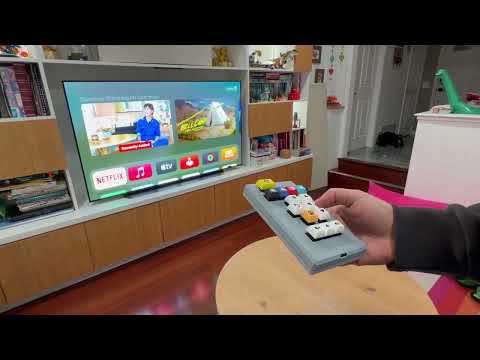
Couch Clicker Atomic works with Amity like any other compatible remote. To read more about Amity and its operation, visit the Amity page.
To clear Couch Clicker Atomic's Bluetooth pairing and to re-pair, press and hold the Power and Volume Up buttons for 6 seconds.
To reset Couch Clicker Atomic, press and hold the Power and Mute buttons for 6 seconds.
Couch Clicker Atomic is really just a standard wireless Bluetooth keyboard. It may work (with some customization) with other home theater devices that have bluetooth remote controls that are really keyboard devices, like Google TVs or Amazon Fire TVs.
The remote is based on a Seeed Studio XIAO nRF52840 board. The PCB design and manufacturing files are here.
A sample design file to get your own keycaps from Yuzu Keycaps is available here.
STEP files for a 3D printed case are available here.
A LiPo with a JST 2 connector that fits in the case should work. The battery should be at most 10mm thick, and 30mm wide. Ensure the battery leads in the connector are the same polarity as the connector on Couch Clicker Atomic. If they are not, battery connector pins can be easily pried out with a utility knife to reverse their position in the connector.
This LiPo battery works well.
Download the ZMK firmware image from here. Install it using the standard ZMK installation method - documented here.
When the remote is fully assembled in the case, to update the firmware, the remote must be reset to the bootloader. Press and hold the Power, Select and Back buttons for 10 seconds to reset to the bootloader.
Couch Clicker Atomic ZMK code is licensed under the MIT license.
Alternatively, you may prefer to use a CircuitPython based firmware with KMK. Code and instructions for installing KMK are here.
Couch Clicker Atomic KMK code is licensed under the GPLv3 license.