by sandeco
Turn legacy systems into executable specifications for AI agents.



Reversa is a specification reverse-engineering framework. Install it inside a legacy project and it coordinates a team of specialized AI agents to analyze the existing code and generate complete, traceable specifications ready for use by any coding agent.
Most production systems carry years of accumulated knowledge: implicit business rules, undocumented architectural decisions, critical logic buried in code nobody wants to touch. That knowledge exists, but it's trapped.
AI agents are transformative for creating and evolving software, but they depend on specifications to operate safely. For new systems, you write the spec and the agent executes. For legacy systems — or those built with pure vibe coding — there is no spec: the agent has no way of knowing what it cannot break.
Reversa is the bridge between the legacy system and AI agents.
It analyzes the existing code, extracts accumulated knowledge (business rules, flows, module contracts, retroactive architectural decisions) and transforms everything into executable, traceable specifications ready for any coding agent.
The result is not documentation for humans to read. These are operational contracts that allow an agent to evolve the system with fidelity to what already exists.
In the root of the legacy project:
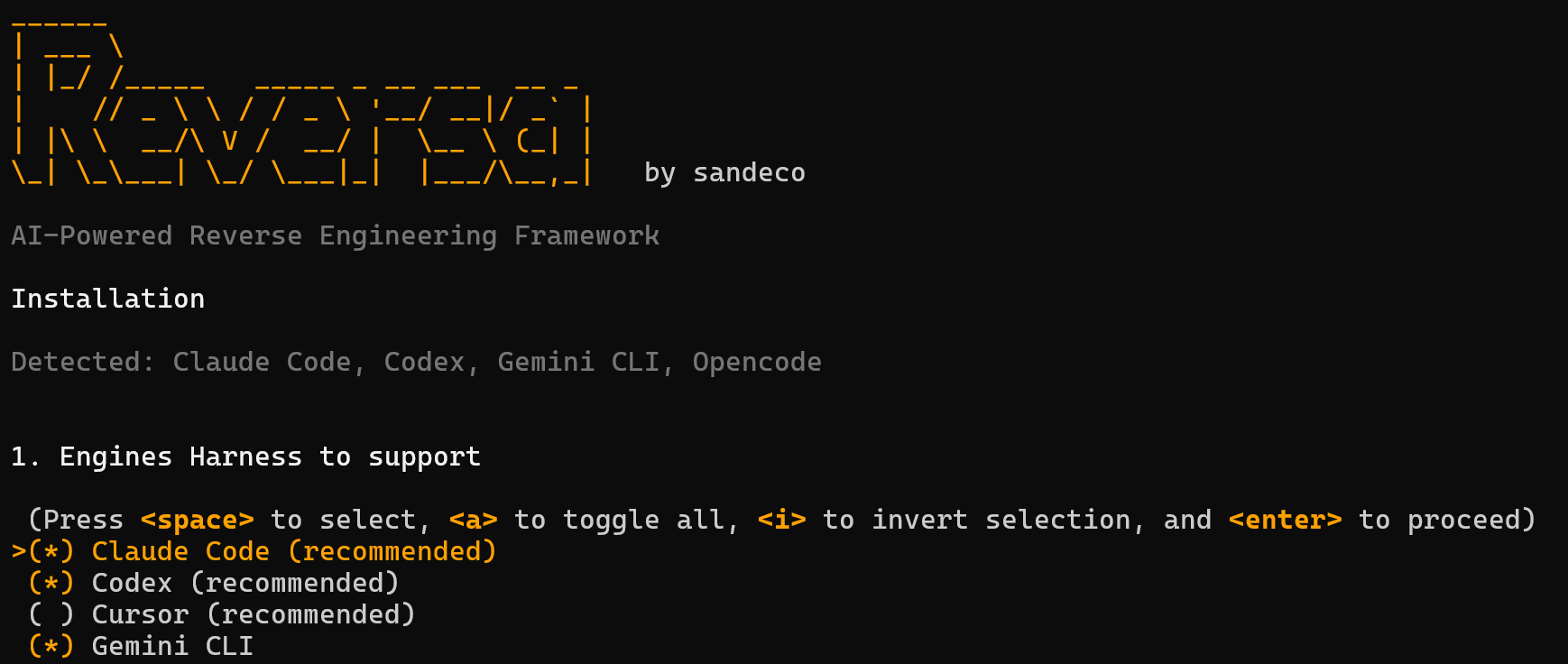
npx reversa installThe installer will:
- Detect the AI engines present in the environment (Claude Code, Codex, Cursor, etc.)
- Ask which agents to install — all selected by default
- Collect project name, language, and preferences
- Copy agents to
.agents/skills/(and.claude/skills/for Claude Code) - Create the engine entry file (
CLAUDE.md,AGENTS.md, etc.) - Create the
.reversa/structure with state, configuration, and plan - Generate SHA-256 manifest for safe updates
Reversa never deletes or modifies existing files in your project. Agents write only to
.reversa/and the output folder (_reversa_sdd/by default).
Requirements: Node.js 18+
Important
The installer only creates new files (CLAUDE.md, AGENTS.md, .agents/skills/, etc.) and never modifies or deletes any existing file in your project. During analysis, agents operate under a strict and inviolable directive: all writes are restricted to .reversa/ and _reversa_sdd/ — no other file in your project is touched.
Caution
Although Reversa never modifies your files, AI agents can make mistakes. We strongly recommend:
- Version the project in Git — make sure all files are committed before starting the analysis
- Have the repository on GitHub (or GitLab, Bitbucket) — so you have a safe remote copy
- Make a local copy of the folder — a simple
cp -r my-project my-project-backupprotects against any unexpected event
If something unexpected happens during analysis, you can restore the original state with git restore . or from the backup copy.
Warning
🔑 Reversa does not request, store, or transmit API keys from any LLM service. All intelligence is delegated to the AI agent already present in your environment (Claude Code, Codex, Cursor, etc.) — no external authentication dependencies.
After installation, open the project in the AI agent and activate Reversa:
/reversa
For engines without slash command support (like Codex):
reversa
Reversa will introduce itself, create a personalized exploration plan, and coordinate the entire analysis. Progress is saved in .reversa/state.json at each checkpoint — if the session is interrupted, just type reversa to resume where you left off.
For other workflows, use the matching entry command:
| Goal | Command |
|---|---|
| Analyze an existing legacy and produce specs | /reversa |
| Start a brand new project from a one-line idea | /reversa-new |
| Evolve the system one feature at a time, from spec to code | /reversa-forward |
| Rebuild the legacy on a modern stack | /reversa-migrate |
| Render the extracted knowledge as an HTML mini-site | /reversa-docs |
| Estimate effort and pricing on top of the specs | /reversa-pricing-profile, /reversa-pricing-size, /reversa-pricing-estimate |
Each orchestrator pauses between agents and asks for CONTINUAR before advancing, so you stay in control of every step.
The Discovery pipeline (/reversa) is the heart of the framework: a 5-phase sequence orchestrated by the Reversa agent.
Reconnaissance  Excavation  Interpretation  Generation  Review
    Scout       Archaeologist  Detective      Writer    Reviewer
                                Architect
Independent agents (run at any phase): Visor, Data Master, Design System, Soul Extractor, Tracer, Chronicler.
Once the specs exist, you can move forward in three directions, depending on the goal:
Discovery (/reversa)
        │
        ├── /reversa-forward    Evolve the system from specs to code
        ├── /reversa-migrate    Rebuild the legacy on a modern stack
        └── /reversa-docs       Render specs as an HTML mini-site
For a greenfield project (no legacy to extract), start with /reversa-new instead. It walks from a one-line idea to SDD specs and then hands off to /reversa-forward.
Reversa organizes its agents in six specialized Teams. The Discovery Team (Reversa Agents Core) is always installed; the other five Teams are pre-checked in the installer and you can opt out of any of them.
| Team | Purpose | Entry command |
|---|---|---|
| Reversa Agents Core (Discovery) | Analyze the existing legacy and produce specs | /reversa |
| Code New Project Agents | Start a new project (greenfield) from a one-line idea and produce specs | /reversa-new |
| Code Forward Agents | Evolve the system from specs to running code, one feature at a time | /reversa-forward |
| Migration Agents | Turn legacy specs into a rebuild plan for a modern stack | /reversa-migrate |
| Pricing and Size Agents | Estimate effort, size and pricing on top of the specs | /reversa-pricing-* |
| Documentation Team | Render the extracted knowledge as a self-contained HTML mini-site | /reversa-docs |
These run the main /reversa pipeline.
| Agent | Role |
|---|---|
| Reversa | Central orchestrator. Coordinates all agents, saves checkpoints, guides the user |
| Scout | Maps the surface: folder structure, languages, frameworks, dependencies, entry points |
| Archaeologist | Deep module-by-module analysis: algorithms, control flows, data structures |
| Detective | Extracts implicit business knowledge: rules, retroactive ADRs, state machines, permissions |
| Architect | Synthesizes everything into C4 diagrams, full ERD, integration map, and technical debt |
| Writer | Generates specifications as operational contracts with code traceability |
| Agent | Role |
|---|---|
| Reviewer | Reviews specs, finds inconsistencies, and validates gaps with the user |
| Tracer | Dynamic analysis: resolves gaps via logs, tracing, and real data (read-only) |
| Visor | Documents the interface from screenshots, without needing the system to be running |
| Data Master | Complete database analysis: DDL, migrations, ORM, ERD, triggers, procedures |
| Design System | Extracts design tokens: colors, typography, spacing, themes, and components |
| Soul Extractor | Produces a single executive Spec (soul.md) with purpose, core entities and founding decisions, useful right after Scout |
| Chronicler | Documents code changes during development sessions |
For projects that do not exist yet. Activate with /reversa-new and the orchestrator drives the pipeline Ideator → Researcher → Drafter → Spec SDD, with a CONTINUAR checkpoint between agents. Final handoff suggests /reversa-forward to take the specs to code.
| Agent | Role |
|---|---|
| Reversa New | Orchestrator. Reads the initial brief, walks the pipeline, saves newproject_progress in state.json |
| Ideator | Structured brainstorm with 6 divergent questions (root problem, value, alternatives, audience, success metrics, dangerous assumptions). Produces _reversa_sdd/ideation.md |
| Researcher | Turns the raw audience into 1 to 3 structured personas with journeys. Produces _reversa_sdd/personas.md |
| Drafter | Synthesizes ideation and personas into a complete PRD (problem, metrics, scope, non-goals, constraints, risks). Produces _reversa_sdd/prd.md |
| Spec SDD | Decomposes the PRD into logical components and writes one SDD spec per component, with an automatic quality score. Vendored from the global sdd-spec skill. Produces _reversa_sdd/sdd/*.md |
The bridge from specs to running code. Pipeline: requirements → clarify → quality → plan → to-do → audit → coding. Use /reversa-forward as the entry point: it detects the physical stage of the active feature (by inspecting the artifacts on disk, not metadata) and suggests the next agent.
| Agent | Role |
|---|---|
| Reversa Forward | Orchestrator. Detects the physical stage and suggests the next skill. Never executes code itself |
| Requirements | Turns a free-form idea into requirements.md anchored to the legacy, with [DOUBT] markers, gaps and glossary |
| Clarify | Up to 5 targeted questions to resolve [DOUBT] markers in place |
| Quality | Read-only auditor of writing clarity. Produces requirements-audit.md |
| Plan | Translates requirements into a technical proposal expressed as a delta over the legacy. Produces roadmap.md, investigation.md, data-delta.md, onboarding.md, interfaces/ |
| To-Do | Decomposes the roadmap into atomic actions across five phases with stable IDs, dependencies and parallelism markers. Produces actions.md |
| Audit | Read-only cross-check between requirements, roadmap and actions. Produces audit/cross-check.md |
| Coding | Executes actions.md, flips checkboxes, writes progress.jsonl, legacy-impact.md and regression-watch.md |
| Principles | Manages durable project rules (principles.md) and emits impact reports when they change |
| Resume | Swaps the active feature with one from the paused-features queue |
Use after /reversa when the goal is to rebuild the legacy on a modern stack. Activate with /reversa-migrate. Pipeline: Paradigm Advisor → Curator → Strategist → Designer → Inspector, with a human review pause between agents. Every artifact lands in _reversa_sdd/migration/.
Three agents on top of the specs to estimate effort, size and price. Activate with /reversa-pricing-profile, /reversa-pricing-size and /reversa-pricing-estimate.
Use when the legacy "code" is not source code but a structured artifact like a visual workflow. Generates the SDD spec and prepares the state for the main pipeline to take over.
| Agent | Role |
|---|---|
| N8N Translator | Reads N8N workflows exported as JSON and produces SDD specs ready for Python reimplementation. Activated via /reversa-n8n |
After discovery completes, this team turns the extracted knowledge into a self-contained HTML mini-site under .reversa/documentation/. Run /reversa-docs to orchestrate the full team, or activate any agent in isolation to regenerate only its pages.
| Agent | Role |
|---|---|
| Reversa Docs | Orchestrates the team, runs the 3-question interview, computes deterministic seed. Activated via /reversa-docs |
| Mapper | Spatial structure: arquitetura.html (Code City 3D, Three.js), modulos.html (force-directed D3), topologia.html (legacy vs modern side-by-side) |
| Analyst | Quantitative data: metricas.html (Highcharts treemap, sankey, histogram, columns), timeline.html (events from .reversa/chronicle.md) |
| Storyteller | Narrative: glossario.html (client-side search), deck.html (6 to 10 navigable slides), features/<spec>.html (one per SDD spec) |
| Publisher | Final integration: index.html with hero + unique generative seal, auto-discovery of auxiliary HTMLs from other agents, link validation, local telemetry |
The team brings 5 shared skills (reversa-arquitetura-3d, reversa-selo-generativo, reversa-highcharts-visualizer, reversa-especialista-d3, reversa-image-prompt-json) which are installed automatically alongside the team. The output is a static mini-site that opens via file:// with no server required.
_reversa_sdd/
├── inventory.md              # Project inventory
├── dependencies.md           # Dependencies with versions
├── code-analysis.md          # Technical analysis per module
├── data-dictionary.md        # Data dictionary
├── domain.md                 # Glossary and business rules
├── state-machines.md         # State machines in Mermaid
├── permissions.md            # Permission matrix
├── architecture.md           # Architectural overview
├── c4-context.md             # C4 Diagram: Context
├── c4-containers.md          # C4 Diagram: Containers
├── c4-components.md          # C4 Diagram: Components
├── erd-complete.md           # Full ERD in Mermaid
├── confidence-report.md      # Confidence report 🟢🟡🔴
├── gaps.md                   # Identified gaps
├── questions.md              # Questions for human validation
├── dynamic.md                # Dynamic analysis findings (Tracer)
├── sdd/                      # Specs per component
│   └── [component].md
├── openapi/                  # API specs (if applicable)
├── user-stories/             # User stories (if applicable)
├── adrs/                     # Retroactive architectural decisions
├── flowcharts/               # Flowcharts in Mermaid
├── sequences/                # Sequence diagrams
├── ui/                       # Interface specs (Visor)
├── database/                 # Database specs (Data Master)
├── design-system/            # Design tokens (Design System)
└── traceability/
    ├── spec-impact-matrix.md # Which spec impacts which
    └── code-spec-matrix.md   # Code file to corresponding spec
In a greenfield run, /reversa-new adds the following on top of _reversa_sdd/:
_reversa_sdd/
├── newproject-brief.md      # Initial brief (Reversa New)
├── ideation.md              # Structured brainstorm (Ideator)
├── personas.md              # Personas with journeys (Researcher)
├── prd.md                   # Product Requirements Document (Drafter)
└── sdd/
    └── [component].md       # SDD specs with quality score (Spec SDD)
Forward features land in a separate folder, _reversa_forward/ by default:
_reversa_forward/
└── <NNN>-<short-name>/      # One folder per feature
    ├── requirements.md
    ├── roadmap.md
    ├── investigation.md
    ├── data-delta.md
    ├── onboarding.md
    ├── interfaces/
    ├── actions.md
    ├── progress.jsonl
    ├── legacy-impact.md
    ├── regression-watch.md
    └── audit/
        ├── requirements-audit.md
        └── cross-check.md
The Documentation Team writes only inside .reversa/documentation/ (HTML mini-site, fully offline).
Every statement in the specs is marked with:
| Mark | Meaning |
|---|---|
| 🟢 CONFIRMED | Extracted directly from code — can be cited with file and line |
| 🟡 INFERRED | Deduced from patterns — may be wrong |
| 🔴 GAP | Not determinable from code — requires human validation |
| Engine | File created | Skills path | Activation |
|---|---|---|---|
| Claude Code ⭐ | CLAUDE.md |
.claude/skills/reversa-*/ and .agents/skills/reversa-*/ |
/reversa |
| Codex ⭐ | AGENTS.md |
.agents/skills/reversa-*/ |
reversa |
| Cursor ⭐ | .cursorrules |
.agents/skills/reversa-*/ |
/reversa |
| Gemini CLI | GEMINI.md |
.agents/skills/reversa-*/ |
/reversa |
| Windsurf | .windsurfrules |
.agents/skills/reversa-*/ |
/reversa |
| Antigravity | AGENTS.md |
.agents/skills/reversa-*/ |
/reversa |
| Kiro | (none) | .kiro/skills/reversa-*/ and .agents/skills/reversa-*/ |
/reversa |
| Opencode | AGENTS.md |
.agents/skills/reversa-*/ |
reversa |
| Cline | .clinerules |
.agents/skills/reversa-*/ |
/reversa |
| Roo Code | .roorules |
.agents/skills/reversa-*/ |
/reversa |
| GitHub Copilot | .github/copilot-instructions.md |
.agents/skills/reversa-*/ |
/reversa |
| Aider | CONVENTIONS.md |
.agents/skills/reversa-*/ |
reversa |
| Amazon Q Developer | .amazonq/rules/reversa.md |
.agents/skills/reversa-*/ |
/reversa |
npx reversa install      # Install Reversa in the project
npx reversa status       # Show current analysis state
npx reversa update       # Update agents to the latest version
npx reversa add-agent    # Add an agent to the project
npx reversa add-engine   # Add support for a new engine
npx reversa uninstall    # Remove Reversa from the project
The update command detects files you modified via SHA-256 and never overwrites customizations.
The uninstall command removes only files created by Reversa — nothing from the legacy project is touched.
.reversa/
├── state.json          # Analysis state between sessions
├── config.toml         # Project configuration
├── config.user.toml    # Personal preferences (don't commit)
├── plan.md             # Exploration plan (user-editable)
├── version             # Installed version
├── context/
│   ├── surface.json    # Generated by Scout
│   └── modules.json    # Generated by Archaeologist
└── _config/
    ├── manifest.yaml       # Installation metadata
    └── files-manifest.json # SHA-256 hashes for safe updates

.agents/skills/         # Universal skills (all compatible agents)
.claude/skills/         # Mirror for Claude Code
Contributions are welcome. Open an issue to discuss before submitting a PR.
git clone https://github.com/sandeco/reversa.git
cd reversa
npm installMIT — see LICENSE for details.