

Give your AI a memory that lasts. Smart Memory is a SillyTavern extension that quietly works in the background, keeping your AI oriented in long stories, aware of what happened this session, and grounded in facts it has learned across every previous chat with a character - even after weeks away.
It runs automatically. You don't have to do anything special. Just chat, and it takes care of the rest.
Both 1:1 chats and group chats are supported. In group chats, each character gets their own independent memory store and receives their own memories before they respond. A character selector in the settings panel lets you switch between group members to view and manage each character's memories, profiles, and entity registry independently.
This is an independent extension for SillyTavern and is not affiliated with the SillyTavern development team.
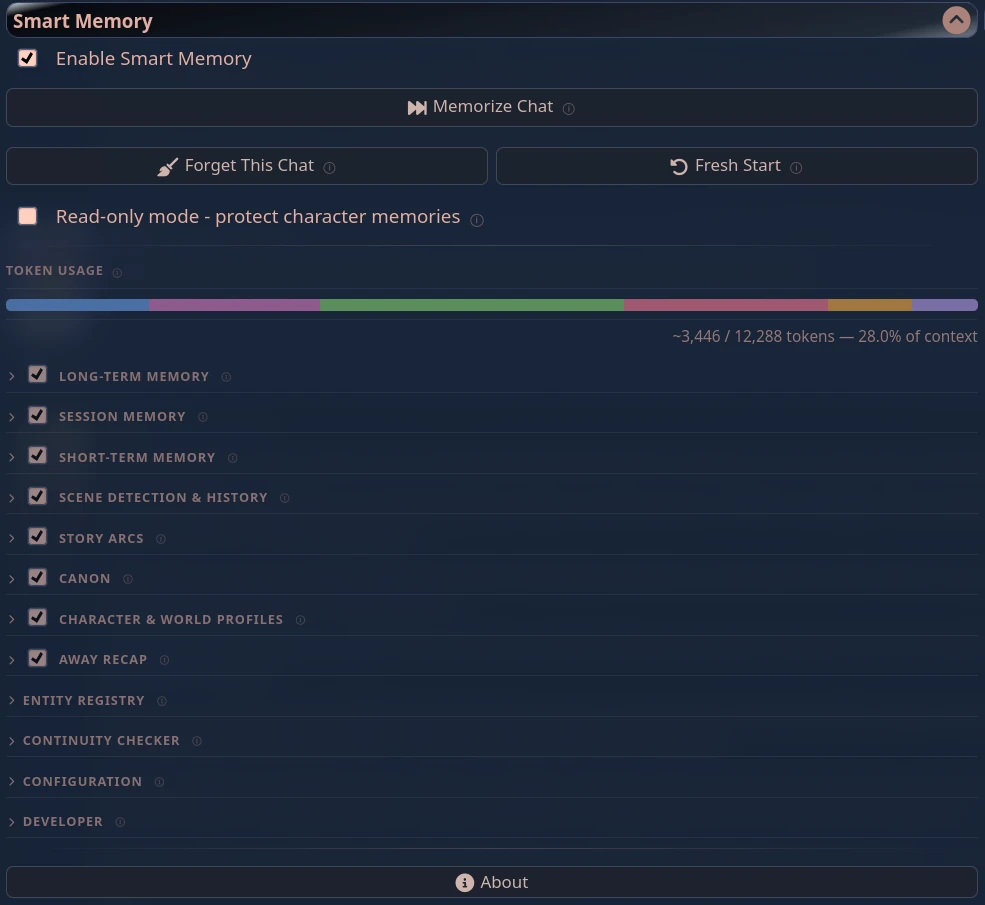 The extension panel |
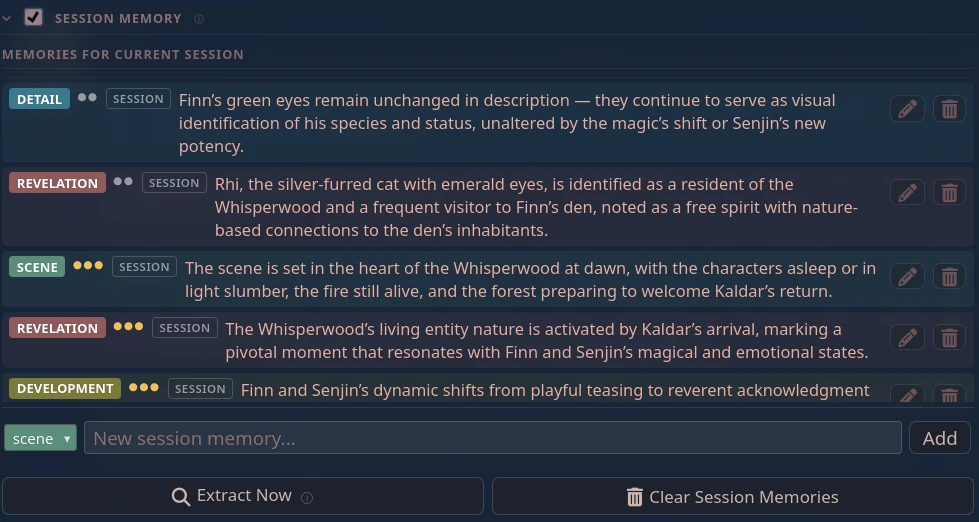 Session memories |
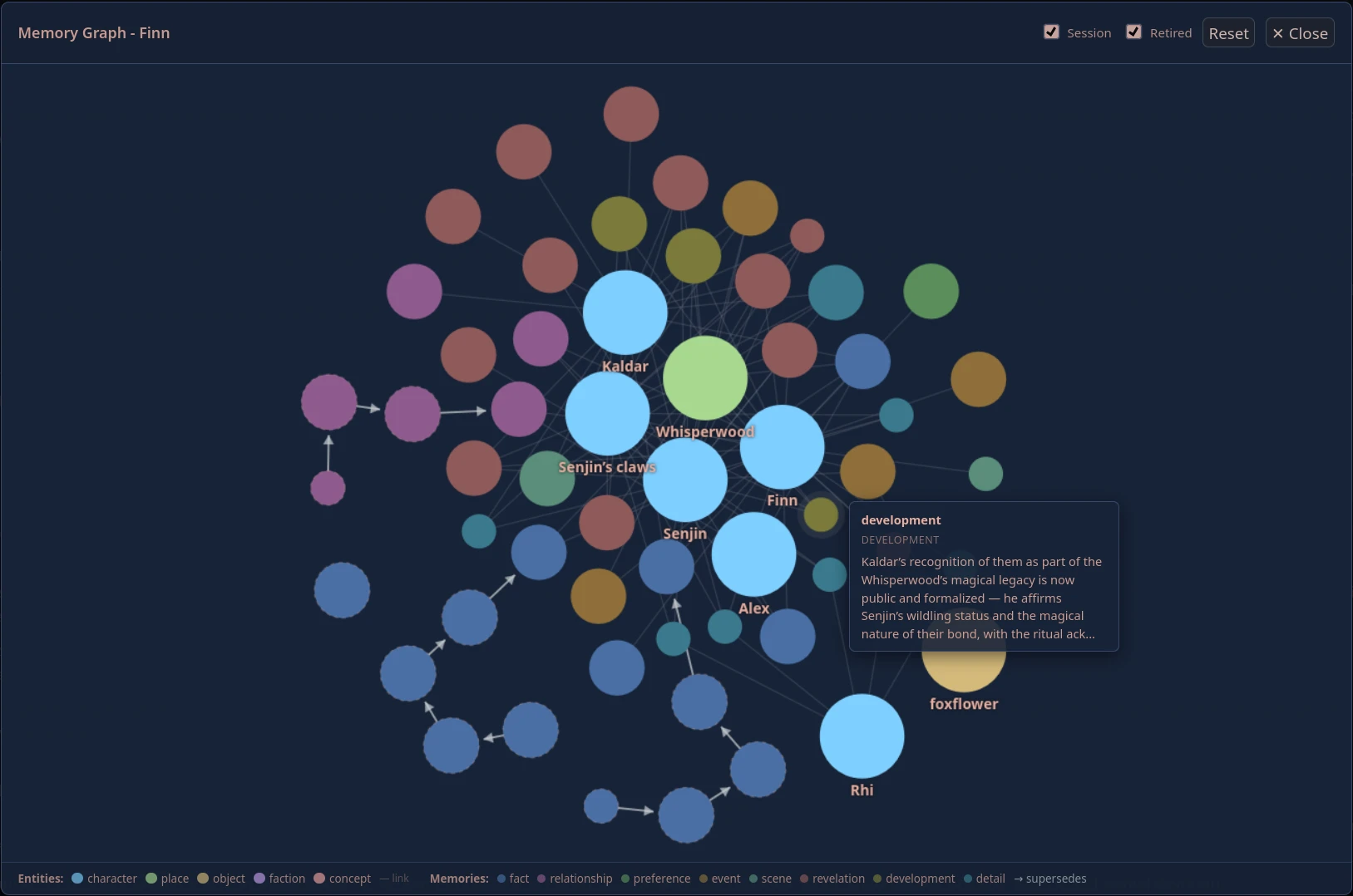 Entity and memory graph - hover any node to inspect it |
|
I'm a solo developer building tools to make AI roleplay better for everyone. Smart Memory is maintained in my free time, and as I'm currently navigating some financial challenges, any support means a lot.
If this extension adds something to your stories, please consider:
- Sponsoring me on GitHub
- Buying me a coffee on Ko-fi
- Bitcoin:
bc1qjsaqw6rjcmhv6ywv2a97wfd4zxnae3ncrn8mf9 - Starring this repository to help others find it.
- In SillyTavern, open the Extensions menu (the stack of cubes icon)
- Click Install extension
- Paste:
https://github.com/senjinthedragon/Smart-Memory - Click Install just for me (or for all users if you're on a shared server)
Restart SillyTavern. Smart Memory will appear in your Extensions panel.
After installing, two things to set up before your first session:
Smart Memory needs a language model to do its work - summarizing, extracting facts, generating recaps. It runs this separately from your main roleplay model so the two don't compete. Open the extension panel, scroll down to Configuration, and set the Memory LLM to whichever source fits your setup. See Recommended Local Models for suggestions on what to run locally.
Embeddings let Smart Memory compare memories by meaning rather than exact wording, which catches far more duplicates and keeps your memory lists clean. If you already use SillyTavern's Vector Storage with Ollama, you likely have nomic-embed-text installed and nothing extra is needed - just make sure Use semantic embeddings is enabled in the Configuration section. If not, see Memory Deduplication for setup instructions.
The default Memory context budget in simple mode is 3750 tokens - the combined total of all memory tiers at their default sizes. This number was chosen to work well with the recommended local models. If you reduce it, one or more tiers will start getting trimmed or cut off entirely to fit the lower limit, which may noticeably affect quality. Leave it at the default until you have a feel for how Smart Memory works in your setup, then adjust carefully in small steps if needed.
That's it - Smart Memory will start building memories automatically from your next chat.
Smart Memory runs several memory systems in the background, each focused on a different slice of your story's history.
A small bar in the settings panel shows how many tokens each memory tier is currently using in the AI's context. It updates after every response so you can see at a glance whether Smart Memory is taking up a sensible amount of your context.
When a tier is actively trimming content to fit its budget, its segment on the bar shows a red strip along the bottom edge. Hovering over the segment shows how many tokens were dropped. This is your signal to consider raising that tier's injection budget in the settings - or lowering another tier's budget to free up room.
Auto-tune budgets adjusts tier budgets automatically based on observed demand. After each injection pass it measures how many tokens each tier actually needed, then sets the budget to that amount plus 15% headroom - enough to stay comfortable without wasting context on unused space. Budgets are never reduced below their defaults, only grown. In group chats it tracks the highest demand seen across all characters in the session, so budgets are sized for the most memory-heavy character rather than whichever one injected last. Enabling auto-tune applies immediately using whatever data has already been collected; after that it re-tunes after every injection pass.
Facts, relationship history, preferences, and significant events are extracted from your chats and saved for each character. These memories survive across all sessions - when you open a new chat with a character, everything they have learned is already there waiting.
Over time, memories are automatically consolidated so the same information does not pile up in slightly different forms. Smart Memory is good at recognising when two differently-worded entries are saying the same thing, so you end up with a clean, rich picture of the character rather than a growing cluttered list.
When a new memory describes a change - "Alex no longer distrusts Finn", "she moved to the capital", "the guild was disbanded" - the old fact is automatically retired and replaced rather than left alongside the newer truth as a contradiction.
Each memory is assigned a set of activation triggers - keywords derived automatically from its content. When a trigger appears in the current chat turn, that memory gets a scoring boost so it rises to the top of what gets injected into context. Memories that fire a trigger are also placed in a secondary slot closer to the prompt, so the AI sees them right before it responds. You do not need to configure anything for this - it runs automatically.
Granular details from the current session: scene descriptions, things that were revealed, how the relationship shifted, specific objects or places that came up. More detailed than long-term memory, and scoped to this chat only - it does not carry forward to future sessions, but it keeps the AI sharp on the specifics of what is happening right now.
Session memory is aware of what is already in long-term memory, so the two complement each other rather than duplicating information.
When your conversation grows long enough that older messages start falling out of the AI's awareness, Smart Memory automatically writes a summary of everything so far and keeps it in context. The AI stays oriented in long stories even as older messages scroll away.
After the first summary is written, only new messages get folded in - the summary grows with your story rather than being rewritten from scratch every time. It also knows what is already captured in your long-term and session memories, so it focuses on narrative flow rather than repeating facts stored elsewhere.
The rolling summary sits alongside canon if you have it enabled - both can be active at the same time, covering different spans of your story's history.
Smart Memory watches for scene transitions - time skips, location changes, those little --- dividers between scenes, and intimate partner changes. When one is detected, a short summary of the completed scene is saved. The last few scene summaries are kept in context so the AI always knows where the story has been, not just where it is.
Unresolved narrative threads - promises made, character goals, mysteries introduced, tensions left hanging - are tracked and kept in context. When the story resolves one, it gets marked closed and a short narrative summary is generated for the record. This keeps the AI oriented toward where the story is going, not just reacting to the last message.
Story arcs normally start fresh with each new chat. If you are running a continuing story across multiple chats (new chats as chapters rather than fresh starts), you can pin an arc with the thumbtack button next to it. Pinned arcs are stored at the character level and appear automatically in every new chat with that character. Unpinning returns it to chat-local scope.
Group chats support pinned arcs too. Pinned arcs in a group are stored against the group itself rather than any individual character, and appear automatically whenever that group starts a new chat.
When a pinned arc gets resolved, it moves to a separate Resolved Threads section below the active list rather than being deleted. Resolved arcs are not injected into context but stay visible as a record of where the story has been. A re-open button reactivates the thread if the story revisits it; a remove button discards it entirely. The resolved state carries into future chats so closed threads arrive already marked as resolved. The Resolved Threads section is collapsed by default and hidden when empty.
Once you have at least one resolved arc summary, you can generate a canon document - a stable prose narrative synthesized from those arc summaries and high-importance long-term facts. Think of it as a "story bible" for the character: not a list of bullet points, but a composed history written by the model from everything it has learned.
Canon gets its own dedicated slot, separate from the rolling short-term summary. Both can be active at the same time: the summary covers recent events, canon covers the broader history. Canon is stored at the character level and carries forward to new chats with the same character. It is cleared by Fresh Start and by the Clear button in the Long-term Memory section.
After each extraction pass, Smart Memory generates compact state snapshots from stored memories and adds them to context alongside the other tiers:
- Character state - current emotional state, active goals, relationship posture
- World state - active threads in the setting, recent developments, current scene context
- Relationship matrix - one-line directional summary per named entity with a confidence score
Profiles are regenerated after each extraction pass and on chat load if stale. On Profile B, an optional message-count schedule can keep them fresh between extraction passes. A manual regenerate button is available in the settings panel.
In group chats, each character has their own independent profile. Switching the character selector updates the profiles panel to show that character's snapshot, and each character's profile is added to context when they are about to respond.
Alongside individual memories, Smart Memory tracks the current emotional state of every named relationship as a set of descriptors - words like warm, cautious, fragile, mistrustful. Each descriptor carries its own magnitude (low, medium, high), displayed as word(magnitude) - e.g. trusting(high), cautious(medium). After each extraction pass the model reviews the scene and emits any shifts; new descriptors are merged in and existing ones updated rather than replaced, so the state accumulates across sessions without losing earlier signals. A maximum of six descriptors per pair is kept; the lowest-magnitude entry is dropped when the cap is exceeded.
The Relationship History section in the settings panel shows all tracked pairs for the current character. You can add pairs manually (useful for seeding a relationship described in the character card), edit any pair to correct or refine the descriptors, and delete pairs that are no longer relevant. Relationship History is cleared alongside long-term memories when you use Clear Memories or Fresh Start.
Only pairs whose names appear in the recent message window are injected into context, so the block stays small even for characters with many relationships.
At each scene break, Smart Memory extracts a per-character knowledge map: what each named character knows, suspects, falsely believes, is unaware of, and is actively hiding from someone else. The responding character's knowledge block is then injected privately into their prompt, so the AI can maintain perspective-accurate behaviour - knowing what to reveal, what to deflect, and what they genuinely do not know.
The five tags map to distinct epistemic states:
- Knows - facts the character is confident about
- Suspects - things they believe but have not confirmed
- Believes (false) - things they are sure of that are actually wrong (dramatic irony)
- Unaware - things they do not know and have not guessed
- Hiding - things they know but are actively concealing from a specific other character
The Perspectives & Secrets section in the settings panel shows all extracted entries for the current character. You can add entries manually, edit existing ones, and delete entries that are no longer relevant. The section is collapsed by default on Profile A hardware (local/low-VRAM) where extraction requires a reasoning-capable model - an override toggle in the section enables it when the hardware can handle it.
Believes and Hiding entries are kept behind a spoiler block at the bottom of the list. It is collapsed by default and requires confirming a warning before it opens, so you do not accidentally reveal secrets that would spoil a mystery scenario. The block is always visible even when empty so you can tell at a glance whether any spoiler-type entries were extracted.
When the entry list grows beyond the injection budget, Smart Memory will ask whether to increase the budget for this roleplay. In normal play the budget grows in 100-token increments per confirmation; after Memorize Chat a single dialog sets the exact size needed plus 100 tokens of headroom. The increase applies only to the current chat and does not change the settings slider.
Long-term memories also benefit: memories extracted from a scene the responding character was not present for are labelled [secondhand] in their injection, so the AI knows the character learned this through hearsay rather than direct experience. This can be turned off to omit non-witnessed memories entirely.
As memories are extracted, Smart Memory tracks the named entities behind them - characters, places, objects, factions, and concepts. The AI classifies each entity by type from the context of the memory it appeared in, so invented names and made-up settings are handled just as well as real-world ones. The registry is built from both your long-term memories and your current session memories, and is updated after each extraction pass.
A collapsible Entity Registry panel in the settings shows all tracked entities with:
- Type badge (character / place / object / faction / concept) - click to edit if the classification is wrong
- Number of memories referencing the entity
- Last seen message index
- A timeline button that expands a vertical timeline of all memories involving that entity, ordered chronologically, with retired entries shown in muted style
- A merge button to combine two entities into one - useful when the model has created separate entries for the same person under different names, or when you want to collapse entries from different tiers together
- A trash button to remove an entity entirely, which also cleans up all references to it from stored memories
A View Graph button opens a full-screen, force-directed canvas of your character's entire memory network. Entity nodes (larger, coloured by type) are connected to the memories that reference them. Where one memory has replaced another, a directed arrow shows the supersession chain so you can see exactly what was retired and what replaced it. The graph supports pan, zoom, node dragging, click-to-highlight neighbours, and hover tooltips with full memory content. Filters for session memories and retired memories can be toggled on and off without closing the graph. The graph follows your active SillyTavern theme automatically.
The State Ledger tracks the current observable physical and operational state of named entities as a compact snapshot injected near the active turn. Where long-term memory records permanent facts ("Kael was once a soldier") and session memory records developing details, the State Ledger answers right now questions: where is Kael standing, what is he wearing, what is he carrying, what is the room's current state.
State cards are maintained per entity type:
- Character - location, injuries, outfit/disguise, mood, active goal, carried items
- Object - owner, location, condition, status
- Place - occupants, hazards, political control, damage, accessibility
- Faction - leadership, objective, alliances, hostility level
Extraction runs once per session against the current message window. State cards are chat-scoped and do not carry over when a new chat begins. Cards can also be filled in or edited manually from the entity panel - click the edit button below any entity row to open the field editor.
When you merge two entities that both have state cards, a modal asks which card to keep. Deleting an entity with a state card shows a warning before proceeding. Changing an entity's type migrates its state card to the new type automatically.
The section is off by default on Profile A hardware (local/low-VRAM) because weaker models tend to pad unknown fields with placeholder values - an override toggle enables it when the local model is reasoning-capable.
Tip: Both Perspectives & Secrets and State Ledger inject close to the active turn by default, which gives stronger models better attention on the content. If your model starts including memory content verbatim in its responses, switch these tiers to In-Prompt injection in the Advanced settings - this moves them clearly outside the conversation flow and stops the leaking.
Come back after a long break and not quite remember where you left off? Smart Memory generates a short "Previously on..." recap and shows it as a dismissible popup before the AI responds. It disappears after the first response - just a gentle reminder, not a permanent fixture.
A manual tool for when something feels off. Click Check Last Response (or use /sm-check) and Smart Memory asks the AI whether the last response contradicts anything in your established facts. Useful for catching drift in long stories - the AI suddenly forgetting a character detail, reversing a decision that was already made, that kind of thing.
Enable Auto-repair contradictions to go one step further: when contradictions are found, Smart Memory generates a brief corrective note and slips it into the next AI response. The note is cleared automatically after that response - it is a one-shot nudge, not a permanent change. This costs one extra model call per check, so it is disabled by default.
On Profile B (hosted models), the continuity check runs automatically after every AI response - no button click required. A small badge appears in the settings panel header: clean (fades after a few seconds) or N conflicts (stays visible until the next check). The Auto-check after each response checkbox lets you turn this off while staying on Profile B if you would rather check manually. On Profile A (local hardware) the check is manual-only.
Note: The continuity checker is only as good as the model doing the checking, and it only knows what is stored in Smart Memory - not what is on the character card by heart. Think of it as a sanity check, not a guarantee.
Smart Memory is designed to work alongside SillyTavern's built-in vector storage, not replace it. Think of them as complementary layers - vector storage retrieves specific details on demand when they seem relevant, while Smart Memory keeps a curated set of important facts and narrative context always present.
| Layer | What it does |
|---|---|
| Smart Memory - long-term | Always-present character facts from all previous sessions |
| Smart Memory - short-term | Always-present narrative summary of everything before the window |
| Smart Memory - session | Always-present curated details from the current chat |
| Vector storage | Retrieves specific details on demand when they are relevant |
| Message Limit extension | Hard cap on raw messages in context - your VRAM budget |
If you are on limited VRAM (8GB or less), keep the Message Limit extension enabled and consider lowering Max session memories to around 15 to keep prompt size comfortable.
These models have been tested against Smart Memory's extraction prompts and are listed in order of recommendation - each step down trades quality or precision for a smaller footprint or faster extraction. Reference hardware for testing is an RTX 2080 (8 GB VRAM). Models requiring more VRAM than that are noted as community reports.
gemma4 - primary recommendation. Passes all extraction tests cleanly. Produces sharp, precise character facts, well-formed arc descriptions, and accurate session details. Does not over-extract - what it finds is genuinely there. Reference hardware uses e4b-it-q4_K_M - this is the minimum tested variant and the floor of what is recommended. Larger variants will perform at least as well. Smaller variants have not been tested and are not recommended. The trade-off is speed: Gemma 4 is a reasoning model and thinks before each extraction pass, so it takes longer per message than Qwen. If output quality matters more than extraction speed, this is the model to use. See Reasoning models below for setup notes.
Huihui-Qwen3-VL-8B-Instruct-abliterated (6.1 GB) - good balance of quality and speed. Produces accurate character facts and reliably identifies open narrative threads without the reasoning overhead of Gemma 4. Can over-extract on arcs and session memory - tends to file more items than strictly necessary.
mistral:7b (4.1 GB) - quality fallback for 6 GB cards or tighter budgets on 8 GB. Extraction quality is lower across all tiers - character details are sometimes less precise, session memory undercounts on shorter exchanges, and arc descriptions tend to be vaguer. Still functional and worth using if the 2 GB saving over Qwen matters to you.
gemma3:4b (3.3 GB) - minimum viable option. The quality gap is meaningful: on shorter exchanges it can misread character traits, occasionally produces duplicate entries in a single pass, and is more prone to extracting from prompt examples rather than conversation content on complex prompts. Use it only if 4 GB is a hard limit and you accept that memory quality will be noticeably lower than the models above.
Smart Memory's prompts are longer than typical chat prompts - a model that works fine for roleplay may still struggle with extraction if the combined prompt length exceeds its effective context window. If you get empty or garbled extraction output with a different model, context overflow is the most likely cause. Use the Test Extraction Model button to check any model before committing to it.
Reasoning models (models that produce a thinking block before their actual response) are supported. Smart Memory automatically gives these models unlimited generation room so they can finish thinking before producing extraction output, then strips the reasoning block before parsing.
Reasoning block stripping uses SillyTavern's own reasoning template system, so any model that ST already recognises will work out of the box. To check or configure this:
- In SillyTavern, open User Settings → Advanced Formatting → Reasoning
- Select the template that matches your model, or set a custom prefix and suffix if your model is not listed
If no template is configured, or the template does not match what your model outputs, the reasoning block will pass through to the parsers. The tagged-line parsers (long-term, session, arcs) will silently discard it since they only match [type] tagged lines - but parsers that produce free-form output (profiles, relationship history, continuity) may be affected. Setting the correct template in ST is recommended for any reasoning model.
Gemma 4 is the exception among reasoning models - most reasoning models are not good choices for extraction. DeepSeek R1 and similar models tend to run extended thinking blocks, consume their generation budget before producing output, and then produce garbled or incorrect structured data. Gemma 4 performs well above what its size would suggest and handles the structured extraction format cleanly. Do not assume another reasoning model will behave the same way - use the model test to verify before committing to one.
The trade-off specific to Gemma 4 is speed: the thinking block adds time before each extraction pass. If extraction latency is a concern, a non-reasoning model like Qwen3 will be faster. Either way, make sure thinking is not disabled at the model level - some reasoning models produce poor output without their reasoning enabled.
The Test Extraction Model button (in the Configuration section, below the hardware profile) runs the extraction pipeline against three fixed roleplay scenarios and shows you the model's raw output for each tier. All five tiers always run regardless of which are enabled in your settings - you can evaluate the full pipeline before committing to a configuration.
The test is safe to run mid-roleplay - it uses its own private scenarios and never writes anything to your session, chat history, or stored memories.
What the test does:
- Runs long-term memories, session memories, and story arcs through a 30-message fantasy investigation scenario
- Runs Perspectives & Secrets through a separate village healer scenario designed to exercise all five epistemic tag types
- Runs State Ledger through a separate dungeon heist scenario with a small set of known entities
- Displays results one tier at a time with Previous and Next buttons to step through them
- Each tier shows the model's raw output in a text area alongside a hint describing what a capable model should produce
- If any tier returns empty output the test stops immediately and reports which tier failed
What to look for:
Long-term memories, session memories, story arcs (investigation scenario - multiple named characters, key revelations, explicit promises, and open threads):
- Long-term memories: 5 or more items covering character facts, relationships, and significant events
- Session memories: 4 or more items covering scene details, revelations, and developments
- Story arcs: 3-4 items identifying unresolved threads - not events that already happened
Perspectives & Secrets (village healer scenario - four characters, secondhand knowledge, a hidden secret):
- Should produce entries across most or all five tag types:
[knows],[suspects],[believes],[unaware],[hiding] - A model that confuses
[knows]with[hiding], or misses all entries of a tag type entirely, may not be suitable for this tier
State Ledger (dungeon heist scenario - small cast with observable physical state):
- Should extract current physical state for the named entities that have observable state
- Characters mentioned but with no observable state should produce no entry
- Any field value of "unknown", "none", or a placeholder means the model is padding rather than omitting unknowns - unsuitable for state extraction
You are the judge. The hint on each tier tells you what to expect; the raw output tells you what the model actually did. Look for structured tagged lines ([fact], [scene], [arc], etc.) with meaningful content. Vague items or repeated paraphrases of the same fact are signs of a weaker model; completely empty output means the model is not suitable.
Already have chats that predate Smart Memory? Memorize Chat reads through an existing chat and builds the full set of memories, scene history, arcs, and summary from it. Run it on any older chat to bring that character's history into the system.
Reads the full chat history and builds memories from it - long-term facts, session details, scene history, story arcs, summary, and profiles. Use this to bring Smart Memory up to speed on an existing chat, or to build up a character's long-term memories from older sessions.
In group chats, Memorize Chat processes all active group members - not just the one currently selected. Each character gets their own pass through the messages, their own memories, and their own profiles at the end.
A Cancel button appears during processing. Cancelling stops cleanly between chunks - anything processed so far is saved.
If memories already exist for one or more characters, a confirmation prompt appears before processing begins. Running Memorize Chat repeatedly on the same chat can introduce near-duplicate entries. Use Forget This Chat first if you want a clean re-run.
Only accepted messages are processed - swiped alternatives are ignored.
To build long-term memories from multiple older chats, open each one and run Memorize Chat. Memories accumulate and deduplicate automatically. Skip any chats you would rather not include.
Clears all chat-scoped context - summary, session memories, scene history, story arcs, profiles, and the session entity list. The following are not cleared and carry forward unchanged: long-term memories, relationship history, state cards, canon, pinned arcs, and the persistent entity registry. Useful before a Memorize Chat run to re-derive everything cleanly from scratch.
Clears everything for a clean slate - long-term memories, canon, and entity registry for the current character, plus all chat-scoped tiers (summary, session memories, scene history, arcs, profiles). The AI will begin building fresh memories from the next message onward. Asks for confirmation before proceeding - this cannot be undone.
To prevent a specific chat from contributing to long-term memory at all, use Read-only mode instead.
The Read-only mode - protect character memories toggle sits just below the chat action buttons. When it is on, the character arrives with all their memories and behaves completely normally - but nothing from this chat gets written back to their permanent history. No new long-term memories, no new arcs, no canon or profile updates.
Use it to safely explore a risky scene before deciding whether to commit it to the character's history. Or for a completely consequence-free session where nothing changes permanently. When you turn it off, their memories are exactly as you left them before the session.
When you turn read-only off, a dialog asks what to do with the session:
- Commit - keeps everything. Session memories are preserved and Smart Memory runs full extraction on the window - long-term memories, arcs, and profiles are built as if read-only had never been active. The messages stay visible.
- Discard - throws everything away. Session memories are purged and the messages from the read-only window are hidden from the AI so they can never influence future extraction passes.
You can toggle read-only on and off multiple times in the same chat; each window is handled independently.
Using read-only with checkpoints and branches: SillyTavern's checkpoint and branch features save the chat up to a specific point as a new file. Smart Memory's long-term memories are shared across all chats with the same character - they do not roll back if you switch to an older checkpoint or branch. If you plan to explore alternative story paths this way, enable read-only mode first. Smart Memory will warn you with a notification if you create a checkpoint or branch without it active.
Each memory tier has its own Extract Now or Extract button that processes a recent window of messages - not the full chat. Useful for pulling in the latest exchanges outside the automatic schedule.
| Button | Window |
|---|---|
| Long-term Extract Now | Last 20 messages |
| Session Extract Now | Last 40 messages |
| Extract Arcs Now | Last 100 messages |
| Extract Scene | Scene buffer or last 40 messages |
For the full chat backlog, use Memorize Chat instead.
- Summarize Now - forces a short-term summary right now, ignoring the threshold
- Generate Canon - synthesizes a prose narrative from resolved arc summaries and high-importance facts. Requires at least one resolved arc summary. On Profile B this runs automatically after each arc closes. Canon is stored at the character level and survives across chats - cleared by Fresh Start and the Long-term Memory Clear button. The canon textarea is also editable directly
- Generate Recap Now - generates and shows a recap popup on demand
- Check Last Response - runs the continuity check against the last AI response
- Regenerate Profiles Now - regenerates character and world profiles immediately
- Clear buttons on each tier - remove all stored data for that tier
Every entry in the long-term memory, session memory, and story arc lists has action buttons:
- Pencil (edit) - replaces the entry with an inline text editor. Edit the content and click Save, or Cancel to discard changes. Not shown on retired memories.
- Trash / Checkmark (delete/resolve) - removes the entry immediately. For story arcs the button is a checkmark to indicate resolving the thread rather than discarding it.
- Pin (active story arcs only) - marks the arc as persistent so it carries into future chats. The pin icon turns gold and the arc gets a gold left border when pinned. Click again to unpin. In group chats, the pin stores the arc against the group rather than an individual character.
- Re-open (resolved arcs only) - moves the arc back to the active list. If an equivalent thread is already active the resolved copy is discarded instead.
- Remove (resolved arcs only) - discards the resolved arc from the panel and the persistent store.
- Jump to source - scrolls the chat to the message window the memory was extracted from. Shown on session memories whenever provenance is available, and on long-term memories when the memory was extracted from the current chat.
Below each list an Add form lets you insert a new entry manually:
- For long-term and session memories, a color-coded type picker lets you choose the type before adding. Each type is shown in its badge color so you can see what you are picking.
- For story arcs, just type the thread and click Add.
Manual edits take effect immediately and are added to the prompt on the next message.
All settings are saved automatically. Hardware Profile, Memory LLM, and Memory Deduplication are in the Configuration accordion at the bottom of the extension panel.
The settings panel has two modes so you can keep things simple or go deep:
- Simple mode (default) - shows only the most commonly adjusted settings: hardware profile, extraction frequency (Low/Medium/High), and how much context Smart Memory is allowed to use. Everything else runs on sensible defaults.
- Advanced mode - reveals the full set of controls: per-tier context budgets, where each tier appears in the prompt, how deep, what role, the template text, summarization thresholds, response length budgets, and the Consolidation section. Toggle it with the Advanced mode checkbox at the top of the settings panel.
Switching from simple to advanced never overwrites your values - the advanced controls always show the current state.
| Setting | Default | Description |
|---|---|---|
| Auto-tune budgets | Off | Automatically adjusts per-tier injection budgets based on observed demand. Each tier's budget is set to its actual usage plus 15% headroom. Budgets never drop below their defaults. In group chats, budgets are sized for the most memory-heavy character seen this session |
Smart Memory adjusts its behavior based on whether you are using a local model or a hosted service. The profile is auto-detected from your Memory LLM selection but can be overridden manually.
| Setting | Default | Description |
|---|---|---|
| Hardware profile | Auto | Auto-detects from your memory source. Ollama or WebLLM selects Profile A (fewer model calls, lighter extraction). Main API or OpenAI Compatible selects Profile B (richer extraction, automatic continuity checks, auto-canon). Override manually if auto-detection does not match your setup |
Profile A (local hardware - Ollama, WebLLM) is designed to be conservative with model calls. Extraction runs on a schedule, scene AI detection is off by default, the continuity check is manual-only, and canon generation is triggered manually. This keeps things running smoothly on limited VRAM.
Profile B (hosted models - Main API, OpenAI Compatible) takes advantage of faster, less constrained inference. The continuity check runs automatically after every response, canon regenerates automatically when an arc closes, and profile regeneration can be scheduled on a message-count interval in addition to extraction passes.
Selects which AI model handles all Smart Memory work - summarization, extraction, and recap generation. Setting this to a lighter model leaves your main roleplay model free for the actual story.
Options: Main API, Ollama, OpenAI Compatible, or WebLLM Extension.
Note: Some OpenAI Compatible providers (including Nvidia NIM) block direct browser connections due to CORS restrictions. If requests fail, run a local proxy such as LiteLLM and point the URL to that instead.
URL format: Enter only the base URL - do not include
/v1at the end. The extension appends the full path automatically. For example, NovelAI should be entered ashttps://text.novelai.net/oa, nothttps://text.novelai.net/oa/v1.
Smart Memory uses a small helper model to understand whether two memories are saying the same thing, even if the wording is completely different. For example, "Finn is Senjin's anchor" and "Finn serves as Senjin's emotional foundation" look nothing alike as text, but the helper model recognises them as the same fact and prevents the duplicate from being stored. The same helper model is also used to measure how relevant each stored memory is to the current moment in the story, which affects which memories get prioritised in context.
This helper model is tiny and runs on CPU - it does not compete with your main roleplay model for VRAM or slow anything down.
If you do not have an embedding model set up, Smart Memory falls back to keyword matching automatically. It works, but catches fewer paraphrased duplicates.
| Setting | Default | Description |
|---|---|---|
| Use semantic embeddings | On | Use the helper model to compare memories by meaning rather than by shared words |
| Embedding source | Ollama | Which server provides embeddings: Ollama or any OpenAI-compatible endpoint |
| Embedding URL | (blank, uses localhost:11434) | Base URL of your embedding server - only change if it is on a different port or host |
| Embedding model | nomic-embed-text |
The model used for meaning comparison |
| Keep model in memory | Off | (Ollama only) Keeps the helper model loaded between calls - faster if Smart Memory runs frequently |
Ollama: The embedding model must be installed before enabling this. If you already use SillyTavern's built-in Vector Storage extension with Ollama, you likely have nomic-embed-text installed already. If not:
ollama pull nomic-embed-textOpenAI Compatible: Set the embedding source to "OpenAI Compatible", enter the base URL of your server, and type the model name it exposes for embeddings. Works with any server that implements the /v1/embeddings endpoint. If your server requires an API key, enter it in the API key field - it is stored in extension settings alongside other Smart Memory configuration.
| Setting | Default | Description |
|---|---|---|
| Enable long-term memory | On | Extract and inject persistent character facts |
| Extract every N messages | 3 | How often automatic extraction runs |
| Max memories per character | 25 | Hard cap on total stored memories. Storage is also balanced per type - no single type (fact, relationship, preference, event) can exceed max / 4 entries so one category cannot crowd out others |
| Injection token budget | 500 | When memories would exceed this limit, the least important ones are trimmed first - based on importance, how permanent they are, how recently they were recalled, and confidence |
| Injection template | Memories from previous conversations:\n{{memories}} |
Wrapper text |
| Injection position | After Main Prompt | Where in the prompt memories appear |
The long-term list shows a retired badge on superseded entries. A "Show retired memories" toggle reveals them. Each retired entry has a "superseded by" link to the replacement. Memories with unresolved contradictions show a yellow warning indicator.
| Setting | Default | Description |
|---|---|---|
| Enable session memory | On | Extract and inject within-session details |
| Extract every N messages | 3 | How often automatic extraction runs |
| Max session memories | 30 | Consider lowering to ~15 on limited VRAM |
| Injection token budget | 400 | When memories would exceed this, the least important ones are trimmed first |
| Injection template | Details from this session:\n{{session}} |
Wrapper text |
| Injection position | In-chat @ depth 3 | Sits just above ST's default vector depth |
| Setting | Default | Description |
|---|---|---|
| Enable auto-summarization | On | Automatically summarize when the threshold is reached |
| Context threshold | 80% | Start summarizing when the context reaches this percentage of the model's limit |
| Summary response length | 2000 tokens | How long the summary can be - also acts as the cap on what gets added to context |
| Injection template | Story so far:\n{{summary}} |
The wrapper text around the summary |
| Injection position | After Main Prompt | Where in the prompt the summary appears |
| Setting | Default | Description |
|---|---|---|
| Enable scene detection | On | Watch for scene breaks and keep a running scene history |
| AI detection | Off | More accurate but costs an extra model call per message |
| Keep last N scenes | 5 | How many scene summaries to retain |
| Injection token budget | 300 | Oldest scenes dropped first when the limit is exceeded |
| Injection position | In-chat @ depth 6 | Further back in context |
| Setting | Default | Description |
|---|---|---|
| Enable arc tracking | On | Extract and keep open narrative threads in context |
| Max tracked arcs | 10 | Oldest arcs are dropped when the limit is hit |
| Injection token budget | 700 | Oldest arcs trimmed first when exceeded |
| Injection position | In-chat @ depth 2 | Near current action, alongside chat vectors |
Over time, the same information can accumulate in slightly different forms across multiple extraction passes. Consolidation runs quietly in the background after each extraction and asks the AI to merge near-identical or redundant entries into richer single items. You end up with fewer, better memories rather than a growing list of overlapping notes.
The Consolidation section is only visible in advanced mode. In simple mode it always runs on the defaults below.
| Setting | Default | Description |
|---|---|---|
| Enable consolidation | On | Master toggle - turning this off skips consolidation for both long-term and session memory |
| Long-term: consolidate [fact] after | 4 | How many unprocessed entries of this type accumulate before a consolidation pass fires |
| Long-term: consolidate [relationship] | 3 | |
| Long-term: consolidate [preference] | 3 | |
| Long-term: consolidate [event] | 4 | |
| Session: consolidate [scene] after | 3 | Same logic, for session memory types |
| Session: consolidate [revelation] | 3 | |
| Session: consolidate [development] | 3 | |
| Session: consolidate [detail] | 3 |
| Setting | Default | Description |
|---|---|---|
| Enable canon | On | Add canon to context and allow auto-regeneration. Turning this off suppresses both |
| Injection budget | 800 tokens | Canon text is trimmed from the end if it would exceed this limit |
| Injection template | Character history:\n{{canon}} |
The wrapper text around the canon document |
| Injection position | After Main Prompt | Where in the prompt canon appears |
The Generate Canon button synthesizes a prose narrative from resolved arc summaries and high-importance long-term facts, stores it at the character level, and immediately adds it to context. At least one resolved arc summary is required. On Profile B this regenerates automatically after each arc closes. Canon is stored at the character level and survives across chats - it is cleared by Fresh Start and the Long-term Memory Clear button. The canon textarea in the Canon section is also editable directly if you want to adjust it by hand.
| Setting | Default | Description |
|---|---|---|
| Enable profiles | On | Generate and add state snapshots to context after each extraction pass |
| Stale threshold | 30 minutes | Regenerate on chat load if profiles are older than this |
| Also regenerate every | Off (0) | Profile B only. Regenerate every N messages even if extraction has not run. 0 = on extraction passes only |
| Response length | 600 tokens | How long the profile generation response can be |
| Injection token budget | 400 | Trim profiles if they would exceed this many tokens |
| Injection position | After Main Prompt | Where in the prompt profiles appear |
A live token count shows how much context the current profiles are using. A Regenerate Profiles Now button forces immediate regeneration. The current profiles are shown read-only below the controls.
| Setting | Default | Description |
|---|---|---|
| Enable relationship history | On | Extract and inject per-pair emotional state across sessions |
| Injection token budget | 250 | Budget for the relationship block; funded from within the shared 3750 token default |
| Injection position | In-chat | Where the relationship block appears in the prompt |
| Injection depth | 5 | Distance from the user prompt (lower = closer) |
| Setting | Default | Description |
|---|---|---|
| Enable Perspectives & Secrets | On (Profile B) | Extract and inject per-character knowledge maps at scene breaks. Off by default on Profile A; enable with the override |
| Enable on Profile A | Off | Override to run epistemic extraction on Profile A hardware. Requires a reasoning-capable local model |
| Inject "does not know" entries | On | Include what each character is unaware of in their knowledge block (for dramatic irony) |
| Frame secondhand long-term memories | On | Prefix long-term memories with [secondhand] when the responding character was not present for the scene they came from |
| Injection token budget | 200 | Budget for the knowledge block; funded from within the shared total |
| Injection position | In-chat | Where the knowledge block appears in the prompt |
| Injection depth | 1 | Distance from the user prompt (lower = closer); depth 1 places it right after the most recent context |
| Setting | Default | Description |
|---|---|---|
| Enable State Ledger | Off | Extract and inject current entity state cards. On Profile A hardware a confirmation is shown first - this feature works best with a reasoning-capable model |
| Injection token budget | 200 | Budget for the state block; funded from within the shared total |
| Injection position | In-chat | Where the state block appears in the prompt |
| Injection depth | 1 | Distance from the user prompt (lower = closer) |
| Setting | Default | Description |
|---|---|---|
| Enable recap | On | Show a recap popup when returning after a long break |
| Threshold | 4 hours | Minimum time away before a recap is generated |
| Setting | Default | Description |
|---|---|---|
| Auto-check after each response | On | Profile B only. Run the continuity check automatically after every AI response. Turn this off to check manually while staying on Profile B |
| Auto-repair contradictions | Off | Profile B only. When contradictions are found, generate a short corrective note and slip it into the next response. Cleared automatically after that response. Costs one extra model call per check |
| Command | Description |
|---|---|
/sm-check |
Check the last AI response for contradictions against established facts |
/sm-summarize |
Force a short-term summary generation now |
/sm-extract |
Run long-term, session, and arc extraction against the current chat now |
/sm-recap |
Generate and show a "Previously on..." recap popup now |
/sm-search <query> |
Search all memories by meaning and show a results popup. Optional k=N sets the result count (default 10, max 50); min=N sets a minimum match quality to filter weak results (default 0.5, range 0-1). Falls back to keyword matching when the embedding model is unavailable |
Long-term memories are tagged by type:
fact- established truths about the character, world, or settingrelationship- the current state and history of the relationshippreference- what the user demonstrably enjoys (themes, tone, pacing)event- significant events that should be recalled in future sessions
Session memories are tagged by type:
scene- current or recently completed scene detailsrevelation- something discovered or revealed this sessiondevelopment- how the relationship or situation changeddetail- specific facts, names, objects, or places mentioned
Extraction also assigns:
- Importance (1-3) - how impactful the memory is (
1fluff,2context,3core) - Expiration - expected durability:
scene(short-lived)session(current chat scope)permanent(durable, keep aggressively)
When the memory budget is full and something needs to be trimmed, Smart Memory keeps the entries that matter most and quietly drops the ones that have become less relevant over time. See Memory Prioritisation in the Advanced section for details on how this works.
When the story changes a fact - a character moves, a relationship ends, a decision is reversed - Smart Memory detects this and retires the old memory automatically rather than leaving two contradictory versions sitting side by side. The old memory is kept in storage (visible with the "Show retired memories" toggle) but is no longer added to the AI's context.
See How Supersession Works in the Advanced section if you are curious about the detection mechanism.
When two stored memories cannot both be true and neither clearly replaces the other, they are flagged with a yellow warning indicator. Use Check Last Response to surface and optionally repair these conflicts.
This section covers the technical details behind Smart Memory's behaviour. You do not need to read it to use the extension - everything works out of the box. It is here for curious users and for anyone tuning Smart Memory alongside other extensions.
Smart Memory's defaults are designed to layer cleanly alongside SillyTavern's Vector Storage extension. "Depth" is how far a piece of context sits from the AI's response - depth 0 is right before the AI responds, higher numbers sit further back.
| Tier | Position | Notes |
|---|---|---|
| State Ledger | In-chat @ depth 1 | Current entity state, alongside Perspectives |
| Perspectives & Secrets | In-chat @ depth 1 | Per-character knowledge block, closest to reply |
| Arcs | In-chat @ depth 2 | Shares depth with ST chat vectors intentionally |
| Session | In-chat @ depth 3 | Just above ST's default vector depth |
| Scenes | In-chat @ depth 6 | Further back - past scene context |
| Long-term | After Main Prompt | Near character card |
| Short-term | After Main Prompt | Rolling narrative summary |
| Canon | After Main Prompt | Stable character history, separate slot |
| Profiles | After Main Prompt | State snapshots, near character card |
The away recap is shown as a popup to the user, not added to the prompt.
If you change ST's vector storage depth, set session memory one higher so it still layers above vectors.
When memories would exceed the token budget, Smart Memory scores each entry across several dimensions and trims the lowest-scoring ones first: how permanent the memory is, how important it was rated at extraction time, how recently it was recalled, how many times it has been used, and how confident the system is that it is still true. Relationship and fact entries for long-term memory, and development and scene entries for session memory, are held onto more aggressively since these tend to matter most for story continuity.
Supersession detection runs in two passes. First, a quick pattern check looks for state-change language in the new memory - phrases like "no longer", "became", "healed", "left the", "was captured", and many others cover the most common ways a fact changes in natural language. Second, when two memories score as clearly being about the same topic but no pattern phrase was found (because the phrasing was unusual - "confiscated", "hijacked", etc.), Smart Memory asks the AI directly: does this new memory update or replace the old one, or are both still true at the same time? One short question, one word answer. Extra model calls only happen when a suspicious pair is found - quiet passes cost nothing extra.
Each memory tier exposes a macro token you can place anywhere in a character card field or instruct template. When Smart Memory finds its token in a card, it injects the tier's content at that position instead of using its default injection slot - so you control exactly where each tier appears relative to your own scaffolding.
| Macro | Tier |
|---|---|
{{smartmemory-shortterm}} |
Short-term summary |
{{smartmemory-longterm}} |
Long-term memories |
{{smartmemory-session}} |
Session memories |
{{smartmemory-scenes}} |
Scene history |
{{smartmemory-arcs}} |
Story arcs |
{{smartmemory-relationships}} |
Relationship history |
{{smartmemory-canon}} |
Canon |
{{smartmemory-profiles}} |
Profiles |
{{smartmemory-epistemic}} |
Perspectives & Secrets |
{{smartmemory-stateledger}} |
State Ledger |
{{smartmemory-unified}} |
Unified block (see below) |
Place any token in the Main Prompt, Description, Personality summary, Scenario, or Examples of dialogue fields of a character card. Smart Memory detects the token automatically and activates macro mode for that tier - no settings change needed.
If you place macros in an instruct template rather than a character card, enable Force macro injection mode in Configuration (advanced mode). Instruct templates cannot be scanned for auto-detection, so the override is required.
The {{smartmemory-unified}} macro is only active when Unified injection is also on. It lets you control where the merged block lands in the same way individual tier macros control per-tier placement. Individual tier macros are inactive while unified injection is on - unified owns all tier content.
| Setting | Default | Description |
|---|---|---|
| Verbose logging | Off | Print detailed progress to the browser console for extraction, consolidation, and scene detection. Errors are always logged regardless |
| Unified injection | Off | Merges all memory tiers into a single block ordered from most stable (canon, long-term) to most immediate (session, arcs). Disables per-tier depth and position settings while active. Available in advanced mode |
| Force macro injection mode | Off | Forces macro injection for all tiers. Use when macros are in instruct templates (cannot be auto-detected from card fields). When unified injection is on, activates {{smartmemory-unified}} for instruct templates - individual tier macros remain inactive. Leave off for card macros - auto-detection handles them |
Editing past messages - If a message is edited after Smart Memory has already extracted memories from it, those memories are not updated. The character may hold beliefs formed from the original text that no longer match the edited version. If you edit a message and the change is significant, review the relevant memory entries manually and correct or delete them as needed.
Hiding past messages - Hiding a message that Smart Memory has already processed does not remove the memories formed from it. The information stays in the character's memory even though the message is no longer in context.
Checkpoints and branches - See the Read-only Mode section.
Not required reading for using the extension. The architecture diagram is a technical overview of Smart Memory's internal structure - intended for developers who want to understand how the tiers, extraction pipeline, and storage system fit together.
Licensed under the GNU Affero General Public License v3.0.
