
TeksEdit is a simple text editor application developed in C# using Windows Forms. It provides basic functionalities to create, edit, and format text files in a user-friendly interface.
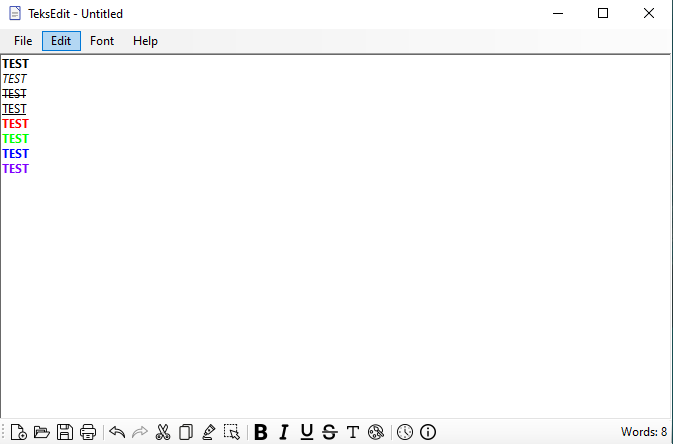
- New File: Create a new untitled text file.
- Open File: Open an existing text file for editing.
- Save File: Save the edited content to a text file.
- Print File: Print the text content.
- Undo/Redo: Perform undo or redo actions on text changes.
- Cut/Copy/Paste: Manipulate text content using clipboard operations.
- Select All: Select the entire text content.
- Text Formatting: Apply formatting styles such as bold, italics, underline, and strikethrough to text.
- Font Color: Change the color of selected text.
- Insert Date/Time: Insert current date and time into the text.
- Word Count: Track and display the number of words in the text.
- New File: Click the New icon on the toolbar to create a new untitled file.
- Open File: Click the Open icon to select and open an existing text file.
- Save File: Click the Save icon to save the edited content to a file.
- Print File: Print the text content using the Print icon.
- Text Formatting: Apply text formatting options like bold, italics, underline, strikethrough using the respective toolbar icons.
- Font Color: Change the font color of selected text by clicking the Color icon.
- Insert Date/Time: Click the DateTime icon to add the current date and time at the cursor position.
- Use the top menu items (
File,Edit,Format,Help) to access the same functionalities available in the toolbar. File: New, Open, Save, Save As, Print, Exit.Edit: Undo, Redo, Cut, Copy, Paste, Select All.Format: Font styles (Bold, Italics, Underline, Strikethrough, Regular), Font Color, Insert Date/Time.Help: About information.
- The application displays the total number of words in the text content. This count updates dynamically as you type or edit the text.
- New File: Click
Newin the toolbar orFile > Newto create a new text file. - Open File: Click
Openin the toolbar orFile > Opento select an existing text file. - Edit & Format Text: Use the available options in the toolbar or menu to modify text content.
- Save File: Click
Savein the toolbar orFile > Saveto save the changes. - Print File: Click
Printin the toolbar orFile > Printto print the text content. - Exit: Click
Exitin theFilemenu to close the application.
- The application is developed using C# with Windows Forms and should run on Windows platforms that support the .NET Framework.