But not only Liferay infos, I put here even some random web dev tricks learned in my experience
- General Java Notes
- General JSP Notes
- General HTML Notes
- General Javascript Notes
- General CSS Notes
- General MySql Notes
- General Freemarker Notes
- General Velocity Notes
- General Maven Notes
- General Gradle Notes
- General jMeter Notes
with this line
<%@ page contentType="text/javascript" %>you can have syntax highlight inside JSP
If the module doesn't have the "square" on IDEA GUI, check the pom.xml configuration, even of the parent one (take a look at the <modules> tags)
- deploy issues? you need to manually add
liferay.workspace.home.dir=ingradle.properties - importing new mavent project from source (no vcs? bad!): copy it inside the workspace before importing
right click somewhere inside the project and import recursively all the modules as gradle projects
- there is no
diffdirectory like Liferay 6.x
using gradle tasks!
- if you don't find the task: maybe you need to import the module as project, then you can find it in the gradle task window
Files *.ftl are freemarkers template!
If the IDE doesn't publish it automatically (maybe the theme module is not in the add/remove server list):
- always task clean
- build the war
- usually you can find the war file in
...\PROJECT_NAME\themes\THEME_NAME\build\libs\ - put it in the
deploydirectory
How to create and configure (with Liferay IDE):
Maven instructions:
- create an osgi module (portlet, hook, doesn't matter)
- create a sub-module, with for the example the name of the entity you want to create/map
- Specify the right Location by hand,
Liferay Developer Studio Version: 3.3.0.201808240530-ga1is bugged and doesn't create the submodule properly - Project Type:
Liferay Module Project - Project Name: something similar to the entity you want to create/map
- Build Type: depends on other modules
- Project Template Name:
service-builder - Package Name: follow the project naming convenction, please
- Specify the right Location by hand,
- at the end of the wizard, modify the
service.xml, see the doc - build services! right click on the module,
Liferay,build-service - check if every classes have been generated
- add the maven dependency in the project you would like to use the services
Example of a simple service.xml:
<?xml version="1.0"?>
<!DOCTYPE service-builder PUBLIC "-//Liferay//DTD Service Builder 7.0.0//EN" "http://www.liferay.com/dtd/liferay-service-builder_7_0_0.dtd">

<service-builder package-path="it.simonecelia.liferay">
	<namespace>blabla_entity</namespace>
	<!--<entity data-source="sampleDataSource" local-service="true" name="Foo" remote-service="false" session-factory="sampleSessionFactory" table="foo" tx-manager="sampleTransactionManager uuid="true"">-->
	<entity local-service="true" name="EntityName" remote-service="false" uuid="true">

		<!-- PK fields -->

		<column name="entityNameId" primary="true" type="long"/>

		<!-- Group instance -->

		<column name="groupId" type="long"/>

		<!-- Audit fields -->

		<column name="companyId" type="long"/>
		<column name="userId" type="long"/>
		<column name="userName" type="String"/>
		<column name="createDate" type="Date"/>
		<column name="modifiedDate" type="Date"/>

		<!-- Other fields -->

		<column name="name" type="String" primary="true"/>
		<column name="enabled" type="boolean"/>
		<!--         <column name="field3" type="int" /> -->
		<!--         <column name="field4" type="Date" /> -->
		<column name="description" type="String"/>

		<!-- Order -->

		<!--         <order by="asc"> -->
		<!--             <order-column name="field1" /> -->
		<!--         </order> -->

		<!-- Finder methods -->

		<finder name="entityName" return-type="EntityName" unique="true">
			<finder-column name="name"/>
		</finder>

		<!-- References -->

		<!--         <reference entity="AssetEntry" package-path="com.liferay.portlet.asset" /> -->
		<!--         <reference entity="AssetTag" package-path="com.liferay.portlet.asset" /> -->
	</entity>
</service-builder>
service builder does not generate methods for finders!!!
You have to manual edit the file <entityName>LocalServiceImpl.java
add for example:
public EntityName findByName(String name)throws NoSuchEntityNameException{
				return entityNamePersistence.findBylistenerName(name);
				}
and the run the build of the service builder again!
DOES NOT WORK ANYWAY?
Just write a dynamic query, byebye the finders!
maven (inside the service.xml folder):
mvn service-builder:build
Note: remember to delete generated sources and binaries.
EntityName entityName=new EntityName();
				entityName.setBlablablablabla();
				EntityNameLocalServiceUtil.addEntityName(entityName);
Doesn't work, the project compiles but the deployment process never ends.
Solution:
EntityName entityName=EntityNameLocalServiceUtil.createEntityName(CounterLocalServiceUtil.increment());
				entityName.setBlablablablabla();
EntityNameLocalServiceUtil.addEntityName(entityName);[ERROR] No plugin found for prefix 'service-builder' in the current project and in the plugin groups [org.apache.maven.plugins, org.codehaus.mojo] available from the repositories [local (C:\Users\Simone\.m2\repository), central (https://repo.maven.apache.org/maven2)] -> [Help 1]
You miss the plugin in the pom.xml, example:
<build>
	<plugins>
		<plugin>
			<groupId>com.liferay</groupId>
			<artifactId>com.liferay.portal.tools.service.builder</artifactId>
			<version>1.0.228</version>
			<configuration>
				<apiDirName>../xx-xxxx-xxxx-xx-persistence-api/src/main/java</apiDirName>
				<autoNamespaceTables>true</autoNamespaceTables>
				<buildNumberIncrement>true</buildNumberIncrement>
				<hbmFileName>src/main/resources/META-INF/module-hbm.xml</hbmFileName>
				<implDirName>src/main/java</implDirName>
				<mergeModelHintsConfigs>src/main/resources/META-INF/portlet-model-hints.xml</mergeModelHintsConfigs>
				<modelHintsFileName>src/main/resources/META-INF/portlet-model-hints.xml</modelHintsFileName>
				<osgiModule>true</osgiModule>
				<propsUtil>xx.xxxx.xxxx.xx.persistence.service.util.ServiceProps</propsUtil>
				<resourcesDirName>src/main/resources</resourcesDirName>
				<springFileName>src/main/resources/META-INF/spring/module-spring.xml</springFileName>
				<sqlDirName>src/main/resources/META-INF/sql</sqlDirName>
				<sqlFileName>tables.sql</sqlFileName>
			</configuration>
		</plugin>
	</plugins>
</build>
OR
You need to decrease the <version>x.x.xxx</version> tag, use the ones of other modules, if any
No entity column exist with column database name ...
- delete all generated source by the service builder
- avoid to use column name similar with sql keyboard (like
name)
Service builder "error: cannot find symbol
A client cannot find a method that exists in a new version of service builder generated code?
- Delete state, temp, work folders, remove services and apis module from osgi module, redeploy.
- if Liferay does not generate service builder's sql tables, you can find the definition in the
*ModelImpl.javaclass
looks for this string
All custom service methods should be put in this class. Whenever methods are added, rerun ServiceBuilder to copy their definitions into the
in java generated code
You can create it witout any ide help, just create the service.xml inside the portlet's WEB-INF folder. And yes, after that you can generate all the
classes and conf file with an ide like Intellij Idea.
Columns length: locate portlet-model-hints.xml in your project, there you can define length and other things for columns. Example:
<field name="fieldName" type="String">
	<hint name="max-length">256</hint>
</field>
This file does not get overwritten when running again build services.
Service Builder just generate code (classes and config files), if you remove a field it doesn't remove it for you!
service.xml- delete all java code generate (if you don't have modified it)
portlet-hbm.xmlportlet-model-hints.xmlportlet-orm.xml
example
Liferay.Service('/name-portlet.bla/method-name', {
		jsonString: '{"userid":' + themeDisplay.getUserId() + ', "signed":' + themeDisplay.isSignedIn()
			+ ', "inputField":"' + inputField + '"}'
	},
	function (obj) {
		var obj = jQuery.parseJSON(obj);
		//process response
	});
public class BlaServiceImpl extends BlaServiceBaseImpl {
@JSONWebService
@AccessControlled ( guestAccessEnabled = false )
public String methodName ( String jsonString ) {
//accept json, return json
}
}/bundles/osgi/modules
- add to the url
?js_fast_load=0&css_fast_load=0&strip=0 - if any (js)error will appear, you can see the code line in the browser console
- add breakpoint on that line
- edit
startup.shaddingjpdato the script
exec "$PRGDIR"/"$EXECUTABLE" jpda start "$@" - Run Menu Entry > Edit Configurations > Add New Remote Configuration > Configure your host and debug port
example:- Debugger mode:
Attach to remote JVM - Host:
localhost - Port:
8000 - Command Line:
-agentlib:jdwp=transport=dt_socket,server=y,suspend=n,address=8000 - Use module classpath!! You have to select something here
- Debugger mode:
Add a private static SLF4J Logger field.
private static Logger _logger;Instantiate the logger.
_logger=LoggerFactory.getLogger(this.getClass().getName());Throughout your class, log messages where noteworthy things happen.
For example,
_logger.debug("...");
				_logger.warn("...");
_logger.error("...");<%@ page import="com.liferay.portal.kernel.log.LogFactoryUtil" %>
<%@ page import="com.liferay.portal.kernel.log.Log" %>
<%! private static Log _log = LogFactoryUtil.getLog("mypackage.html.myfile.jsp"); %>Add this category:
com.liferay
<%@ page import = "com.liferay.portal.kernel.util.WebKeys" %>
<%@ page import = "com.liferay.portal.theme.ThemeDisplay" %>

<%
ThemeDisplay themeDisplay = (ThemeDisplay)request.getAttribute(WebKeys.THEME_DISPLAY);
String pageName = themeDisplay.getLayout().getName(themeDisplay.getLocale());
%>
For example, in the login page: pageName.equals("Login")
<%
ThemeDisplay themeDisplay  = (ThemeDisplay) renderRequest.getAttribute(WebKeys.THEME_DISPLAY);
String urlCurrent = themeDisplay.getURLCurrent();
%>
Output example: /web/guest/search?paramMode=v¶mType=r&a=barcelona-croccante-¶mLang=es_ES
inside a jsp file
<aui:script>
	Liferay.provide(window, 'functionNameExample',
	function(variable1, variable2, variable3, ...) {
	var A = AUI();
	...
},
	['aui-base']
	);
</aui:script><portlet:renderURL var="force_back">
<portlet:param name="mvcPath" value="/html/blabla/view.jsp"/>
</portlet:renderURL>
<aui:form action="<%= blablaURL %>" method="post" name="nameBla" >
<aui:button-row>
<aui:button href="<%= force_back %>" type="cancel" />
</aui:button-row>
</aui:form><c:if test="${user.age ge 40}">
You are over the hill.
</c:if>and the choose element
<c:choose>
    <c:when test="${a boolean expr}">
        do something
    </c:when>
    <c:when test="${another boolean expr}">
        do something else
    </c:when>
    <c:otherwise>
        do this when nothing else is true
    </c:otherwise>
</c:choose>jsp core one (its an example): \webapps\ROOT\html\taglib\aui\fieldset\start.jsp
inside <%@ include file="/html/taglib/taglib-init.jsp" %>
you can find the variables initialization
for example: java.lang.String label = GetterUtil.getString((java.lang.String)request.getAttribute("aui:fieldset:label"));
you can use it inside your own portlet in this way:
<aui:fieldset label="value here" cssClass="accessibleLegend"> rendered html:
<fieldset class="fieldset accessibleLegend">
	<legend class="fieldset-legend">
		<span class="legend">value here</span></legend>
	<div class="">
...Just use an hook, and put the jsp inside it with the same name of the original one
How to redefine lifeportal javascript ?
or...
You can avoid this using pure javascript, but is a bad solution(but faster)!
Put this on portal-ext.properties
auth.token.check.enabled=false<script type="text/javascript">
window.onload = function() {
for(var i = 0, l = document.getElementsByTagName('input').length; i < l; i++) {
if(document.getElementsByTagName('input').item(i).type == 'text') {
document.getElementsByTagName('input').item(i).setAttribute('autocomplete', 'off');
}
}
}
</script>You can develop a module as a control Panel portlet in a very easy way
Maven Module Structure example:
My-Module
│   bnd.bnd
│   mvnw
│   mvnw.cmd
│   pom.xml
├───src
│   └───main
│       ├───java
│       │   └───com
│       │       └───simonecelia
│       │           └───backoffice
│       │               ├───constants
│       │               │       BackofficePortletKeys.java
│       │               │
│       │               ├───panel
│       │               │       BackofficePanelApp.java
│       │               │
│       │               ├───portlet
│       │               │       BackofficePortlet.java
│       │               │
│       │               └───util
│       │                       BackofficeUtil.java
│       │
│       └───resources
│           ├───content
│           │       Language.properties
│           │
│           └───META-INF
│               └───resources
│                   │   action.jsp
│                   │   init.jsp
│                   │   view.jsp
│                   │
│                   └───css
│                           main.css
@Component (
				immediate = true,
				property = {
								"panel.category.key=" + PanelCategoryKeys.CONTROL_PANEL_CONFIGURATION,
								"panel.app.order:Integer=301"
				},
				service = PanelApp.class
)
public class BackofficePanelApp extends BasePanelApp {

	@Override
	public String getPortletId () {
		return BackofficePortletKeys.BackofficePortlet;
	}

	@Override
	public String getLabel ( Locale locale ) {
		ResourceBundle resourceBundle = ResourceBundleUtil.getBundle ( "content.Language", locale, getClass () );

		return LanguageUtil.get ( resourceBundle, "javax.portlet.display-name.backofficePortlet" );
	}

	@Override
	@Reference (
					target = "(javax.portlet.name=" + BackofficePortletKeys.BackofficePortlet + ")",
					unbind = "-"
	)
	public void setPortlet ( Portlet portlet ) {
		super.setPortlet ( portlet );
	}
}@Component ( immediate = true, property = { "com.liferay.portlet.display-category=category.hidden",
"javax.portlet.display-name=Blabla Backoffice", "javax.portlet.init-param.template-path=/",
"com.liferay.portlet.header-portlet-css=/css/main.css", "javax.portlet.init-param.view-template=/view.jsp",
"javax.portlet.name=" + BackofficePortletKeys.BackofficePortlet,
"javax.portlet.resource-bundle=content.Language",
"javax.portlet.security-role-ref=power-user,user" }, service = Portlet.class )
public class BackofficePortlet extends MVCPortlet {
@Override
public void doView ( RenderRequest renderRequest, RenderResponse renderResponse ) throws IOException, PortletException {
super.doView ( renderRequest, renderResponse );
}
//custom
public void enablingXXX ( ActionRequest actionRequest, ActionResponse actionResponse ) {
long xxxListenerId = ParamUtil.getLong ( actionRequest, FORM_XXX_ID );
try {
} catch ( PortalException portalException ) {
portalException.printStackTrace ();
}
SessionMessages.add ( actionRequest, "xxxEnabled" );
}
...
}view.jsp
<%@ page import="com.liferay.portal.kernel.language.LanguageUtil" %>
<%@ page import="com.liferay.portal.kernel.util.Constants" %>
<%@ page import="java.text.SimpleDateFormat" %>
<%@ page import="package.service.XxxLocalServiceUtil" %>
<%@ taglib uri="http://java.sun.com/jsp/jstl/core" prefix="c" %>

<%@ taglib uri="http://java.sun.com/portlet_2_0" prefix="portlet" %>

<%@ taglib uri="http://liferay.com/tld/aui" prefix="aui" %>
<%@ taglib uri="http://liferay.com/tld/portlet" prefix="liferay-portlet" %>
<%@ taglib uri="http://liferay.com/tld/theme" prefix="liferay-theme" %>
<%@ taglib uri="http://liferay.com/tld/ui" prefix="liferay-ui" %>
<%@ taglib uri="http://liferay.com/tld/frontend" prefix="liferay-frontend" %>
<%@ taglib uri="http://liferay.com/tld/ui" prefix="liferay-ui" %>

<liferay-theme:defineObjects/>
<liferay-frontend:defineObjects/>
<portlet:defineObjects/>

<liferay-ui:success key="xxxEnabled" message="package.backoffice.jsp.message.xxx.enabled"/>

<div class="container">
    <div class="col-md-12">
        <div class=" ">
            <h2><liferay-ui:message key="package.backoffice.main.title" /></h2>
        </div>
        <div class="backofficeView">
            <liferay-ui:search-container emptyResultsMessage="package.backoffice.table.empty" total="<%= XxxLocalServiceUtil.getXxxListenersCount() %>" delta="20" deltaConfigurable="false">
                <liferay-ui:search-container-results
                        results="<%= XxxListenerLocalServiceUtil.getXxxListeners(searchContainer.getStart(), searchContainer.getEnd() ) %>"
                />
                <liferay-ui:search-container-row
                        className="package.sb.model.XxxListener"
                        modelVar="aXxxListener"
                >
                    <liferay-ui:search-container-column-text cssClass="width-15" name="package.backoffice.form.name" value="<%=aXxxListener.getListenerName()%>" />
                    <liferay-ui:search-container-column-text cssClass="width-15" name="package.backoffice.form.description" value="<%=aXxxListener.getDescription()%>" />
                    <liferay-ui:search-container-column-text cssClass="width-15" name="package.backoffice.form.enabled" value="<%=String.valueOf(aXxxListener.isEnabled())%>" />
                    <liferay-ui:search-container-column-jsp  cssClass="width-10" path="/action.jsp" name="package.backoffice.form.actions" />
                </liferay-ui:search-container-row>
                <liferay-ui:search-iterator />
            </liferay-ui:search-container>
        </div>
    </div>
</div>
action.jsp
<%@ page import="com.liferay.portal.kernel.util.WebKeys"%>
<%@ page import="com.liferay.portal.kernel.dao.search.ResultRow"%>
<%@ taglib uri="http://java.sun.com/jsp/jstl/core" prefix="c" %>
<%@ taglib uri="http://java.sun.com/portlet_2_0" prefix="portlet" %>
<%@ taglib uri="http://liferay.com/tld/aui" prefix="aui" %>
<%@ taglib uri="http://liferay.com/tld/portlet" prefix="liferay-portlet" %>
<%@ taglib uri="http://liferay.com/tld/theme" prefix="liferay-theme" %>
<%@ taglib uri="http://liferay.com/tld/ui" prefix="liferay-ui" %>
<%@ taglib uri="http://liferay.com/tld/frontend" prefix="liferay-frontend"%>
<%@ taglib uri="http://liferay.com/tld/ui" prefix="liferay-ui" %>
<%@ page import="package.model.XxxListener" %>

<liferay-theme:defineObjects />
<liferay-frontend:defineObjects />
<portlet:defineObjects />
<%
    ResultRow row = (ResultRow)request.getAttribute(WebKeys.SEARCH_CONTAINER_RESULT_ROW);
    XxxListener aXxxListener = (XxxListener)row.getObject();
%>

<liferay-ui:icon-menu>
    <portlet:actionURL name="enablingListener" var="enablingListenerURL">
        <portlet:param name="listenerId" value="<%= String.valueOf(aXxxListener.getListenerId())%>" />
    </portlet:actionURL>
    <liferay-ui:icon message="package.backoffice.form.actions.enabling" iconCssClass="icon-exclamation-sign" url="<%= enablingListenerURL %>" />

    <portlet:actionURL name="disablingListener" var="disablingListenerURL">
        <portlet:param name="listenerId" value="<%= String.valueOf(aXxxListener.getListenerId())%>" />
    </portlet:actionURL>
    <liferay-ui:icon message="package.backoffice.form.actions.disabling" iconCssClass="icon-remove" url="<%= disablingListenerURL %>" />
</liferay-ui:icon-menu>example:
<%-- on portlet ready --%>
<aui:script>
  AUI().ready(
    function() {
      console.log("ON_PORTLET_READY_TEST");
    }
  );
</aui:script>bad practice
Liferay.Service(
	'/role/get-user-roles',
	{
		userId: Liferay.ThemeDisplay.getUserId()
	},
	function (response) {
		console.log(response);

		var roles = [];
		response.forEach(function (e) {
			roles.push(e.name); // or e.roleId
		});

		console.log(roles);
	}
);in Java:
LanguageUtil.get(locale,"key.value");in Java inside JSP:
'<%=LanguageUtil.get(pageContext, "key.value.croccantina")%>'or:
<aui:input type="submit" name="submit" value='<%=LanguageUtil.get(themeDisplay.getLocale(), "contacts-portlet-submit-button-value") %>' label=""/>
in JSP:
<liferay-ui:message key="welcome-x" arguments="<%= user.getScreenName() %>" />properties file
welcome-x=Welcome{0}!Create liferay-hook.xml
<?xml version="1.0" encoding="UTF-8"?>
<!DOCTYPE hook PUBLIC "-//Liferay//DTD Hook 6.2.0//EN" "http://www.liferay.com/dtd/liferay-hook_6_2_0.dtd">

<hook>
	<language-properties>Language.properties</language-properties>
	<language-properties>Language_en.properties</language-properties>
	<language-properties>Language_it.properties</language-properties>
</hook>
Create Language.properties in the resources directory.
location: /liferay-portal-6.2-ce-ga6/tomcat-7.0.62/webapps/ROOT/WEB-INF/classes/
Liferay 7.x example:
import com.liferay.portal.kernel.util.PropsUtil;

String myKey=PropsUtil.get("my.key");For example the one inside an hook...
Is the same thing of the portal-ext.properties !
public static void setFilePermissions(FileEntry fileEntry)throws Exception{
				ResourcePermission resourcePermission=null;
final Role siteMemberRole=RoleLocalServiceUtil.getRole(fileEntry.getCompanyId(),RoleConstants.USER);
				ResourceAction resourceAction=ResourceActionLocalServiceUtil.getResourceAction(DLFileEntry.class.getName(),ActionKeys.VIEW);
				try{
				resourcePermission=ResourcePermissionLocalServiceUtil.getResourcePermission(fileEntry.getCompanyId(),
				DLFileEntry.class.getName(),ResourceConstants.SCOPE_INDIVIDUAL,String.valueOf(fileEntry
				.getPrimaryKey()),siteMemberRole.getRoleId());
				if(Validator.isNotNull(resourcePermission)){
				resourcePermission.setActionIds(resourceAction.getBitwiseValue());
				ResourcePermissionLocalServiceUtil.updateResourcePermission(resourcePermission);
				}
				}catch(com.liferay.portal.NoSuchResourcePermissionException e){
				resourcePermission=ResourcePermissionLocalServiceUtil
				.createResourcePermission(CounterLocalServiceUtil.increment());
				resourcePermission.setCompanyId(fileEntry.getCompanyId());
				resourcePermission.setName(DLFileEntry.class.getName());
				resourcePermission.setScope(ResourceConstants.SCOPE_INDIVIDUAL);
				resourcePermission.setPrimKey(String.valueOf(fileEntry.getPrimaryKey()));
				resourcePermission.setRoleId(siteMemberRole.getRoleId());
				resourcePermission.setActionIds(resourceAction.getBitwiseValue());// (ActionKeys.VIEW);
				ResourcePermissionLocalServiceUtil.addResourcePermission(resourcePermission);
				}
}example
telnet localhost 11311
pay caution! don't kill this process or type exit ! will kill the Tomcat! use the disconnect command!
lb | grep Liferay
stop $bundleId
very different from unistall !!
start $bundleId
NOTE: even if you re-deploy it, it is always in the stop(Resolved) state!
- remember to set
liferay.homeinportal-setup-wizard.properties - delete
/osgi/state - delete
tempandworkdirectories - change if needed database connection info in
/tomcat/conf/context.xml - increase if needed
-Xmxand-XX:MaxPermSize=insidetomcat/bin/setenv.* - !! dunno why changing log levels in
logging.propertiessolved a startup freezing on loading spring context !!
- inside
portal-ext.propertiessetmodule.framework.properties.lpkg.index.validator.enabled=falseto decrease startup time
In liferay 7 DXP, I just created from maven/gradle a new osgi module (I.E.: it can be a random type of portlet) and I used the @Component mechanism to add/override the functionalities I needed
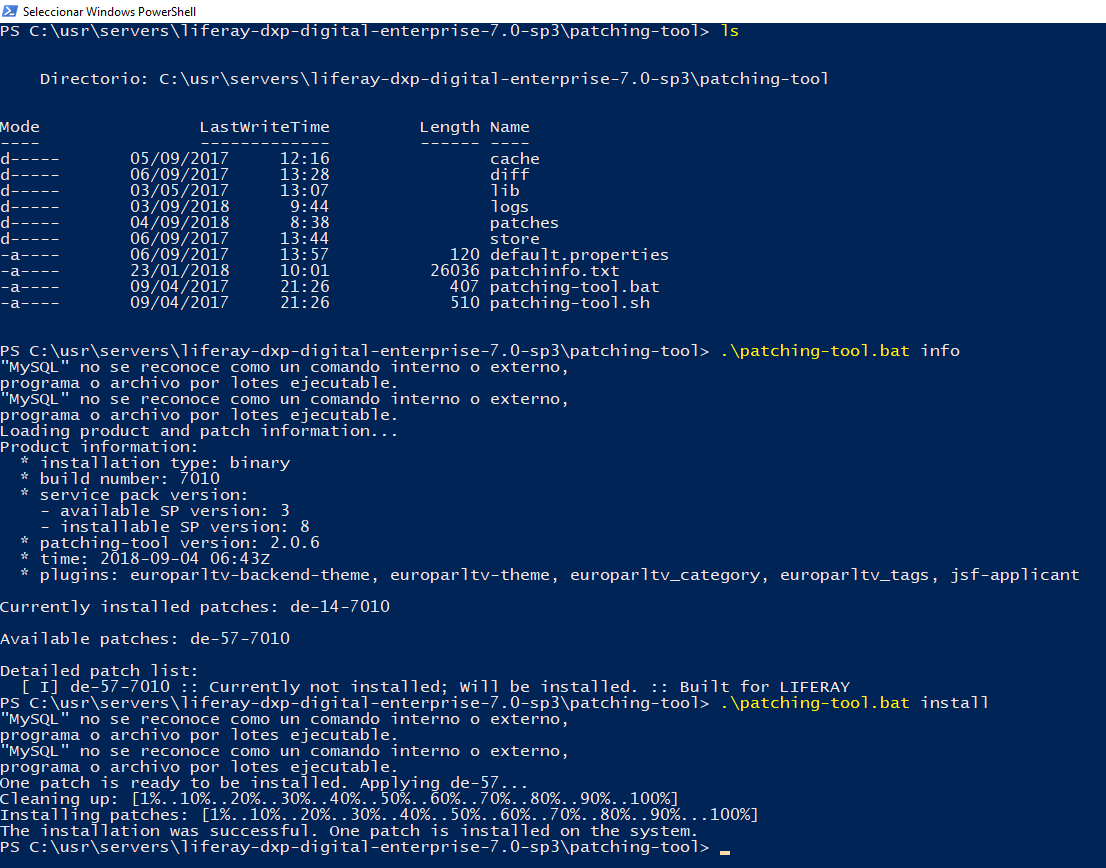
- only available on EE
- download the .zip
- copy it under
/[liferay_directory]/patching-tool/patches/ - delete old zips if presents
- STOP THE SERVER
- run
patching-tool install - if all right start the server, otherwise fix things :(
- even if the procedure worked, Liferay will never start up again correctly
- redeploy and fix things?
Running example:
put jars under /deploy/ dir
If not working, check liferay home directory in file property like the wizard one
.ie .example {
}

/* IE 11*/
@media screen and (-ms-high-contrast: none) {
    #heading.heading__img {
        background-image: url("/ADRTEL-theme/img/header-explorer.png");
    }
}

.firefox .example {
}

/* EDGE ONLY */
@supports (-ms-ime-align: auto) {
    .example {
    }
}- main-resources like footer.html can be edited as admin user in Liferay under
Content > Web Content
from jsp:
<img src="<%= themeDisplay.getPathThemeImages() %>/img.png" />They are similar to the templates under web contents, remember to search in both location if you can't find the desidered template.
- database table:
ddmtemplate- after editing one row, I had to restart Liferay to see the effect (lol)
- you can edit them as admin user in Liferay under
Configuration > Application Display Template
Site entry are save by AssetEntry model - assetentry table.
If assetentry.classNameId = 20045 it is the assetentry relative to the site. NO, IT DEPENDS BY OTHER TABLE DATA, check the relations
Use always the xxxLocalServiceUtil...
AssetEntry assetEntry=AssetEntryLocalServiceUtil.getAssetEntry(newAssetEntry.getEntryId());//DynamicQuery dynamicQuery = DynamicQueryFactoryUtil.forClass(Library.class); // <-- possible runtime error
DynamicQuery dynamicQuery=LibraryLocalServiceUtil.dynamicQuery();
dynamicQuery.add(RestrictionsFactoryUtil.like("bookName","java"));
dynamicQuery.add(RestrictionsFactoryUtil.eq("author","james"));
List results=LibraryLocalServiceUtil.dynamicQuery(dynamicQuery);-
Documents library files
- DLFileEntry
- the version is increased at every update
- DLFileRank
- DLFileShortcut
- DLFileVersion
- DLFolder
- DLFileEntry
-
Web contents
- JournalArticle
- JournalArticleImage
- JournalArticleResource
- JournalContentSearch
- JournalFeed
- JournalStructure
- JournalTemplate
Web Content Folders are different from Documents and Media Folders
HttpServletRequest request=PortalUtil.getHttpServletRequest(actionRequest);
HttpServletResponse response=PortalUtil.getHttpServletResponse(actionResponse);Inside a custom.ftl:
<#assign xxxToolService = serviceLocator.findService("com.simone.celia.package.service", "com.simone.celia.package.service.xxxToolLocalService") />Usefull to parse xml to Java Object
There are different type of listeners.
Example of a BaseModelListener:
@Component (
				service = ModelListener.class,
				immediate = true
)
public class MyNewCustomOnAssetEntryEntityListener extends BaseModelListener<AssetEntry> {

	private static final Log logger = LogFactoryUtil.getLog ( MyNewCustomOnAssetEntryEntityListener.class );

	@Override
	public void onBeforeUpdate ( AssetEntry model ) throws ModelListenerException {
		logger.info ( model.toString () );

		super.onBeforeUpdate ( model );
	}
}It's like a java properties file, use the # at the start of the line
Example:
#Fragment-Host: com.liferay.site.admin.web;bundle-version="1.0.0"Modify these files and restart the server
/liferay-portal-6.2-ce-ga6/tomcat-7.0.62/webapps/ROOT/WEB-INF/web.xml
/liferay-portal-6.2-ce-ga6/tomcat-7.0.62/conf/web.xml
You can see the result on the control panel, server properties tab
Portlet in Popup window in Liferay 6.2
For example:
how do you put the login page inside a bootstrap modal ?
This is code example inside a template/js
// <%@ taglib uri="http://liferay.com/tld/portlet" prefix="liferay-portlet" %>

// <liferay-portlet:renderURL portletName="58" var="loginPortletURL"  windowState="<%=LiferayWindowState.POP_UP.toString()%>">
// </liferay-portlet:renderURL>

// <aui:button name="login-popup"  id="login-popup"  value="login"> </aui:button>
// <aui:script>
AUI().use('aui-base','liferay-util-window','aui-io-plugin-deprecated',function(A){

    // A.one('#<portlet:namespace/>login-popup').on('click', function(event){
    var login_popup= Liferay.Util.Window.getWindow({
        dialog: {
            centered: true,
            constrain2view: true,
            modal: true,
            resizable: false,
            // width: 475
        }
    }).plug(A.Plugin.DialogIframe, {
        autoLoad: true,
        iframeCssClass: 'dialog-iframe',
        uri:'<%=loginPortletURL.toString()%>'
    }).render();

    login_popup.show();
    login_popup.titleNode.html("Login");
});
// });<div id="<portlet:namespace/>render-popup-container"></div>
<aui:script use="aui-modal,aui-overlay-manager">
var dialog = new A.Modal({
title: "title",
bodyContent: "<div><img src=""></div>",
headerContent: "title",//this is the real title
centered: true,
modal: true,
height: 400,
width: 750,
render: '#<portlet:namespace/>render-popup-container',
close: true
});
dialog.render();
</aui:script><portlet:resourceURL var="baseResourceUrl" ></portlet:resourceURL>
<script>
$("#<portlet:namespace/>myButton").on("click", function(event) {
var urlAjax = "${baseResourceUrl}&<portlet:namespace/>cmd=getMyData";
var var1js = "asd";
var var2js = "lol";
jQuery.ajax({
url: urlAjax,
type: "POST",
dataType: "json",
async: false,
cache: false,
data:{
<portlet:namespace/>var1: var1js,
<portlet:namespace/>var2: var2js
},
success:function(data,textStatus, XMLHttpRequest) {
if (data.length === 0) {
//error
} else {
$.each(data, function(index, value) {
//if data is an array of jsons, its just an example
console.log("id=" + value.id);
console.log("name=" + value.name);
});
}
},
error:function(data,textStatus, XMLHttpRequest) {
console.log("request failed: getMyData");
}
});
});
</script>@Component (
immediate = true,
property = {
"com.liferay.portlet.display-category=category.sample",
"com.liferay.portlet.instanceable=false",
"javax.portlet.init-param.template-path=/",
"javax.portlet.init-param.view-template=/view.jsp",
"javax.portlet.name=" + MyModulePortletKeys.PortletName,
"javax.portlet.resource-bundle=content.Language",
"javax.portlet.security-role-ref=power-user,user",
},
service = Portlet.class
)
public class MyModule extends MVCPortlet {
@Override
public void doView ( RenderRequest renderRequest, RenderResponse renderResponse ) throws IOException, PortletException {
//
}
@Override
public void serveResource ( ResourceRequest resourceRequest, ResourceResponse resourceResponse ) throws IOException, PortletException {
ThemeDisplay themeDisplay = (ThemeDisplay) resourceRequest.getAttribute ( WebKeys.THEME_DISPLAY );
Locale locale = themeDisplay.getLocale ();
Layout layout = themeDisplay.getLayout ();
long groupID = layout.getGroupId ();
HttpServletRequest hsr = PortalUtil.getOriginalServletRequest ( PortalUtil.getHttpServletRequest ( resourceRequest ) );
String cmd = ParamUtil.getString ( resourceRequest, "cmd" );
if ( "getMyData".equalsIgnoreCase ( cmd ) ) {
String var1js = resourceRequest.getParameter ( "var1js" );//reading variables from the data POSTed... you can use them
String var2js = resourceRequest.getParameter ( "var2js" );
JSONArray jsonList = JSONFactoryUtil.createJSONArray ();
JSONObject jsonObj = JSONFactoryUtil.createJSONObject ();
jsonObj.put ( "id", 0 );
jsonObj.put ( "name", LanguageUtil.get ( hsr, "key.0.inside.language.properties" ) );
jsonList.put ( jsonObj );
jsonObj = JSONFactoryUtil.createJSONObject ();
jsonObj.put ( "id", 1 );
jsonObj.put ( "name", LanguageUtil.get ( hsr, "key.1.inside.language.properties" ) );
jsonList.put ( jsonObj );
resourceResponse.getWriter ().print ( jsonList.toString () );//write json
}
}
}//linkName is a field of the structure (can be an url in this example)
//it is the current name inside the database (xml field)
private boolean isLinkNotEmpty(long groupId,String uuid,String linkName){
JournalArticle journalArticle=JournalArticleLocalServiceUtil.fetchJournalArticleByUuidAndGroupId(uuid,groupId);
String content=journalArticle.getContent();
Document contentDoc;
try{
contentDoc=SAXReaderUtil.read(content);
Node node=contentDoc.selectSingleNode("/root/dynamic-element[@name='"+linkName+"']/dynamic-content");
String url=node.getText();
return!url.isEmpty();
}catch(DocumentException e){
e.printStackTrace();
}
return true;
}-
to see if it is installed:
Control Panel -> Configuration -> System Settings -> Foundation -> Audit -
to go to the panel:
Control Panel -> Configuration -> Audit
Example inside an BaseModelListener
//assetEntry is an Entity, Model
try{
				String eventType="event bla";
				long companyId=CompanyThreadLocal.getCompanyId().longValue();
				long userId=0L;
				if(null!=PrincipalThreadLocal.getName()){
				userId=GetterUtil.getLong(PrincipalThreadLocal.getName());
				}
				AuditRequestThreadLocal auditRequestThreadLocal=AuditRequestThreadLocal.getAuditThreadLocal();
				long realUserId=auditRequestThreadLocal.getRealUserId();
				String realUserName=PortalUtil.getUserName(realUserId,"");
				JSONObject additionalInfo=JSONFactoryUtil.createJSONObject();

				if((realUserId>0L)&&(userId!=realUserId)){
				additionalInfo.put("doAsUserId",String.valueOf(userId));
				additionalInfo.put("doAsUserName",PortalUtil.getUserName(userId,""));
				}
				additionalInfo.put("name",organization.getName());
				additionalInfo.put("type",organization.getType());
				additionalInfo.put("countryId",organization.getCountryId());
				additionalInfo.put("regionId",organization.getRegionId());
				if(organization.getParentOrganization()!=null){
				additionalInfo.put("parentName",organization.getParentOrganization().getName());
				}

				AuditMessage auditMessage=new AuditMessage(
				eventType,companyId,realUserId,realUserName,AssetEntry.class.getName(),String.valueOf(assetEntry.getEntryId()),null,additionalInfo);

				AuditRouterUtil.route(auditMessage);

				}catch(Exception exception){
				throw new ModelListenerException(exception);
				}finally{
				super.onAfterUpdate(assetEntry);
}This script enables/disables a button according to a random number of checkboxes.
(this table and button are inside a form)
<table id="" class="table table-bordered table-striped" style="width: 100%">
    <thead>
    <tr>
        <th>Id Odv (Sap)</th>
        <th>Data Odv</th>
        <th>Data Scadenza</th>
        <th>Id Fattura</th>
        <th>Data Fattura</th>
        <th>Incasso su Odv</th>
        <th>Selezione</th>
    </tr>
    </thead>
    <tbody>
    <c:forEach items="${odvList}" var="odv">
        <c:if test="${odv.prestazioneId == prestazione.id}">
        <tr>
            <td>${odv.idODV}</td>
            <td>${odv.dataODV.toLocaleString().substring(0,12)}</td>
            <td>${odv.dataScadenza.toLocaleString().substring(0,12)}</td>
            <td>${odv.idFattura}</td>
            <td>${odv.dataFattura.toLocaleString().substring(0,12)}</td>
            <td>${odv.incassoSuODV}</td>
            <td>
               <aui:input name="selezione" label="Seleziona" checked="false" id="${odv.id}" type="checkbox"/>
                <aui:input name="idODV" value="${odv.id}" type="hidden"/>
            </td>
        </tr>
        </c:if>
    </c:forEach>
    </tbody>
</table>
<aui:button id="${pns}ordinaButton" type="submit" value="ORDINA" disabled="true"/><aui:script>
AUI().ready('aui-node', function(A) {
let mappa = new Map();
A.all(':checkbox').each(function() {
this.on('click', function() {
const id = A.one(this).attr("id");
const value = A.one(this).attr("checked");
mappa.set(id, value);
let enableButton = false;
for (let [k, v] of mappa) {
if (true == v) {
enableButton = true;
break;
}
}
if (enableButton) {
A.one('#${pns}ordinaButton').attr({'disabled' : false});
A.one('#${pns}ordinaButton').attr({'class' : 'btn btn-primary'});
} else {
A.one('#${pns}ordinaButton').attr({'disabled' : true});
A.one('#${pns}ordinaButton').attr({'class' : 'btn disabled btn-primary'});
}
});
});
});
</aui:script>...\tomcat-8.0.32\webapps\ROOT\WEB-INF\urlrewrite.xml
public class com.liferay.portal.servlet.filters.dynamiccss.DynamicCSSUtil-> theme sass cache generation trigger- plugins:
- portlet
- hook
- theme
- ext
- layout
- set proxy inside dev environment
build-common-ivy.xml
<!-- before "if not avalable file=''"-->
<setproxy proxyhost="" proxyport=""/>
- Eclipse setup example
- download Eclipse
- download and install Liferay IDE from Eclipse marketplace or web
- create new workspace
- set the jdk
- download from project version system the sdk
- set the just downloaded sdk as default
- if you want you can set the source folder, tomcat bundle zip and javadoc
- to edit a Liferay plugin just export from sdk (project nature:liferay should be already enabled)
- now the Liferay menu should be enabled from context menu (es. right click on project, Liferay, build)
- set the proxy if any in
build-common-ivy.xml<setproxy proxyhost="" proxyport=""/>
- if some library cannot be downloaded automatically from ivy, just download and add it in
/liferay-plugins-sdk-6.2/.ivy/cache( unzipped) example of added zip - to include the Liferay source code into Eclipse:
- right click on Package Explorer
- import
- Existing project into Workspace
- EXT deploy example
- stop Liferay
- remove the old ext
sudo rm /opt/liferay/liferay-portal-6.2-ce-ga2/tomcat-7.0.42/lib/ext/ext-NAME-ext-service.jarsudo rm -rf /opt/liferay/liferay-portal-6.2-ce-ga2/tomcat-7.0.42/webapps/NAME-ext/sudo rm /opt/liferay/liferay-portal-6.2-ce-ga2/tomcat-7.0.42/webapps/ROOT/WEB-INF/ext-NAME-ext.xmlsudo rm /opt/liferay/liferay/tomcat-7.0.42/webapps/ROOT/WEB-INF/lib/ext-NAME-ext-*
- start Liferay
- after complete startup, deploy the war (just cp it)
- always check logs
- at the end restart Liferay
Using Liferay Ide (eclipse one) And its committed w/o SDK structure
1. check it out from version control
2. download or get in some way the right SDK
3. set the SDK in Liferay IDE
4. copy the theme or hook or portlet or etc.. you need to edit inside the right folder of the SDK (by hand)
5. in Liferay IDE right click on projects area and chose Import -> Liferay Project from Plugin SDK
6. follow the wizard, and then you should see new project(s) in workspace
7. They should be working and you can build them with Ant or Maven or Gradle or...
just do in this way:
- download or get in some way the right SDK
- set the SDK in Liferay IDE
- single checkout the plugin (theme, hook, portlet, whatever) inside the right SDK's directory
Liferay IDE bugs appears!
- delete the project keeping the files on file system
- reimport project from SDK plugin
- for sure you have also to fix
.classpath- right click on project
- Java Build Path
- double click on unbound things, and replace with correct value (if necessary, for example, copy lib jar from server to your local environment)
Tips: sometime you need to play with checkboxes (Java Build Path -> Order and Export tab)
Thank me later!
Not sure! but it worked!
- download liferay-sdk and extract it
- open intellij IDEA and import from existing source
- set SDK (i.e. 1.7)
- use command line
sh create.shto create portlets with ant
or
- use maven
<div class="yui3-skin-sam">
	<div id="modal"></div>
</div><aui:script>
YUI().use(
'aui-modal',
function(Y) {
var modal = new Y.Modal(
{
bodyContent: 'Modal body',
centered: true,
headerContent: '<h3>Modal header</h3>',
modal: true,
render: '#modal',
width: 450
}
).render();
}
);
</aui:script>var liferayForm = Liferay.Form.get('YOUR-FORM-ID');
liferayForm.formValidator.get('rules')['ID-OF-YOUR-INPUT-FIELD'] = {required: true};jsp:
<%@ taglib uri="http://java.sun.com/portlet_2_0" prefix="portlet" %>
<%@ taglib uri="http://liferay.com/tld/ui" prefix="liferay-ui" %>

<portlet:defineObjects />

<portlet:actionURL var="submitProfileUrl">
 <portlet:param name="action" value="submitProfile"></portlet:param>
</portlet:actionURL>

<liferay-ui:error key="name-is-required" message="Name is Required"></liferay-ui:error>
<liferay-ui:error key="age-is-required" message="Age is Required"></liferay-ui:error>
<liferay-ui:error key="email-is-required" message="Email is Required"></liferay-ui:error>

<h1>MyProfile</h1> <Br>

 <form action="${submitProfileUrl}" method="post">
  <table>
   <tr>
    <td>Name</td>
    <td><input type="text" name="name"></td>
   </tr>
   <tr>
    <td>Age</td>
    <td><input type="text" name="age"> Years</td>
   </tr>
   <tr>
    <td>Email</td>
    <td><input type="text" name="email"></td>
   </tr>
   <tr>
    <td colspan="2" align="center">
     <input type="submit">
    </td>
   <tr>
  </table>
 </form>
java:
import javax.portlet.ActionRequest;
import javax.portlet.ActionResponse;
import javax.portlet.RenderRequest;
import javax.portlet.RenderResponse;

import org.springframework.stereotype.Controller;
import org.springframework.ui.Model;
import org.springframework.web.bind.annotation.RequestMapping;
import org.springframework.web.portlet.bind.annotation.ActionMapping;
import org.springframework.web.portlet.bind.annotation.RenderMapping;

import com.liferay.portal.kernel.log.Log;
import com.liferay.portal.kernel.log.LogFactoryUtil;
import com.liferay.portal.kernel.servlet.SessionErrors;
import com.liferay.portal.kernel.util.ParamUtil;


@Controller ( value = "ServerSideValidationTestViewController" )
@RequestMapping ( "VIEW" )
public class ServerSideValidationTestViewController {

	private static Log log = LogFactoryUtil.getLog ( ServerSideValidationTestViewController.class );

	/*
	 * maps the incoming portlet request to this method
	 * Since no request parameters are specified, therefore the default
	 * render method will always be this method
	 */
	@RenderMapping
	public String handleRenderRequest ( RenderRequest request, RenderResponse response, Model model ) {

		return "profile";
	}

	@ActionMapping ( params = "action=submitProfile" )
	public void submitProfileAction ( ActionRequest request, ActionResponse response ) {
		String name = ParamUtil.get ( request, "name", "" );
		String age = ParamUtil.get ( request, "age", "" );
		String email = ParamUtil.get ( request, "email", "" );

		if ( name == null || "".equalsIgnoreCase ( name ) ) {
			SessionErrors.add ( request, "name-is-required" );
		}
		if ( age == null || "".equalsIgnoreCase ( age ) ) {
			SessionErrors.add ( request, "age-is-required" );
		}
		if ( email == null || "".equalsIgnoreCase ( email ) ) {
			SessionErrors.add ( request, "email-is-required" );
		}
	}

}(The best way)
In first jsp page set the value of current url(themeDisplay.getURLCurrent) in renderURL which you used to navigate to another jsp page...
renderURL.setParameter("backURL", themeDisplay.getURLCurrent());
And in second jsp page get that paramter value and use as back url
<%
String backURL = ParamUtil.getString(request, "backURL");
%>
<liferay-ui:header
backLabel="« Back to first jsp"
title=""
backURL="<%= backURL %>"
/>
or
<aui:button onClick="javascript:history.back(1)" value="Back"/>working example:
contractList.jsp
<portlet:actionURL var="visualizzaContratto" name="dettagliContrattoHelper">
    <portlet:param name="jspPage" value="/html/contract/dettaglioContratto.jsp"/>
    <portlet:param name="backURL" value="<%=themeDisplay.getURLCurrent()%>"/>
    <portlet:param name="idContratto" value="${contratto.id}"/>
</portlet:actionURL>
Java Portlet Class
public void dettagliContrattoHelper(final ActionRequest actionRequest,final ActionResponse actionResponse)throws SystemException,PortalException{
				String backURL=actionRequest.getParameter(BACK_URL);
				Contract contract=dettagliContrattoUffVenditeActionHelper(actionRequest,actionResponse);
				actionRequest.setAttribute(BACK_URL,backURL);
				if(null!=backURL){
				actionResponse.setRenderParameter(BACK_URL,backURL);
				}
				List<String> allegati=new ArrayList();
				List<String> nomiAllegati=new ArrayList();
				DynamicQuery query=DynamicQueryFactoryUtil.forClass(Allegato.class,ALLEGATO,PortletClassLoaderUtil.getClassLoader());
				query.add(RestrictionsFactoryUtil.eq(CONTRACT_ID,contract.getId()));
				List<Allegato> allegatoList=AllegatoLocalServiceUtil.dynamicQuery(query);
				for(Allegato allegato:allegatoList){
				loadAllegatiListHelper(allegato,actionRequest,allegati);
				nomiAllegati.add(allegato.getName());
				}
				String[]fileUrls=allegati.toArray(new String[0]);
				String[]nomiAllegatiString=nomiAllegati.toArray(new String[0]);
				actionRequest.setAttribute(FILE_URLS,fileUrls);
				actionRequest.setAttribute(NOMI_ALLEGATI_STRING,nomiAllegatiString);
				}
dettaglioContratto.jsp
<%
    String backURL = ParamUtil.getString(request, BACK_URL);
%>
<aui:button onClick="<%=backURL%>" value="Indietro" iconAlign="right"/>upload_file.jsp
<%@ taglib uri="http://java.sun.com/portlet_2_0" prefix="portlet" %>
<%@ taglib uri="http://liferay.com/tld/aui" prefix="aui" %>

<portlet:defineObjects />

<portlet:actionURL name='uploadFile' var="uploadFileURL" windowState="normal" />

<aui:form action="<%= uploadFileURL %>" method="POST" name="fm" enctype="multipart/form-data">
  <aui:fieldset>

    <aui:input type="file" name="file-to-upload"/>

    <aui:button-row>
      <aui:button type="submit" />
    </aui:button-row>

  </aui:fieldset>
</aui:form>
MyPortlet.java
public class MyPortlet extends MVCPortlet {

	//action method
	public void uploadFile ( ActionRequest request, ActionResponse response )
					throws Exception {

		UploadPortletRequest uploadRequest
						= PortalUtil.getUploadPortletRequest ( request );

		ServiceContext serviceContext = ServiceContextFactory.getInstance (
						MyPortlet.class.getName (), uploadRequest );

		this.uploadFileEntity ( serviceContext, uploadRequest );

		response.setRenderParameter ( "mvcPath", "/html/view.jsp" );
	}

	// Create a folder called "A_FOLDER" in Documents & Media
	private void uploadFileEntity ( ServiceContext serviceContext,
					UploadPortletRequest request )
					throws PortalException, SystemException {

		String filename = "";
		String description = "File description";

		try {

			// serviceContext.scopeGroupId is the groupId of a site
			long repositoryId = DLFolderConstants.getDataRepositoryId (
							serviceContext.getScopeGroupId (),
							DLFolderConstants.DEFAULT_PARENT_FOLDER_ID );

			Folder f = DLAppLocalServiceUtil.getFolder (
							repositoryId, 0L, "A_FOLDER" );
			long folderId = f.getFolderId ();

			File file = request.getFile ( "file-to-upload" );
			filename = request.getFileName ( "file-to-upload" );
			String mimeType = MimeTypesUtil.getContentType ( file );

			FileEntry entry = DLAppLocalServiceUtil.addFileEntry ( serviceContext.getUserId (),
							repositoryId, folderId, filename,
							mimeType, filename, description, "",
							file, serviceContext
			);

		} catch ( PortalException e ) {
			_log.error ( "An exception occured uploading file: "
							+ e.getMessage () );
			throw e;
		} catch ( SystemException e ) {
			_log.error ( "An exception occured uploading file: "
							+ e.getMessage () );
			throw e;
		}
	}

	private static Log _log = LogFactoryUtil.getLog ( MyPortlet.class );
}There are two types of Auth Tokens:
- p_auth: Portal Authentication Token for CSRF protection
- p_p_auth: Portlet Authentication token for add-default-resource protection
Regular Expression Extractor
- Apply to:
main sample only - Field to check:
body - Name of created variable:
pauth - RE:
;p_auth=(.+?)" - Template:
$1$ - Match No.
1 - Default Value:
Failed
You can put it under every request, with a similar expression for the p_p_auth, and use the variables for the next requests.
SiteAdminPortletKeys
/**
 * Copyright (c) 2000-present Liferay, Inc. All rights reserved.
 *
 * This library is free software; you can redistribute it and/or modify it under
 * the terms of the GNU Lesser General Public License as published by the Free
 * Software Foundation; either version 2.1 of the License, or (at your option)
 * any later version.
 *
 * This library is distributed in the hope that it will be useful, but WITHOUT
 * ANY WARRANTY; without even the implied warranty of MERCHANTABILITY or FITNESS
 * FOR A PARTICULAR PURPOSE. See the GNU Lesser General Public License for more
 * details.
 */

package com.liferay.site.admin.web.internal.constants;

/**
 * @author Eudaldo Alonso
 */
public class SiteAdminPortletKeys {

	public static final String SITE_ADMIN =
					"com_liferay_site_admin_web_portlet_SiteAdminPortlet";

	public static final String SITE_SETTINGS =
					"com_liferay_site_admin_web_portlet_SiteSettingsPortlet";

}- create a empty theme with Liferay IDE or eclipse (LOL)
- choose maven
- open it with IDEA
- set the server in DEV mode
tomcat-7.0.62/webapps/ROOT/WEB-INF/classes/portal.ext.properties
theme.css.fast.load=false
theme.images.fast.load=false
javascript.fast.load=true
javascript.log.enabled=false
layout.template.cache.enabled=false
browser.launcher.url=
combo.check.timestamp=true
freemarker.engine.cache.storage=soft:1
freemarker.engine.resource.modification.check.interval=0
log.sanitizer.enabled=false
minifier.enabled=false
openoffice.cache.enabled=false
com.liferay.portal.servlet.filters.cache.CacheFilter=false
com.liferay.portal.servlet.filters.etag.ETagFilter=false
com.liferay.portal.servlet.filters.header.HeaderFilter=false
com.liferay.portal.servlet.filters.themepreview.ThemePreviewFilter=true(30 70 example)
liferay-look-and-feel.xml
<theme id="ADRTEL-theme" name="ADRTEL-theme">

	<layout-templates>
		<custom>
			<layout-template id="layoutAdrtelTwoCol3070" name="Adrtel Grid 30-70 1 Row">
				<template-path>/layout/30_70_ADRTEL/layout_ADRTEL_30_70.tpl</template-path>
				<wap-template-path>/layout/30_70_ADRTEL/layout_ADRTEL_30_70.tpl</wap-template-path>
				<thumbnail-path>/layout/30_70_ADRTEL/layout_ADRTEL_30_70.png</thumbnail-path>
			</layout-template>
layout_ADRTEL_30_70.tpl
<div class="columns-2" id="main-content" role="main">
	<div class="portlet-layout row-fluid">
		<div class="portlet-column portlet-column-first span4" id="column-1">
			$processor.processColumn("column-1", "portlet-column-content portlet-column-content-first")
		</div>

		<div class="portlet-column portlet-column-last span8" id="column-2">
			$processor.processColumn("column-2", "portlet-column-content portlet-column-content-last")
		</div>
	</div>
</div>- open en edit mode the theme folder with IDEA, so you don't need to build and deploy
- use
<finalName>theme-name-theme</finalName>in the pom - use
src="/theme-name-theme/img/logo-blu.png"for images liferay-plugin-package.propertiesthere are the name of the theme/hook/app that final admin user can see in the portal's control panel.
Select with idiomas on the theme:
#set ($cur_idioma = "$themeDisplay.getLocale().getISO3Language()")
<select id="header__select" onChange="window.document.location.href=this.options[this.selectedIndex].value;">
#foreach( $language in $languageUtil.getAvailableLocales($layout.getGroup().getGroupId()))
	#set ($selected = "")
	#if ($cur_idioma == $language.getISO3Language())
		#set ($selected = "selected")
	#end
	<option $selected class="header__select__option" value="/$language.getLanguage()/web$themeDisplay.getLayout().getGroup().getFriendlyURL()">$language.getISO3Language()</option>
#end
</select>
Theme settings example
<look-and-feel>
	<compatibility>
		<version>6.2.2+</version>
	</compatibility>
	<theme id="Tema-Restyle2015B" name="Tema-Restyle2015B">
		<settings>
			<setting configurable="true" key="portlet-setup-show-borders-default" type="checkbox" value="false"></setting>
			<setting configurable="false" key="show-site-name-default" value="false"></setting>
			<setting configurable="false" key="show-site-name-supported" value="true"></setting>
</settings>- Liferay 6.2
- Velocity
$velocityPortletPreferences.setValue("portlet-setup-show-borders", "false")
$theme.runtime("82", "", $velocityPortletPreferences.toString())
$velocityPortletPreferences.reset()- field name:
myField
MyPortlet.java:
public class MyPortlet extends MVCPortlet {

	@ProcessAction ( name = "saveConfiguration" )
	public void saveConfiguration ( ActionRequest request, ActionResponse response ) throws PortletException, IOException {
		String myField = ParamUtil.getString ( request, "myField" );
		PortletPreferences portletPreferences = request.getPreferences ();
		if ( myField != null && !myField.isEmpty () ) {
			portletPreferences.setValue ( "myField", myField );
			portletPreferences.store ();
			response.setPortletMode ( PortletMode.VIEW );
		}
	}

	@Override
	public void doEdit ( RenderRequest request, RenderResponse response ) throws IOException, PortletException {
		PortletPreferences portletPreferences = request.getPreferences ();
		String myField = portletPreferences.getValue ( "myField", StringPool.BLANK );
		request.setAttribute ( "myField", myField );
		super.doEdit ( request, response );
	}
}
Usage in edit.jsp:
<liferay-ui:error key="internal-error" message="internal-error" />
<portlet:actionURL name="saveConfiguration" var="saveConfigurationURL" />
<jsp:useBean id="myField" class="java.lang.String" scope="request" />

<aui:form name="formName" action="<%=saveConfigurationURL.toString()%>" method="post">
    <aui:fieldset>
        <aui:input maxlength="5" name="myField" value="<%=myField%>" label="myField"></aui:input>
    </aui:fieldset>
    <aui:button-row>
        <aui:button value="save" type="submit"></aui:button>
    </aui:button-row>
</aui:form>
Usage in view.jsp:
<%@page import="com.liferay.portal.kernel.util.PropsUtil"%>
<%@page import="com.liferay.util.portlet.PortletProps"%>
<%@ include file="/html/init.jsp"%>

<%
String myField = portletPreferences.getValue("myField", "no-string-value");
%>
How to abilitate portlet edit-mode:
portlet.xml
...
<init-param>
	<name>edit-template</name>
	<value>/html/contacts/edit.jsp</value>
</init-param>
		...
<supports>
<mime-type>text/html</mime-type>
<portlet-mode>view</portlet-mode>
<portlet-mode>edit</portlet-mode>
</supports>- Liferay 6.2
portal_normal.vm
#if ($url_pagina == "login")

#else
    <div id="loginOne" class="modal modal_custom fade propound regular_form transparent" role="dialog" style="display:none;">
        <div class="modal-dialog">
            <div class="modal-content">
                <a href="javascript:void(0);" title="<@liferay.language key='Exit' />" data-dismiss="modal" data-target="#loginOne" class="sh_icon-close"></a>
                $theme.runtime("58", "", "")
            </div>
        </div>
    </div>
#end
anywhere in the JS code:
$("#loginOne").modal('toggle');From JSP java code:
request.isUserInRole("custom role name or standard one");<portlet:actionURL var="chiudiContratto" name="chiudiContrattoAction">
</portlet:actionURL>window.location.href = '<%=chiudiContratto%>';- Structure present
- Template not present
- Web Content created with specific structure
- Example with only one field in one model class
Controller:
public class MyController extends MVCPortlet {

	public void doView ( RenderRequest renderRequest, RenderResponse renderResponse ) throws IOException, PortletException {
		ThemeDisplay themeDisplay = (ThemeDisplay) renderRequest.getAttribute ( WebKeys.THEME_DISPLAY );
		Layout layout = themeDisplay.getLayout ();
		Locale locale = themeDisplay.getLocale ();
		long groupId = themeDisplay.getScopeGroupId ();
		String articleId = (String) layout.getExpandoBridge ().getAttribute ( " name " );
		String structureId = PropsUtil.get ( " structure.name " );
		Long lStructureId = new Long ( structureId );

		JournalArticle journalArticle = JournalArticleLocalServiceUtil.getArticle ( groupId, articleId );
		journalArticle = JournalArticleLocalServiceUtil.getLatestArticle ( journalArticle.getGroupId (), journalArticle.getArticleId () );
		DDMStructure ddmStructure = DDMStructureLocalServiceUtil.getDDMStructure ( lStructureId );

		Fields fields = JournalConverterUtil.getDDMFields ( ddmStructure, journalArticle.getContent () );
		String imgUrl = Validator.isNotNull ( fields.get ( "imgUrl" ) ) ? (String) fields.get ( "imgUrl" ).getValue ( locale ) : StringPool.BLANK;

		MyModelClass myModelClass = new MyModelClass ();
		myModelClass.setImgUrl ( imgUrl );

		renderRequest.setAttribute ( "myModelClass", myModelClass );

		super.doView ( renderRequest, renderResponse );
	}
}
models java classes are just POJOs with getters and setters (toString() not needed)...
View:
<%@ include file="/html/init.jsp"%>

<%
MyModelClass myModelClass = (MyModelClass)request.getAttribute("myModelClass");
%>

<div style="background-image: url(${myModelClass.imgUrl});"></div>public static long classNameIdForClass(Class<?> clazz)throws SystemException{
return ClassNameLocalServiceUtil
.getClassName(clazz.getName())
.getClassNameId();
}public static Class<?> classForClassNameId(long classNameId)throws PortalException,SystemException{
try{
String modelClassName=ClassNameLocalServiceUtil
.getClassName(classNameId)
.getValue();
return Class.forName(modelClassName);
}catch(ClassNotFoundException e){
throw new SystemException(e);
}
}Usually server configuration like datasources are in standalone.xml
Example:
<subsystem xmlns="urn:jboss:domain:datasources:1.2">
	<datasources>
		<datasource jndi-name="java:/jdbc/nameeeeee" pool-name="namee" enabled="true" use-java-context="true">
			<connection-url>jdbc:oracle:thin:@xxx.xxx.xxx.xxx:1521:ORCL</connection-url>
			<driver>oracle</driver>
			<security>
				<user-name>xxx</user-name>
				<password>xxx</password>
			</security>
		</datasource>
		<drivers>
			<driver name="oracle" module="com.liferay.portal">
				<driver-class>oracle.jdbc.OracleDriver</driver-class>
				<xa-datasource-class>oracle.jdbc.xa.client.OracleXADataSource</xa-datasource-class>
			</driver>
		</drivers>
	</datasources>
</subsystem>
When you deploy something, you can find the unzipped code here:
.../jboss-eap-x.x/standalone/deployments/
if jar files inside here /opt/jboss-eap-x.y/modules/com/liferay/portal/main/
are missing inside this declaration /opt/jboss-eap-x.y/modules/com/liferay/portal/main/module.xml
Jboss will not start!
Always pay attenction to permissions on them (control panel)! or you will get nullpointers!
String ufficioVenditeDellUser=(String)user.getExpandoBridge().getAttribute(UFFICIO_VENDITE_CUSTOM_FIELD);Javascript:
themeDisplay.isSignedIn();Always in javascript context, you can get current user id with:
themeDisplay.getUserId();import com.liferay.portal.kernel.json.JSONFactoryUtil;
Blob blob= //input Blob Object got from somewhere
int blobLength=(int)blob.length();
byte[]blobAsBytes=blob.getBytes(1,blobLength);
blob.free();//release the blob and free up memory. (since JDBC 4.0)
String blobAsString=new String(blobAsBytes,StandardCharsets.UTF_8);
JSONObject jSONObject=JSONFactoryUtil.createJSONObject(blobAsString);import com.liferay.portal.kernel.json.JSONFactoryUtil;
import com.liferay.portal.kernel.dao.jdbc.OutputBlob;
import java.io.ByteArrayInputStream;
JSONObject jSONObject= //input JSONObject Object got from somewhere
String jSONObjectAsString=jSONObject.toString();
InputStream inputStream=new ByteArrayInputStream(jSONObjectAsString.getBytes(StandardCharsets.UTF_8));
OutputBlob blob=new OutputBlob(inputStream,jSONObjectAsString.length());<%@page import="com.liferay.portal.kernel.json.JSONFactoryUtil"%>
<%@page import="java.util.Collections"%>
<%@page import="java.util.Comparator"%>
<%
JSONArray myJSONArray = //input
JSONArray sortedJsonArray = JSONFactoryUtil.createJSONArray();
List<JSONObject> jsonValues = new ArrayList<JSONObject>();
for (int i = 0; i < myJSONArray.length(); i++) {
jsonValues.add(myJSONArray.getJSONObject(i));
}
Collections.sort(jsonValues, new Comparator<JSONObject>() {
private static final String KEY_NAME = "name";
public int compare(JSONObject a, JSONObject b) {
String valA = new String();
String valB = new String();
try {
valA = (String) a.getString(KEY_NAME);
valB = (String) b.getString(KEY_NAME);
}
catch (Exception e) {
}
return valA.compareTo(valB);
}
});
for (int i = 0; i < myJSONArray.length(); i++) {
sortedJsonArray.put(jsonValues.get(i));
}
%>On Windows, Liferay 6.2 edit setenv.bat
Example:
set "JAVA_OPTS=%JAVA_OPTS% -Dfile.encoding=UTF8 -Djava.net.preferIPv4Stack=true -Dorg.apache.catalina.loader.WebappClassLoader.ENABLE_CLEAR_REFERENCES=false -Duser.timezone=GMT -Xmx2048m -XX:MaxPermSize=512m"
To open this page, just add this to baseurl: /api/jsonws
Inside liferay-portlet.xml
Example:
<?xml version="1.0"?>
<!DOCTYPE liferay-portlet-app PUBLIC "-//Liferay//DTD Portlet Application 6.2.0//EN" "http://www.liferay.com/dtd/liferay-portlet-app_6_2_0.dtd">

<liferay-portlet-app>
	<portlet>
		<portlet-name>croccantina</portlet-name>
		<icon>/icon.png</icon>
		<configuration-action-class>com.liferay.portal.kernel.portlet.DefaultConfigurationAction</configuration-action-class>
		...
		<header-portlet-javascript>/js/jsrender.min.js</header-portlet-javascript>
...Liferay.Portlet.refresh("#p_p_id_portlet_name_");Example:
Portlet class:
if(sendMail(nome,email,telefono,motivo)){
				SessionMessages.add(actionRequest,REQUEST_OK);
				log.info("Mail sent!");
				}else{
				SessionErrors.add(actionRequest,REQUEST_KO);
				log.error("Can't send mail.");
				}
JSP:
<liferay-ui:success key="<%=REQUEST_OK%>" message="contacts-portlet-request-ok" />
<liferay-ui:error key="<%=REQUEST_KO%>" message="contacts-portlet-request-ko" /><!-- https://mvnrepository.com/artifact/javax.mail/mail -->
<dependency>
<groupId>javax.mail</groupId>
<artifactId>mail</artifactId>
<version>1.4</version>
<scope>provided</scope>
</dependency>public static void sendMail(String subject,String body,String from,String to)
throws AddressException{
InternetAddress fromAddress;
InternetAddress toAddress;
fromAddress=new InternetAddress(from);
toAddress=new InternetAddress(to);
MailMessage mailMessage=new MailMessage();
mailMessage.setTo(toAddress);
mailMessage.setFrom(fromAddress);
mailMessage.setSubject(subject);
mailMessage.setBody(body);
mailMessage.setHTMLFormat(true);
MailServiceUtil.sendEmail(mailMessage);
}or
MailMessage mailMessage=new MailMessage();
				mailMessage.setHTMLFormat(false);
				mailMessage.setSubject("subject");
				mailMessage.setBody("body");
				try{
				mailMessage.setFrom(new InternetAddress("from@gmail.com","from name as title of the mail"));
				mailMessage.setTo(new InternetAddress("to@gmail.com"));
				MailEngine.send(mailMessage);
				}catch(AddressException|MailEngineException|UnsupportedEncodingException e1){
				e1.printStackTrace();
}Add this to liferay-portlet.xml
<portlet>
	...
	<user-notification-definitions>
		dockbar-user-notification-definitions.xml
	</user-notification-definitions>
	<user-notification-handler-class>
		custom.p_ackage.path.DockBarUserNotificationHandler
	</user-notification-handler-class>
Create this new Class
package custom.p_ackage.path.notification;

public class DockBarUserNotificationHandler extends BaseUserNotificationHandler {

	public static final String PORTLET_ID = "dockbarnotificationaction_WAR_DockBarCustomNotificationportlet";

	public DockBarUserNotificationHandler () {
		setPortletId ( DockBarUserNotificationHandler.PORTLET_ID );
	}

	@Override
	protected String getBody ( UserNotificationEvent userNotificationEvent, ServiceContext serviceContext ) throws Exception {
		JSONObject jsonObject = JSONFactoryUtil.createJSONObject ( userNotificationEvent.getPayload () );
		//long userId = jsonObject.getLong("userId");
		String notificationText = jsonObject.getString ( "notificationText" );
		String title = "<strong>Dockbar Custom User Notification for You</strong>";
		String body = StringUtil.replace ( getBodyTemplate (), new String[] {
										"[$TITLE$]", "[$BODY_TEXT$]" },
						new String[] { title, notificationText } );
		return body;
	}

	protected String getBodyTemplate () {
		StringBundler sb = new StringBundler ( 5 );
		sb.append ( "<div class=\"title\">[$TITLE$]</div><div " );
		sb.append ( "class=\"body\">[$BODY_TEXT$]</div>" );
		return sb.toString ();
	}
}
Create this new xml and add it inside the a correct class path location (example: portlet/src/main/resources/dockbar-user-notification-definitions.xml)
<?xml version="1.0"?>
<!DOCTYPE user-notification-definitions
		PUBLIC "-//Liferay//DTD User Notification Definitions 6.2.0//EN"
		"http://www.liferay.com/dtd/liferay-user-notification-definitions_6_2_0.dtd">
<user-notification-definitions>
	<definition>
		<notification-type>${custom.p_ackage.path.notification.DockBarUserNotificationHandler.PORTLET_ID}</notification-type>
		<description>receive-a-notification-when-administrator-triggered</description>
		<delivery-type>
			<name>email</name>
			<type>${com.liferay.portal.model.UserNotificationDeliveryConstants.TYPE_EMAIL}</type>
			<default>false</default>
			<modifiable>true</modifiable>
		</delivery-type>
		<delivery-type>
			<name>website</name>
			<type>${com.liferay.portal.model.UserNotificationDeliveryConstants.TYPE_WEBSITE}</type>
			<default>true</default>
			<modifiable>true</modifiable>
		</delivery-type>
	</definition>
</user-notification-definitions>
And you can use it
//	public void sendUserNotification(ActionRequest actionRequest, ActionResponse actionResponse) {
public void sendUserNotification(RenderRequest renderRequest){
				try{
				List<User> users=UserLocalServiceUtil.getUsers(0,
				UserLocalServiceUtil.getUsersCount());
				//			ServiceContext serviceContext = ServiceContextFactory.getInstance(actionRequest);
				ServiceContext serviceContext=ServiceContextFactory.getInstance(renderRequest);
				//			String notificationText = ParamUtil.getString(actionRequest,"notifciationText");
				String notificationText="test text";
				for(User user:users){
				JSONObject payloadJSON=JSONFactoryUtil.createJSONObject();
				payloadJSON.put("userId",user.getUserId());
				payloadJSON.put("notificationText",notificationText);

				UserNotificationEventLocalServiceUtil.addUserNotificationEvent(
				user.getUserId(),DockBarUserNotificationHandler.PORTLET_ID,
				(new Date()).getTime(),user.getUserId(),payloadJSON.toString(),false,serviceContext);
				}
				}catch(Exception e){
				_log.error(e);
				}
}List<Company> companies=CompanyLocalServiceUtil.getCompanies(0,1);
Group group=GroupLocalServiceUtil.getCompanyGroup(companies.get(0).getCompanyId());
ServiceContext serviceContext=new ServiceContext();
serviceContext.setScopeGroupId(group.getGroupId());You can execute server side script in Liferay Admin Panel.
Here: localhost/en/group/control_panel/manage/-/server/script
Example:
import java.text.SimpleDateFormat;
import com.liferay.portal.kernel.util.StringPool;
import com.liferay.portal.kernel.util.StringUtil;
import com.liferay.portal.kernel.util.Validator;
import com.liferay.portal.template.ServiceLocator;

String separator = StringPool.SEMICOLON;

ServiceLocator serviceLocator = ServiceLocator.getInstance();

itemLocalService = serviceLocator.findService("name-of-the-portlet-inside-bundle-xml", "com.full.package.path.ItemLocalService");

java.util.List<T> list = itemLocalService.getItems(-1, -1);

out.println(
        "uuid" + separator +
                "resourcePrimKey" + separator +
                "ref" + separator +
                "companyId" + separator +
                "groupId" + separator +
                "createDate" + separator +
                "modifiedDate"
);

SimpleDateFormat dateFormatDate = new SimpleDateFormat("yyyy/MM/dd");

for (item in list) {
    out.println(
            item.getUuid() + separator +
                    item.getResourcePrimKey() + separator +
                    item.getRef() + separator +
                    item.getCompanyId() + separator +
                    item.getGroupId() + separator +
                    dateFormatDate.format(item.getCreateDate()) + separator +
                    dateFormatDate.format(item.getModifiedDate())
    );
}
try {
    nullVar = null
    out.println(nullVar.length())
} catch (e) {
    out.println("""<div class="portlet-msg-error">${e}</div>""")
    e.printStackTrace(out)
}<%
String modificaClickedString = ParamUtil.getString(request, MODIFICA_CLICKED_STRING);
boolean modificaClicked = modificaClickedString.equalsIgnoreCase(StringPool.TRUE);
Calendar calendar = new GregorianCalendar();
Integer ultimaFatturaDay = calendar.get(Calendar.DATE);
Integer ultimaFatturaMonth = calendar.get(Calendar.MONTH);
Integer ultimaFatturaYear = calendar.get(Calendar.YEAR);
//...
String idPrestazione = ParamUtil.getString(request, ID_PRESTAZIONE);
Prestazione prestazione = PrestazioneLocalServiceUtil.getPrestazione(Long.parseLong(idPrestazione));
Date date = prestazione.getDataUltimaFattura();
calendar.setTime(date);
ultimaFatturaDay = calendar.get(Calendar.DAY_OF_MONTH);
ultimaFatturaMonth = calendar.get(Calendar.MONTH);
ultimaFatturaYear = calendar.get(Calendar.YEAR);
%>
<!-- ... -->
<aui:col span="3">
<aui:fieldset>
<aui:field-wrapper label="Data Ultima Fattura" helpMessage="<%=WARNING_DATE_REQUIRED%>" required="true">
<liferay-ui:input-date name="dataUltimaFattura" formName="date"
nullable="<%=!modificaClicked%>"
yearValue="<%=ultimaFatturaYear%>"
monthValue="<%=ultimaFatturaMonth%>" dayValue="<%=ultimaFatturaDay%>"
dayParam="dayDataUltimaFattura" monthParam="monthDataUltimaFattura"
yearParam="yearDataUltimaFattura"/>
</aui:field-wrapper>
</aui:fieldset>
</aui:col>
<!-- ... -->
<aui:script>
function checkDate(bypass) {
var hid = $('.popover-hidden').length;
$(".modal").remove();
if (bypass == true) {
} else {
if (0 == hid) {
return;
}
}
var dayDataPrimaFattura = parseInt(document.getElementById("<portlet:namespace/>dayDataPrimaFattura").value);
var monthDataPrimaFattura = parseInt(document.getElementById("<portlet:namespace/>monthDataPrimaFattura").value);
var yearDataPrimaFattura = parseInt(document.getElementById("<portlet:namespace/>yearDataPrimaFattura").value);
var dayDataUltimaFattura = parseInt(document.getElementById("<portlet:namespace/>dayDataUltimaFattura").value);
var monthDataUltimaFattura = parseInt(document.getElementById("<portlet:namespace/>monthDataUltimaFattura").value);
var yearDataUltimaFattura = parseInt(document.getElementById("<portlet:namespace/>yearDataUltimaFattura").value);
var dataScadenzaDay = parseInt(document.getElementById("<portlet:namespace/>dataScadenzaDay").value);
var dataScadenzaMonth = parseInt(document.getElementById("<portlet:namespace/>dataScadenzaMonth").value);
var dataScadenzaYear = parseInt(document.getElementById("<portlet:namespace/>dataScadenzaYear").value);
var dataPrimaFattura = new Date(Date.UTC(yearDataPrimaFattura, monthDataPrimaFattura, dayDataPrimaFattura));
var dataUltimaFattura = new Date(Date.UTC(yearDataUltimaFattura, monthDataUltimaFattura, dayDataUltimaFattura));
var dataScadenza = new Date(Date.UTC(dataScadenzaYear, dataScadenzaMonth, dataScadenzaDay));
<%-- console.log("dataUltimaFattura=" + dataUltimaFattura);--%>
<%-- console.log("dataScadenza =" + dataScadenza);--%>
<%-- console.log("dataPrimaFattura =" + dataPrimaFattura);--%>
if (dataUltimaFattura > dataScadenza) {
YUI().use(
'aui-modal',
function(Y) {
new Y.Modal({
bodyContent: 'Data di Ultima Fattura maggiore della data di scadenza del Contratto',
centered: true,
headerContent: '<h3>Avviso!</h3>',
modal: true,
render: '#modal',
width: 450
}).render();
}
);
}
if (dataPrimaFattura > dataScadenza) {
YUI().use(
'aui-modal',
function(Y) {
new Y.Modal({
bodyContent: 'Data di Prima Fattura maggiore della data di scadenza del Contratto',
centered: true,
headerContent: '<h3>Avviso!</h3>',
modal: true,
render: '#modal',
width: 450
}).render();
}
);
}
}
</aui:script>
<aui:script>
function setFocusOut() {
$(".datepicker-popover").on("click", function() {
checkDate();
});
}
$(document).ready(function () {
$("#<portlet:namespace/>dataScadenza").on("click", setFocusOut);
$("#<portlet:namespace/>dataPrimaFattura").on("click", setFocusOut);
$("#<portlet:namespace/>dataUltimaFattura").on("click", setFocusOut);
(function () {
<%-- var oldVal;--%>
<%-- $("#<portlet:namespace/>dataUltimaFattura").on('change textInput input', function () {--%>
$("#<portlet:namespace/>dataUltimaFattura").on('change', function () {
<%-- var val = this.value;--%>
<%-- if (val !== oldVal) {--%>
<%-- oldVal = val;--%>
checkDate(true);
<%-- }--%>
});
$("#<portlet:namespace/>dataPrimaFattura").on('change', function () {
checkDate(true);
});
$("#<portlet:namespace/>dataScadenza").on('change', function () {
checkDate(true);
});
}());
});
</aui:script>
<div class="yui3-skin-sam">
<div id="modal"></div>
</div>- https://www.finalist.nl/techblog/2017/02/adding-scheduled-tasks-to-liferay/
- https://community.liferay.com/es/forums/-/message_boards/message/43151575
- https://web.liferay.com/es/marketplace/-/mp/application/35025281
- https://proliferay.com/liferay-quartz-scheduler/
Solution: put the xml in the first portlet of the project!
<scheduler-entry>
	<scheduler-event-listener-class>
		package.class
	</scheduler-event-listener-class>
	<trigger>
		<simple>
			<simple-trigger-value>1</simple-trigger-value>
			<time-unit>minute</time-unit>
		</simple>
	</trigger>
</scheduler-entry>
Example of every day run trigger:
<trigger>
	<cron>
		<cron-trigger-value>0 30 06 ? * *</cron-trigger-value>
	</cron>
</trigger>
NOTE: if the class name of the scheduler is too long, it's not going to work!!!
Note: I always prefer to run in from command line, like production environment
Example on linux, similar on Windows:
- Run Configuration
- Bash
- Script:
/home/scelia/dev/servers/idea_liferay-portal-6.2-ce-ga6/tomcat-7.0.62/bin/startup.sh - Interpreter path:
/bin/sh - Working directory:
/home/scelia/dev/servers/idea_liferay-portal-6.2-ce-ga6/tomcat-7.0.62/bin
Similar configuration to stop it, just use shutdown.sh as the script.
If it is missing you need to shutdown the server and place license xml in the deploy dir and restart the server.
Put this properties on portal-ext.properties to blank:
browser.launcher.url=
import java.util.Calendar;
import java.util.Date;
import java.util.List;

import com.liferay.portal.kernel.dao.orm.DynamicQuery;
import com.liferay.portal.kernel.dao.orm.DynamicQueryFactoryUtil;
import com.liferay.portal.kernel.dao.orm.OrderFactoryUtil;
import com.liferay.portal.kernel.dao.orm.Property;
import com.liferay.portal.kernel.dao.orm.PropertyFactoryUtil;
import com.liferay.portlet.journal.model.JournalArticle;
import com.liferay.portlet.journal.service.JournalArticleLocalServiceUtil;

try{
				DynamicQuery dynamicQuery=DynamicQueryFactoryUtil.forClass(JournalArticle.class);
				String structureId=12345+""; // replace with real structure ID
				int status=0;
				long[]userIds=new long[1];
				userIds[0]=12345; // replace with real user ID
				List results=null;
				Calendar calendar=Calendar.getInstance();
				Date statusDate=calendar.getTime();
				calendar.add(Calendar.DATE,-30);
				Date fromDate=calendar.getTime();

				Property structureIdProperty=PropertyFactoryUtil.forName("structureId");
				Property statusProperty=PropertyFactoryUtil.forName("status");
				Property userIdProperty=PropertyFactoryUtil.forName("userId");
				Property statusDateProperty=PropertyFactoryUtil.forName("createDate");

				dynamicQuery.add(structureIdProperty.eq(structureId));
				dynamicQuery.add(statusProperty.eq(status));
				dynamicQuery.add(userIdProperty.in(userIds));
				dynamicQuery.add(statusDateProperty.between(fromDate,statusDate));
				dynamicQuery.addOrder(OrderFactoryUtil.desc("modifiedDate"));
				results=JournalArticleLocalServiceUtil.dynamicQuery(dynamicQuery);
				// out.println(results);

				}catch(Exception e){
				e.printStackTrace();
}user: test@liferay.com
pass: test
passwords.encryption.algorithm=NONE
- Move the
jarinWEB-INF/lib - Set the
pom.xmlin this way:
<dependency>
	<groupId>com.sample</groupId>
	<artifactId>sample</artifactId>
	<version>1.0</version>
	<scope>system</scope>
	<systemPath>${project.basedir}/src/main/webapp/WEB-INF/lib/yourExactJarName.jar</systemPath>
</dependency>- Everything is an Asset!
- In maven or gradle projects, always create a parent module per osgi module... so you can put inside service builders sub-modules (for example)
- Always have a liferay portal bundle with tomcat for development
- Always use constant fields
- Always localize strings
- Always execute the task clean before building
warwhen switching workspace! - In JSP, always use
<portlet:namespace/>before any html element id! - Always use methods with Locale when using methods that use database data!!
example:
String content = jArticle.getContentByLocale(themeDisplay.getLocale().toString()); - Always use Logs framework, never
soutorprintstacktraceor similar! - Always use Liferay Portal to change log's levels
- Liferay 7.x: if you want to create a new Portlet in Liferay IDE (Eclipse based) you have to: right click on parent module -> New -> Other -> Liferay -> Liferay Module Project
- Always write code in english!
- You can edit files like
portal_normal.vmmacros deployed in the server without have to redeploy (hot-editing is working) - if you use
instead of
int myEntityCount = MyEntityLocalServiceUtil.getMyEntities(0, Integer.MAX_VALUE).size();
it gives the correct result even if you edit the database without updating indexes / cacheint myEntityCount = MyEntityLocalServiceUtil.getMyEntityCount();
- If you can't find a piece of rendered html in the source code... maybe it's inside the database! (for example as a web content)
- If you change extension to the
.warfiles before copying them into the deploy folder, you will get less errors in the hot deploy phase... just put back the right extension after the transfer. This trick is usefull only for large.war(typically >1MB)- see warRenamer.au3 for automatic renaming in Windows systems.
- If you can't create a local database, use the dev one (duplicate it from the original one)
- Every time you edit a structure, Liferay (lucene i.e.) reindexes everything and can be a very long process. Go in server page to enable logs (search lucene) so you can see when reindex ends.
Note: I prefer to use Linux environments, but most clients require to use Windows 😟
- IntelliJ IDEA Ultimate (indexed search is great)
- Liferay IDE
- Visual Studio Code (tips here)
- Notepad++ (old but faster than VSC for large files)
- Meld (Folder comparison is brutal)
- Chrome (tips here)
- Firefox (you can see events on DOM elements) (tips here)
- Opera browser (javascript's debugger and ctrl + shift + f are more aggressive) (tips here)
- MobaXterm (tips here)
- WinSCP
- MySQL Workbench
- Autoit with SciTE editor, for Windows automation
- Everything Locate files and folders by name instantly.
When on linux, Fedora Project Distribution in my opinion is the best one for this kind of development.
- Alternate text for css background images
- Using a Custom Bundle for the Liferay Workspace
- Override command from Site Admin Portlet
- Event tracking by JS
- Portlet filters in Liferay 7 dxp
- Top Service Builder Article
- Liferay 7 pop up
- XPath Tester
- (IPC) Inter portlet communication
Sometime they are not related to Liferay, but I put them here anyway because I suppose they are pretty common in a LF environment!
Not using AUI...
- put
method=postin the<form>tag - use
UploadPortletRequestclass in the portlet
Example:
@SuppressWarnings ( "unused" )
public void richiediUnaConsulenzaAction(final ActionRequest actionRequest,final ActionResponse actionResponse){
				UploadPortletRequest uploadPortletRequest=PortalUtil.getUploadPortletRequest(actionRequest);
String nome=ParamUtil.getString(uploadPortletRequest,"nome",StringPool.BLANK);Solution: added <pluginName>ADRTEL-contacts-portlet</pluginName> in the pom.xml
<plugin>
	<groupId>com.liferay.maven.plugins</groupId>
	<artifactId>liferay-maven-plugin</artifactId>
	<version>${liferay.maven.plugin.version}</version>
	<executions>
		<execution>
			<phase>generate-sources</phase>
			<goals>
				<goal>build-css</goal>
			</goals>
		</execution>
	</executions>
	<configuration>
		<autoDeployDir>${liferay.auto.deploy.dir}</autoDeployDir>
		<appServerDeployDir>${liferay.app.server.deploy.dir}</appServerDeployDir>
		<appServerLibGlobalDir>${liferay.app.server.lib.global.dir}</appServerLibGlobalDir>
		<appServerPortalDir>${liferay.app.server.portal.dir}</appServerPortalDir>
		<liferayVersion>${liferay.version}</liferayVersion>
		<pluginType>portlet</pluginType>
		<pluginName>ADRTEL-contacts-portlet</pluginName>
	</configuration>
</plugin>
Liferay Search Container pagination issue: When we click on next or page no # it will redirect to default render method and default jsp is called
You need to specify the iteratorURL
Example:
gestioneCodiceArticolo.jsp
<liferay-portlet:renderURL varImpl="iteratorURL">
    <portlet:param name="mvcPath" value="/html/articolo/gestioneCodiceArticolo.jsp" />
</liferay-portlet:renderURL>
<liferay-ui:search-container var="articolo" iteratorURL="<%=iteratorURL%>">
    <liferay-ui:search-container-results
            results="<%=ArticoloLocalServiceUtil.getArticolos(articolo.getStart(), articolo.getEnd())%>"
            total="<%=ArticoloLocalServiceUtil.getArticolosCount()%>"
    />
    <liferay-ui:search-container-row className="it.thinkopen.educatt.sb.model.Articolo" modelVar="aArticolo">
        <liferay-ui:search-container-column-text property="wbs" name="WBS"/>
        <liferay-ui:search-container-column-jsp path="/html/articolo/action_articolo.jsp" align="right" name="Azioni"/>
    </liferay-ui:search-container-row>
    <liferay-ui:search-iterator/>
</liferay-ui:search-container>Add this to the java code before the line that create the error
Company companyqq=CompanyLocalServiceUtil.getCompanyByWebId("liferay.com");
				Role adminRole=RoleLocalServiceUtil.getRole(companyqq.getCompanyId(),"Administrator");
				List<User> adminUsers=UserLocalServiceUtil.getRoleUsers(adminRole.getRoleId());
				PrincipalThreadLocal.setName(adminUsers.get(0).getUserId());
				PermissionChecker permissionChecker=PermissionCheckerFactoryUtil.create(adminUsers.get(0),true);
PermissionThreadLocal.setPermissionChecker(permissionChecker);Shutdown the server, delete temp, work, the portlet and restart the server.
Now maybe another error will occurs, but its more specific.
Changed Calendar.getInstance() to new GregorianCalendar() solved the issues... but I think is a locale setting problem.
The database get automatically update only when build.number is greater then deployed one
service.propierties:
build.namespace=
build.number=9999
build.date=1555312282027
build.auto.upgrade=true
Maybe there is a level of cache, clear it in the server administration's page
There are 2 PropsUtil class, switch them when things don't working
com.liferay.portal.kernel.util.PropsUtil
com.liferay.portal.util.PropsUtilSolution: removed numbers from jsp name, clean work, temp, application, server restarted.
Other solution: remove parameter from the render/action URL, they are wrong! (see example of backButton)
2018-09-05 16:17:35.292 ERROR [Framework Event Dispatcher: Equinox Container: d0fb4625-27b1-0018-117c-b64379ebebfd][XXX:97] FrameworkEvent ERROR
org.osgi.framework.BundleException: Could not resolve module: XXX [84]_  Unresolved requirement: Import-Package: com.liferay.faces.portal.context_ [Sanitized]
    at org.eclipse.osgi.container.Module.start(Module.java:429)
    at org.eclipse.osgi.container.ModuleContainer$ContainerStartLevel.incStartLevel(ModuleContainer.java:1582)
    at org.eclipse.osgi.container.ModuleContainer$ContainerStartLevel.incStartLevel(ModuleContainer.java:1562)
    at org.eclipse.osgi.container.ModuleContainer$ContainerStartLevel.doContainerStartLevel(ModuleContainer.java:1533)
    at org.eclipse.osgi.container.ModuleContainer$ContainerStartLevel.dispatchEvent(ModuleContainer.java:1476)
    at org.eclipse.osgi.container.ModuleContainer$ContainerStartLevel.dispatchEvent(ModuleContainer.java:1)
    at org.eclipse.osgi.framework.eventmgr.EventManager.dispatchEvent(EventManager.java:230)
    at org.eclipse.osgi.framework.eventmgr.EventManager$EventThread.run(EventManager.java:340)
was a fake error, inside the osgi/war folder there was the XXX.war, it was deprecated and not used in the environment
gogo shell helpfull command:
g! packages com.liferay.faces.portal.context_
result:
No exported packages
you got some javascript errors, check the browser javascript console!
add in jsp
<%@ taglib uri="http://java.sun.com/portlet_2_0" prefix="portlet" %>Just go to [baseurl]/c/portal/login
example: localhost:8080/c/portal/login
Commenting out the code in the right places reveled the code causing the problem...
Was a bad usage of xxLocalServiceUtil();
or
liferay Unable find model ...
Possible solution if happening while using dynamyc queries:
Change the code from this one:
DynamicQuery dynamicQuery=DynamicQueryFactoryUtil.forClass(MyEntity.class);to this one:
DynamicQuery dynamicQuery=MyEntityLocalServiceUtil.dynamicQuery();maybe you miss the dependency?
if maven, add something like this to the pom gerarchy
<dependency>
	<groupId>javax.servlet</groupId>
	<artifactId>javax.servlet-api</artifactId>
	<version>3.0.1</version>
	<scope>provided</scope>
</dependency>Maybe the ide is too new, download an older version (6.x ones)
Even if the java classpath is correct?
Use the "save" trick (Eclipse based IDEs):
- Click on console error, in the class name, should open the java file
- Edit it, just whitespace
- re run the goal (build, deploy, whatever)
- should work
-
Do as other Ant error, adding whitespace on file, etc...
-
Check if the project setup is correct: source level x.y
example:
Right-click on the project. Choose Properties. Choose Java Compiler on the left. Choose 1.7 for the Compiler Compliance level. If the 2 drop-downs below that aren't 1.7, uncheck Use default compliance settings and set those to 1.7. -
clean
-
rerun task
Caused by: org.springframework.beans.factory.BeanCreationException: Error creating bean with name 'com.xxxx.EntityNameLocalService' defined in ServletContext resource [/WEB-INF/classes/META-INF/portlet-spring.xml]: Initialization of bean failed; nested exception is org.springframework.beans.factory.BeanCreationException: Error creating bean with name 'com.xxx.service.persistence.EntityPersistence' defined in ServletContext resource [/WEB-INF/classes/META-INF/portlet-spring.xml]: Instantiation of bean failed; nested exception is java.lang.Error: Unresolved compilation problems:
    com.liferay.util.service cannot be resolved
    com.liferay.util.service cannot be resolved
    com.liferay.util.service cannot be resolved
    com.liferay.util.service cannot be resolved
Maybe your Liferay IDE portlet setup is broken, see here - Another-example-of-6.2-setup
jsp
<aui:script use="aui-base,aui-io-request,liferay-portlet-url,aui-io-deprecated">
    A.one('#<portlet:namespace/>loginButton').on('click', function(event) {
        var resourceURL = Liferay.PortletURL.createResourceURL();
Liferay.PortletURL is undefined.
Adding the taglibrary can help:
<%@ taglib uri="http://liferay.com/tld/aui" prefix="aui" %>ERROR [http-/xxx][JSONWebServiceServiceAction:xxx] No JSON web service action with path /yyy/zzz-www and method null for //name-of-a-portlet
When calling from javascript Liferay.Service()
Solution:
- re-build the service
- copy the service's
jar(the one insideWEB-INF/lib) into the remote server library runtime (for example/opt/jboss-eap-x.y/modules/com/liferay/portal/main) - copy it in your local server for development (to avoid compilation error)
- empty the folder
WEB-INF/lib - build the portlet
- deploy the portlet
- restart the server
Example:
This is from template:
${propsUtil.get("kek.asd.lol")}
${languageUtil.format(locale, "mex.kek")}
And this is the jsp equivalent:
'<%=LanguageUtil.get(locale, "kek.asd.lol")%>'/>
'<%=PropsUtil.get("mex.kek")%>'/>Remove return; on public void serveResource() method of class extending MVCPortlet
org.eclipse.core.runtime.CoreException: Could not resolve archetype com.liferay.maven.archetypes:liferay-portlet-archetype:6.2.2 from any of the configured repositories.
Solution: take a look to maven profile settings.xml
Try to give a look at portlet-hbm.xml
Solution: put ms-sql to other machine or dockerize it