High-performance Telegram MTProto proxy written in Zig
Disguises Telegram traffic as standard TLS 1.3 HTTPS to bypass network censorship.
177 KB binary · Sub-1 MB RAM · Boots in <10 ms · Zero dependencies



Why this one? · Install · Update · Commands · Routing · Config · Dashboard · Build · Docker · FAQ
Most MTProto proxies are large, dependency-heavy, and use lots of memory. This one is different:
| Proxy | Language | Binary | Baseline RSS | Startup | Dependencies |
|---|---|---|---|---|---|
| mtproto.zig | Zig | 177 KB | 0.75 MB | < 10 ms | 0 |
| Official MTProxy | C | 524 KB | 8.0 MB | < 10 ms | openssl, zlib |
| Telemt | Rust | 15 MB | 12.1 MB | ~ 5-6 s | 423 crates |
| mtg | Go | 13 MB | 11.6 MB | ~ 30 ms | 78 modules |
| MTProtoProxy | Python | N/A | ~ 30 MB | ~ 300 ms | python3, cryptography |
| JSMTProxy | Node.js | N/A | ~ 45 MB | ~ 400 ms | nodejs, openssl |
We chose Zig because it provides the raw performance and micro-footprint of C, but without the memory unsafety or build-system nightmares:
- No arbitrary allocations: All connection slots and buffers are pre-allocated on startup. There is no garbage collector dropping frames under heavy load.
- Hermetic cross-compilation: Run
zig buildon macOS, and out comes a statically linked Linux binary. No Docker, noglibcversion mismatches. - Comptime: Costly operations like protocol definition mapping, endianness conversions, and bilingual string lookup for
mtbuddyare resolved during compilation, giving instant startup times.
It also ships more evasion techniques than any of the above:
| Technique | What it does |
|---|---|
| Fake TLS 1.3 | Connections look like normal HTTPS to DPI |
| DRS | Mimics Chrome/Firefox TLS record sizes |
| Zero-RTT masking | Local Nginx serves real TLS responses to active probes, defeating timing analysis |
| TCPMSS=88 | Fragments ClientHello across 6 TCP packets, breaking DPI reassembly |
| nfqws TCP desync | Sends fake packets + TTL-limited splits to confuse stateful DPI |
| Split-TLS | 1-byte Application records to defeat passive signatures |
| VPN tunnel | Routes through WireGuard/AmneziaWG using explicit socket policy routing (SO_MARK) when DCs are blocked |
| IPv6 hopping | Auto-rotates IPv6 address from /64 on ban detection via Cloudflare API |
| Anti-replay | Rejects replayed handshakes + detects ТСПУ Revisor active probes |
| Multi-user | Independent per-user secrets |
| MiddleProxy | ME transport with auto-refreshed Telegram metadata |
All installation, updates, and management are done through mtbuddy — a native Zig CLI that ships alongside the proxy.
curl -fsSL https://raw.githubusercontent.com/sleep3r/mtproto.zig/main/deploy/bootstrap.sh | sudo bashThis downloads the latest mtbuddy binary and runs mtbuddy --help. Then install the proxy:
# Minimal — auto-generates a secret, enables all DPI bypass modules
sudo mtbuddy install --port 443 --domain wb.ru --yes

# Bring your own secret and username
sudo mtbuddy install --port 443 --domain wb.ru --secret <32-hex> --user alice --yes

# Disable all DPI modules (bare proxy only)
sudo mtbuddy install --port 443 --domain wb.ru --no-dpi --yes

# Install using an existing config file (auto-maps port and domain)
sudo mtbuddy install --config /path/to/config.toml --yes
At the end, mtbuddy prints a ready-to-use tg:// connection link.
If you prefer to be walked through the setup:
sudo mtbuddy --interactiveDemo: interactive installer
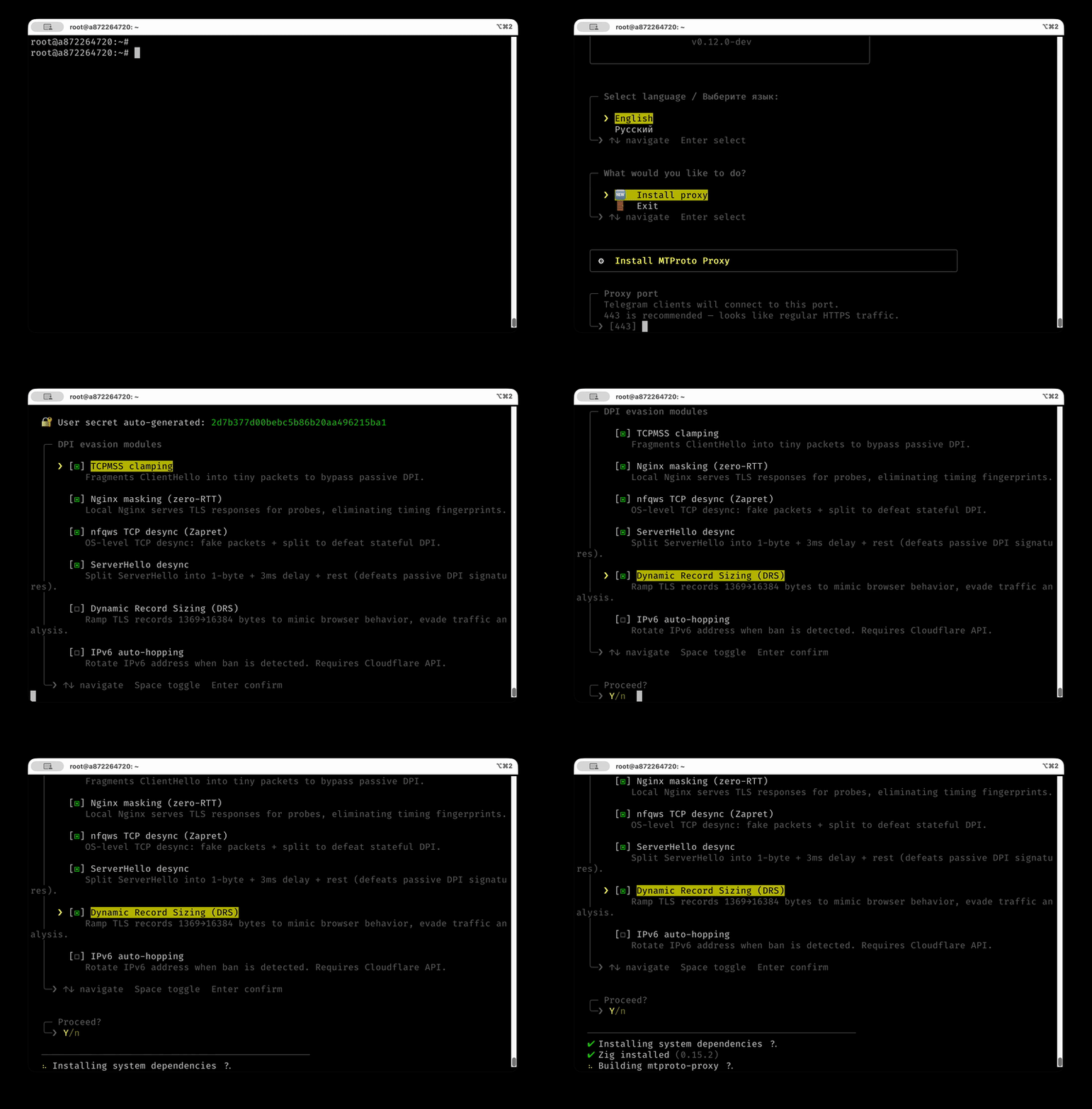
- Downloads the pre-built proxy binary from GitHub Releases (auto-detects CPU:
x86_64_v3→x86_64→aarch64) - Generates a random secret (or uses
--secret) - Creates a systemd service (
mtproto-proxy) - Opens the port in
ufw(if active) - Applies TCPMSS=88 iptables rules
- Sets up Nginx masking + nfqws TCP desync (unless
--no-dpi) - Prints
tg://link
| Flag | Default | Description |
|---|---|---|
--port, -p |
443 |
Proxy listen port |
--domain, -d |
wb.ru |
TLS masking domain |
--secret, -s |
auto | User secret (32 hex chars) |
--user, -u |
user |
Username in config.toml |
--config, -c |
— | Use existing config.toml file |
--yes, -y |
— | Skip confirmation prompt |
--bind, -b |
— | Bind to specific IP (default: all interfaces) |
--no-masking |
— | Disable Nginx masking |
--no-nfqws |
— | Disable nfqws TCP desync |
--no-tcpmss |
— | Disable TCPMSS=88 |
--no-dpi |
— | Disable all DPI modules |
--middle-proxy |
— | Enable Telegram MiddleProxy relay |
# Update to latest release (checks CPU compat, auto-rollback on failure)
sudo mtbuddy update

# Pin to a specific version
sudo mtbuddy update --version v0.11.1# Show proxy and module status
sudo mtbuddy status
# Setup DPI modules after the fact
sudo mtbuddy setup masking --domain wb.ru
sudo mtbuddy setup nfqws
sudo mtbuddy setup recovery
# Install web monitoring dashboard
sudo mtbuddy setup dashboard
# VPN tunnel (for servers where Telegram DCs are blocked)
sudo mtbuddy setup tunnel /path/to/awg0.conf
# IPv6 hopping
sudo mtbuddy ipv6-hop --check
sudo mtbuddy ipv6-hop --auto --prefix 2a01:abcd:ef00:: --threshold 5
# Update Cloudflare DNS A record
sudo mtbuddy update-dns 1.2.3.4
# Full help
mtbuddy --helpsudo systemctl status mtproto-proxy
sudo journalctl -u mtproto-proxy -f
sudo systemctl restart mtproto-proxyThe proxy supports multiple ways to route outgoing connections to Telegram DC servers.
[upstream].type |
How it works | When to use |
|---|---|---|
auto (default) |
Direct egress without tunnel policy marks | Most deployments |
direct |
Connect to Telegram DCs directly from the host | DCs reachable from the server |
tunnel |
Direct connect with SO_MARK=200 policy-routed via VPN interface |
DCs blocked by the ISP |
socks5 |
Route through an external SOCKS5 proxy with optional auth | Existing proxy infrastructure |
http |
Route through an HTTP CONNECT proxy with optional auth | Corporate proxy environments |
If your VPS is in a region where Telegram DCs are blocked at the network level, you can route proxy traffic through a VPN tunnel with explicit socket policy routing. The proxy runs in the host namespace; only sockets marked by the proxy (SO_MARK=200) are routed through the tunnel table.
Currently supported VPN types:
- AmneziaWG — DPI-resistant WireGuard fork (recommended for Russia/Iran)
- WireGuard — standard WireGuard (planned)
Client → mtproto-proxy (host namespace)
                     │
                SO_MARK=200
                     │
        Linux policy routing table 200
                     │
                 awg0 (tunnel)
                     │
             Telegram DC servers
sudo mtbuddy setup tunnel /path/to/awg0.confmtbuddy keeps [general].use_middle_proxy unchanged and only configures transport ([upstream].type = "tunnel").
After setup, it validates policy routes (mark 200) to Telegram DC ranges and prints operational commands.
You can also explicitly configure the tunnel interface in config.toml:
[upstream]
type = "tunnel"

[upstream.tunnel]
tunnel_interface = "awg0"Route DC connections through an external SOCKS5 proxy. Supports RFC 1928 auth.
[upstream]
type = "socks5"

[upstream.socks5]
host = "127.0.0.1"
port = 1080
username = "admin"    # optional, omit for no-auth
password = "secret"Route DC connections through an HTTP CONNECT proxy. Supports Basic auth.
[upstream]
type = "http"

[upstream.http]
host = "127.0.0.1"
port = 8080
username = "admin"    # optional, omit for no-auth
password = "secret"
Note: Only DC-bound traffic is routed through the configured upstream. Mask (camouflage) connections always go direct.
Config lives at /opt/mtproto-proxy/config.toml. MTBuddy generates it on install; you can edit it manually and restart:
[general]
use_middle_proxy = true   # ME mode for promo-channel parity

[upstream]
type = "auto"            # auto | direct | tunnel | socks5 | http

[server]
port = 443
# public_ip = "proxy.example.com"   # Override auto-detected IP (recommended with tunnel)
max_connections = 512
idle_timeout_sec = 120
handshake_timeout_sec = 15
log_level = "info"        # debug | info | warn | err
rate_limit_per_subnet = 30
tag = ""                  # Optional: promotion tag from @MTProxybot

[censorship]
tls_domain = "wb.ru"
mask = true
mask_port = 8443          # 8443 for local Nginx zero-RTT masking
fast_mode = true          # Recommended: delegates S2C AES to the DC, saves CPU/RAM
drs = true                # Dynamic Record Sizing (mimics Chrome/Firefox)

[access.users]
alice = "00112233445566778899aabbccddeeff"
bob   = "ffeeddccbbaa99887766554433221100"

[access.direct_users]
alice = true   # bypass MiddleProxy for this user
Full configuration reference
| Key | Default | Description |
|---|---|---|
[upstream].type |
auto |
Egress mode: auto (direct), direct, tunnel (VPN via socket policy routing), socks5, or http |
[upstream.tunnel] tunnel_interface |
"awg0" |
Name of the VPN network interface for SO_MARK routing |
[upstream.socks5] host |
— | SOCKS5 proxy address |
[upstream.socks5] port |
— | SOCKS5 proxy port |
[upstream.socks5] username |
— | SOCKS5 username (empty = no auth) |
[upstream.socks5] password |
— | SOCKS5 password |
[upstream.http] host |
— | HTTP CONNECT proxy address |
[upstream.http] port |
— | HTTP CONNECT proxy port |
[upstream.http] username |
— | HTTP proxy username (empty = no auth) |
[upstream.http] password |
— | HTTP proxy password |
[general] use_middle_proxy |
false |
ME mode for DC1..5 (recommended for promo parity) |
[general] ad_tag |
— | Alias for [server].tag |
[server] port |
443 |
TCP listen port |
[server] bind_address |
— | Specific IP to bind the listen socket (default: all interfaces) |
[server] public_ip |
auto | Override auto-detected IP/domain. Required with VPN tunnel; set IPv4 explicitly if clients fail on IPv6 links |
[server] backlog |
4096 |
TCP listen queue depth |
[server] max_connections |
512 |
Concurrent connection cap, auto-clamped by RAM and RLIMIT_NOFILE |
[server] idle_timeout_sec |
120 |
Connection idle timeout |
[server] handshake_timeout_sec |
15 |
Handshake completion timeout |
[server] middleproxy_buffer_kb |
1024 |
ME per-connection buffer (KiB). Below 1024 may cause overflow on media traffic |
[server] tag |
— | 32 hex-char promotion tag from @MTProxybot |
[server] log_level |
"info" |
debug / info / warn / err |
[server] rate_limit_per_subnet |
30 |
Max new conns/sec per /24 (IPv4) or /48 (IPv6). Set 0 to disable |
[server] unsafe_override_limits |
false |
Disable auto-clamping of max_connections |
[monitor] host |
"127.0.0.1" |
Dashboard bind address |
[monitor] port |
61208 |
Dashboard port |
[censorship] tls_domain |
"google.com" |
Domain to impersonate |
[censorship] mask |
true |
Forward unauthenticated clients to tls_domain |
[censorship] mask_port |
443 |
Local masking port (use 8443 for Nginx zero-RTT) |
[censorship] desync |
true |
Split-TLS: 1-byte Application records |
[censorship] drs |
false |
Dynamic Record Sizing |
[censorship] fast_mode |
false |
Delegate S2C encryption to DC (recommended) |
[access.users] <name> |
— | 32 hex-char secret per user |
[access.direct_users] <name> |
— | Bypass ME for this user |
Generate a secret:
openssl rand -hex 16
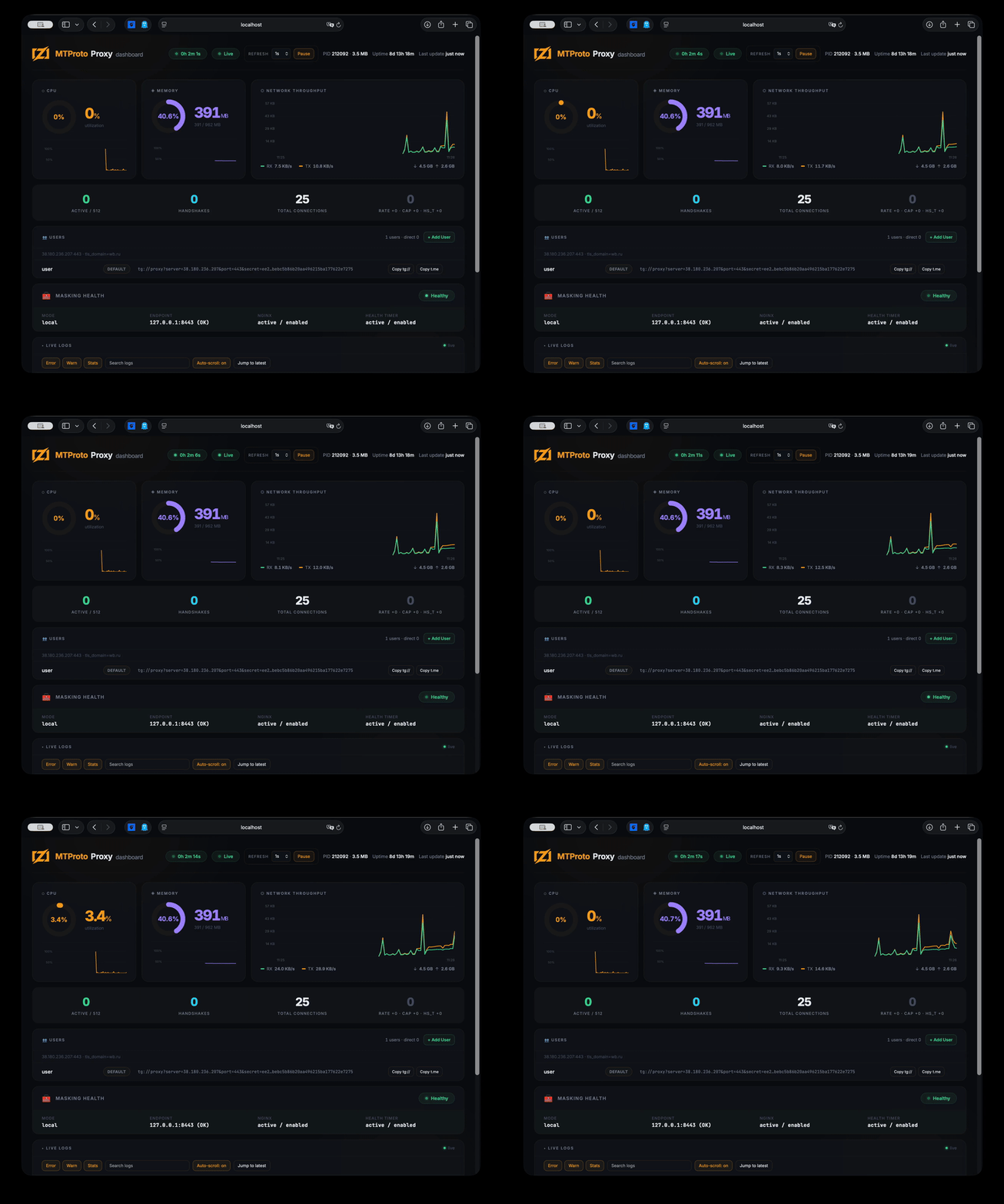
A lightweight web dashboard (~30 MB RAM) shows live connections, CPU/memory, network throughput, proxy stats, tunnel metrics, user management, and streaming logs.
The dashboard is embedded directly into the mtbuddy binary — no extra files needed.
# Install the dashboard on the server
sudo mtbuddy setup dashboard

# Open via SSH tunnel (binds to 127.0.0.1:61208 by default)
ssh -L 61208:localhost:61208 root@<server_ip>
# → http://localhost:61208
Alternatively, expose the dashboard port via [monitor] config section and access directly.
Demo: monitoring dashboard
Requires Zig 0.15.2.
git clone https://github.com/sleep3r/mtproto.zig.git
cd mtproto.zig

make build     # debug
make release   # optimized
make run       # run with config.toml
make test      # unit tests (78 tests)
make bench     # C2S encapsulation microbenchmark
make soak      # 30s multithreaded stability test
Cross-compile for Linux from macOS:
zig build -Doptimize=ReleaseFast -Dtarget=x86_64-linux -Dcpu=x86_64_v3+aes
scp zig-out/bin/mtproto-proxy root@<SERVER>:/opt/mtproto-proxy/docker pull ghcr.io/sleep3r/mtproto.zig:latest
docker run --rm \
-p 443:443 \
-v "$PWD/config.toml:/etc/mtproto-proxy/config.toml:ro" \
ghcr.io/sleep3r/mtproto.zig:latestBuild locally:
docker build -t mtproto-zig .
# multi-arch
docker buildx build --platform linux/amd64,linux/arm64 -t your-registry/mtproto-zig:latest --push .
Published linux/amd64 images are built with a portable CPU profile (-Dcpu=x86_64) to avoid Illegal instruction crashes on older VPS CPUs.
OS-level mitigations (iptables TCPMSS, nfqws, etc.) are not applied inside the container; only the proxy binary runs there.
1. AAAA record exists but IPv6 doesn't work on the server. DNS has an AAAA → iOS tries IPv6 first → timeout → slow fallback to IPv4. Fix: remove AAAA until IPv6 routing is fully configured.
dig +short proxy.example.com AAAA
ip -6 route
2. Home Wi-Fi blocks the server's IPv4. Mobile networks usually work (they use IPv6). Home routers often block the destination IPv4. Fix: enable IPv6 Prefix Delegation (IA_PD) on your router.
3. VPN is dropping MTProto traffic. Commercial VPNs often DPI and drop proxy traffic. Fix: switch VPN protocol, or use a self-hosted AmneziaWG.
4. Co-located WireGuard/Docker on the same server.
Docker's bridge drops packets from VPN subnet.
Fix: iptables -I DOCKER-USER -s 172.29.172.0/24 -p tcp --dport 443 -j ACCEPT
5. DC203 media resets on non-premium clients.
Check logs: journalctl -u mtproto-proxy | grep -E "dc=203|Middle".
The proxy auto-refreshes DC203 metadata from Telegram on startup. If core.telegram.org is unreachable, it uses bundled fallback addresses.
MIT © 2026 Aleksandr Kalashnikov
