Developer Guidelines
Running all generator tests takes very long time and fails frequently due to instability problem in some test. Not recommended unless you run a final check before release...
Command for running all tests on all supported versions of Mule:
$ cd .../soi-toolkit-mule/tools/soitoolkit-generator/soitoolkit-generator
$ mvn test -PrunGeneratorTests
Instead it's better to run one significant test for each mule flow generator. To be able to test one Mule version at the time you can also specify what Mule version test. The three most important tests to run are:
OneWayServiceGeneratorTest.testOneWayServicesInOneCommonIC()OneWayServiceV2GeneratorTest.testOneWayServicesInOneCommonIC()RequestResponseServiceV2GeneratorTest.testRequestResponseServicesInOneCommonIC()
They can be run for a specific Mule version with a command like:
$ cd .../soi-toolkit-mule/tools/soitoolkit-generator/soitoolkit-generator
$ mvn test -PrunGeneratorTests -Dtest=*GeneratorTest#test*InOneCommonIC -Dmule.version="3.4.0"
The tests takes around 15 minutes on a developer Mac and should result in test results that looks like:
$ cat target/surefire-reports/*.txt
-------------------------------------------------------------------------------
Test set: org.soitoolkit.tools.generator.IntegrationComponentGeneratorTest
-------------------------------------------------------------------------------
Tests run: 0, Failures: 0, Errors: 0, Skipped: 0, Time elapsed: 0.001 sec - in org.soitoolkit.tools.generator.IntegrationComponentGeneratorTest
-------------------------------------------------------------------------------
Test set: org.soitoolkit.tools.generator.IntegrationComponentTeststubGeneratorTest
-------------------------------------------------------------------------------
Tests run: 0, Failures: 0, Errors: 0, Skipped: 0, Time elapsed: 0 sec - in org.soitoolkit.tools.generator.IntegrationComponentTeststubGeneratorTest
-------------------------------------------------------------------------------
Test set: org.soitoolkit.tools.generator.IntegrationComponentV2GeneratorTest
-------------------------------------------------------------------------------
Tests run: 0, Failures: 0, Errors: 0, Skipped: 0, Time elapsed: 0 sec - in org.soitoolkit.tools.generator.IntegrationComponentV2GeneratorTest
-------------------------------------------------------------------------------
Test set: org.soitoolkit.tools.generator.OneWayRobustServiceGeneratorTest
-------------------------------------------------------------------------------
Tests run: 1, Failures: 0, Errors: 0, Skipped: 1, Time elapsed: 0.001 sec - in org.soitoolkit.tools.generator.OneWayRobustServiceGeneratorTest
-------------------------------------------------------------------------------
Test set: org.soitoolkit.tools.generator.OneWayServiceGeneratorTest
-------------------------------------------------------------------------------
Tests run: 1, Failures: 0, Errors: 0, Skipped: 0, Time elapsed: 117.416 sec - in org.soitoolkit.tools.generator.OneWayServiceGeneratorTest
-------------------------------------------------------------------------------
Test set: org.soitoolkit.tools.generator.OneWayServiceV2GeneratorTest
-------------------------------------------------------------------------------
Tests run: 1, Failures: 0, Errors: 0, Skipped: 0, Time elapsed: 486.88 sec - in org.soitoolkit.tools.generator.OneWayServiceV2GeneratorTest
-------------------------------------------------------------------------------
Test set: org.soitoolkit.tools.generator.RequestResponseServiceV2GeneratorTest
-------------------------------------------------------------------------------
Tests run: 1, Failures: 0, Errors: 0, Skipped: 0, Time elapsed: 151.589 sec - in org.soitoolkit.tools.generator.RequestResponseServiceV2GeneratorTest
-------------------------------------------------------------------------------
Test set: org.soitoolkit.tools.generator.SchemaComponentGeneratorTest
-------------------------------------------------------------------------------
Tests run: 0, Failures: 0, Errors: 0, Skipped: 0, Time elapsed: 0 sec - in org.soitoolkit.tools.generator.SchemaComponentGeneratorTest
Note: #400 (Since: 2.0.0-M6) introduced new system properties useful for test suite debugging:
- -Dsoitoolkit.test.override.dispose_context_per_class=false
- -Dsoitoolkit.test.sleep.ms.before_test=1000
If some tests fails you can go to the generated projects and look for an existing target folder (target folders are removed after a successful build to preserve disk space). Look into the surefire-reports folder for txt-files that have a size over 400 bytes, they typically contain output from a failing test. E.g.:
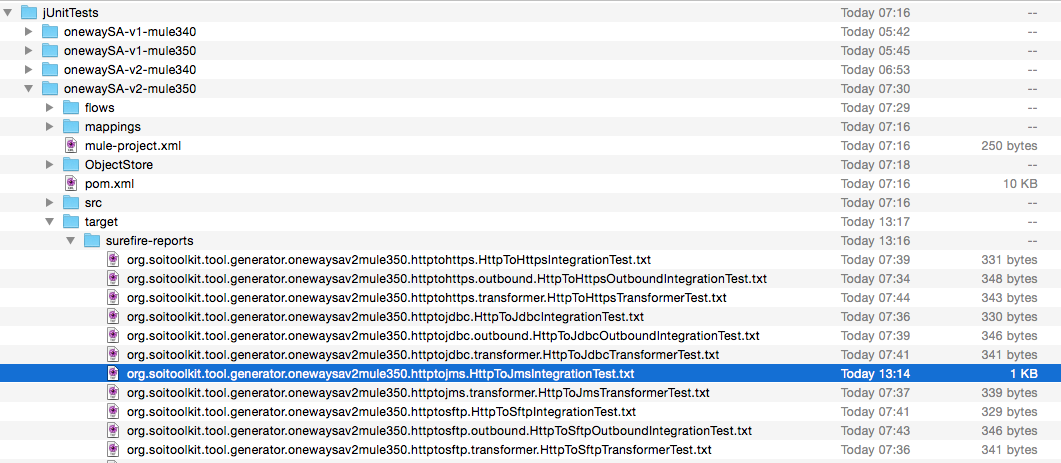
If you open the txt-file you can see that the test-method testHttpToJmsOk() in the test-class HttpToJmsIntegrationTest failed:
-------------------------------------------------------------------------------
Test set: org.soitoolkit.tool.generator.onewaysav2mule350.httptojms.HttpToJmsIntegrationTest
-------------------------------------------------------------------------------
Tests run: 1, Failures: 1, Errors: 0, Skipped: 0, Time elapsed: 7.066 sec <<< FAILURE! - in org.soitoolkit.tool.generator.onewaysav2mule350.httptojms.HttpToJmsIntegrationTest
testHttpToJmsOk(org.soitoolkit.tool.generator.onewaysav2mule350.httptojms.HttpToJmsIntegrationTest)  Time elapsed: 6.161 sec  <<< FAILURE!
java.lang.AssertionError: expected:<1> but was:<0>
	at org.junit.Assert.fail(Assert.java:93)
	at org.junit.Assert.failNotEquals(Assert.java:647)
	at org.junit.Assert.assertEquals(Assert.java:128)
	at org.junit.Assert.assertEquals(Assert.java:472)
	at org.junit.Assert.assertEquals(Assert.java:456)
	at org.soitoolkit.tool.generator.onewaysav2mule350.httptojms.HttpToJmsIntegrationTest.testHttpToJmsOk(HttpToJmsIntegrationTest.java:195)
After analysing the error, and if required performing some code changes, you can rerun the failing test-method:
$ mvn test -Dtest=HttpToJmsIntegrationTest#testHttpToJmsOk
If you need to run some specific generator-test after you corrected the error, you can do that with a command like:
$ mvn test -PrunGeneratorTests -Dtest=OneWayServiceV2GeneratorTest#testOneWayServicesInOneCommonIC -Dmule.version="3.5.0"
For details see soi-toolkit v1 Release Handling.
git checkout master
TBD: Using a release branch in between?
git merge develop
To the release version, e.g. from 2.0.0-M4-SNAPSHOT to 2.0.0-M4, in the following files:
- Constant
SOITOOLKIT_VERSIONintools/soitoolkit-generator/soitoolkit-generator/src/main/java/org/soitoolkit/tools/generator/model/impl/DefaultModelImpl.java -
commons/poms/default-parent/pom.xml-->/ns:project/ns:properties/ns:soitoolkit.version
Make sure that the default Mule version for the Maven-generator plugin is up tp date in:
-
tools/soitoolkit-generator/soitoolkit-generator-maven-plugin/src/main/java/org/soitoolkit/tools/generator/maven/GenIntegrationComponentMojo.javaandGenIntegrationComponentV2Mojo.java
mvn clean testgit commit -a -m "Commit for releasing v0.4.0"mvn release:clean release:prepare -DdryRun=truemvn release:clean release:preparemvn release:perform- Go to Sonatypes staging repository and release it to synch with maven central repo
- Go to: https://oss.sonatype.org
- Login to the Nexus UI.
- Go to Staging Repositories page.
- Select a staging repository.
- Select the soi-toolkit release
- Click the Close button.
- Validate Perform the following steps:
- Validate against the staging repo https://oss.sonatype.org/content/repositories/staging/org/soitoolkit/
- Activate the maven profile soi-toolkit-sonatype in the maven
settings.xml- file:
Code:
<activeProfiles>
  <activeProfile>soi-toolkit-sonatype</activeProfile>
</activeProfiles>
-
Remove org.soitoolkit from the local maven repository (to ensure that the artifacts are downloaded as expected from the Sonatypes staging repository)
-
If errors then you can after correcting the error either redeploy just one artefact or Click on the Drop button and redeploy all artefacts...
If something is wrong you can fix it on the release-tag in git and perform av redeploy to the staging repo from the tag-folder using:
mvn release:clean
git checkout soitoolkit-2.0.0-M4
mvn deploy -Psonatype-oss-release
...
mvn deploy -f commons/poms/mule-dependencies/mule-3.2.0-dependencies/pom.xml -Psonatype-oss-release
...
git checkout master
NOTE: Don't forget to merge the relevant changes to developer as well...
- Deploy Perform the following steps:
- Manually deploy the eclipse plugin as described below
- Publish to central repo
- If ok go back to the Sonatype staging repository web-app, https://oss.sonatype.org Select the soi-toolkit release again and click on the Release button. Artifacts should now be synched with central repo on a hourly bases...
git checkout develop
TBD: Using a release branch in between and then delete it?
git merge master
To the release version, e.g. from 2.0.0-M4 to 2.0.0-M5-SNAPSHOT, in the following files:
- Constant
SOITOOLKIT_VERSIONintools/soitoolkit-generator/soitoolkit-generator/src/main/java/org/soitoolkit/tools/generator/model/impl/DefaultModelImpl.java -
commons/poms/default-parent/pom.xml-->/ns:project/ns:properties/ns:soitoolkit.version
mvn clean install
git commit -a -m "Start work on version n.n.n"
git push --tags origin develop:develop master:master