


A Discord bot that integrates with Groq's LLM API to provide AI-powered question answering and assistance. Users can interact with different AI models through mentions or commands, maintaining conversation context across interactions. Now with vision capabilities to analyze images and real-time weather information!
- 🌦️ 16/3/2025 - Added weather agent for real-time weather forecasts using PydanticAI and Tomorrow.io API!
- 🖼️ 14/3/2025 - Added vision capabilities to analyze images
- ⭐ Star this repo เพื่อเป็นกำลังใจให้ผู้พัฒนา!
- 🍴 Fork this repo เพื่อนำไปพัฒนาต่อ!
- 📝 Report issues ถ้าเจอข้อผิดพลาดหรือบัค
- Ask AI questions by mentioning the bot
- NEW: Get real-time weather forecasts for any location (16/3/2025)
- Analyze images by attaching them to your messages
- Choose from multiple AI models, including vision models
- Simple command interface
- Handles long responses automatically
- Python 3.8+
- Discord Bot Token
- Groq API Key
- Tomorrow.io Weather API Key (for weather functionality)
- Geocode Maps API Key (for location services)
- Clone or download this repository
git clone https://github.com/spped2000/GroqDiscordAssistant.git cd GroqDiscordAssistant - Install dependencies
pip install -r requirements.txt
- Set up environment variables
- Copy
.env.exampleto.env - Add your Discord token, Groq API key, and weather API keys
- Copy
- Run the bot
python bot.py
Just mention the bot with your question:
@YourBot What's the capital of France?
 Example: @ตื่นมาโค้ดpython แนะนำอาหารไทยเผ็ดๆหน่อย?
Ask the bot about the weather in any location:
Or use the dedicated weather command:
!weather Bangkok
 Example: @ตื่นมาโค้ดpython !weather bangkok
You can ask the bot general knowledge questions:
@YourBot Who wrote the novel "Pride and Prejudice"?
@YourBot What are the main causes of climate change?
Specify a model for different types of responses:
!groq "Explain quantum computing in simple terms" model:llama3-70b-8192
!groq "Write a short poem about technology" model:mixtral-8x7b-32768
The bot can handle more complex tasks as well:
@YourBot Can you summarize the key differences between machine learning and deep learning?
@YourBot How would you explain the concept of blockchain to a 10-year-old?
Attach an image and mention the bot with your question about the image:
@YourBot [image attached] What's in this image?
 Example: @ตื่นมาโค้ดpython วัดนี้คือวัดอะไร?
!groq <prompt>- Ask a text question!groq <prompt> model:<model>- Use a specific text model!vision <prompt>- Ask about your most recently uploaded image!vision <prompt> model:<model>- Use a specific vision model!weather <location(s)>- Get weather for one or more locations!models- List available models!bothelp- Show help information
llama-3.1-8b-versatile- Fastest responsesllama-3.1-70b-versatile- Most capable (default for text)llama-3.1-405b-versatile- Highest quality responsesmixtral-8x7b-32768- Good for longer contextsgemma-7b-it- Google's model
llama-3.1-8b-vision- Default for images
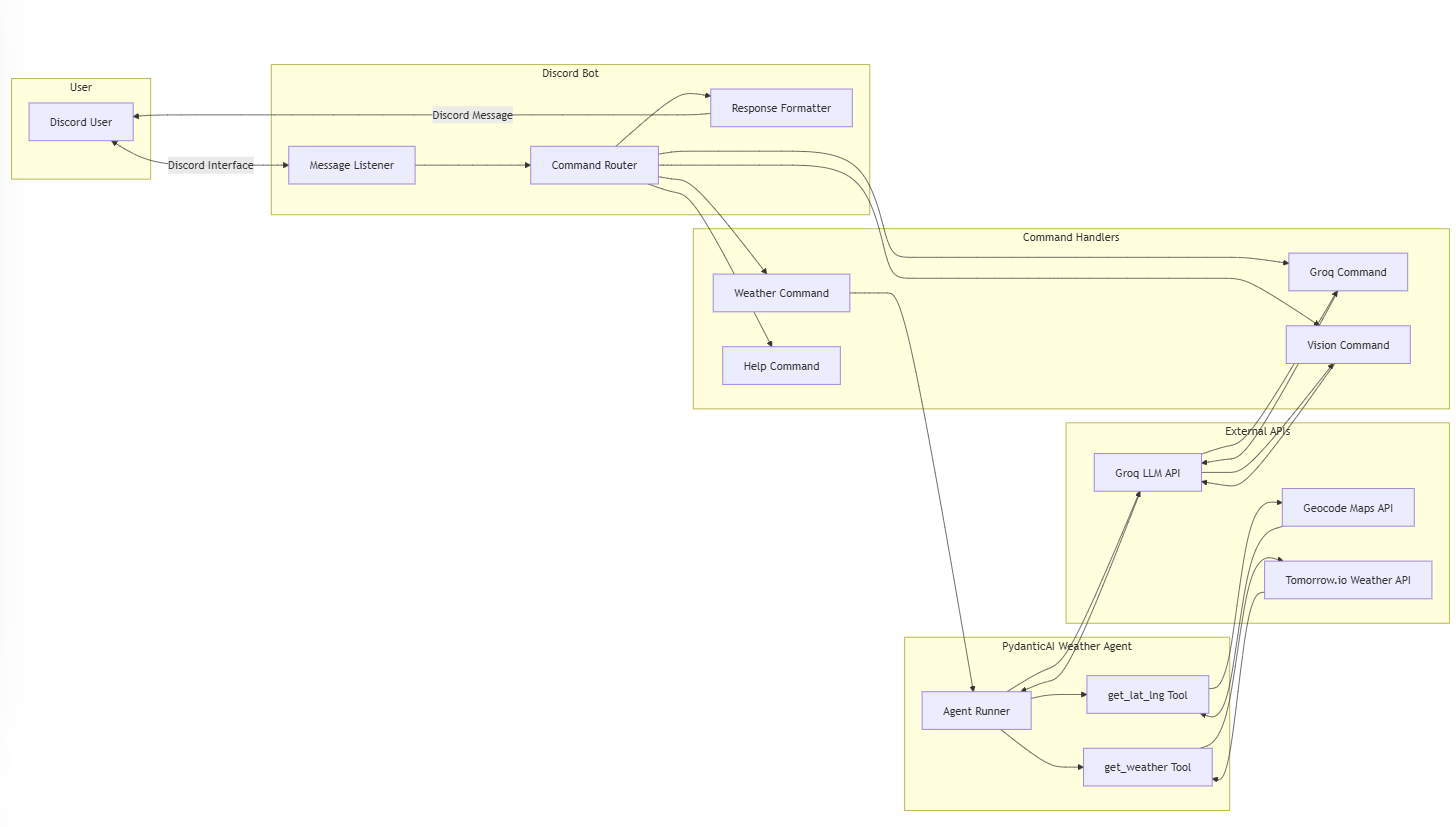
The bot uses PydanticAI with Groq LLM to create a powerful weather agent that:
- Processes natural language - Ask about weather in any way you want
- Supports multiple locations - Check weather in several places at once
- Provides accurate data - Uses Tomorrow.io API for real-time weather information
- Shows detailed information - Temperature, conditions, humidity, and wind speed
- The agent extracts location names from your query
- It gets the coordinates using the Geocode Maps API
- It fetches weather data from Tomorrow.io
- The Groq LLM formats this data into a natural language response
!weather Bangkok
!weather Tokyo, Paris, New York
The bot can now analyze images and answer questions about them:
- Describe scenes and objects
- Identify text in images
- Answer questions about image content
If you've already shared an image, you can use the dedicated command:
!vision What can you tell me about this image?
This will analyze your most recently uploaded image.
Contributions are welcome! Here's how you can contribute:
- Fork the repository
- Create a new branch (
git checkout -b feature/amazing-feature) - Make your changes
- Commit your changes (
git commit -m 'Add some amazing feature') - Push to the branch (
git push origin feature/amazing-feature) - Open a Pull Request
MIT License
Made with ❤️ using Hikari, Lightbulb, PydanticAI, and Groq