


Repository badges highlight your project's key aspects such as build status, code coverage percentage, software version, license and more.
setup-badge empowers you to create dynamic and static endpoint badges to showcase on your README file.
Note:
dynamic badge changes regularly over time (e.g. code coverage percentage and software version)
static badge doesn't change regularly over time (e.g. license and programming language)
Under the hood, setup-badge creates a shields.io endpoint badge, which is composed of a shields.io endpoint and an URL to your JSON file (JSON Endpoint).

- setup-badge runs with command line options.
- setup-badge adds/updates a json file from your options.
- setup-badge pushes a commit to the remote branch.
- endpoint badge is created with
shields.io endpointandyour json file.
Afterwards, you can put endpoint badge into your README file.
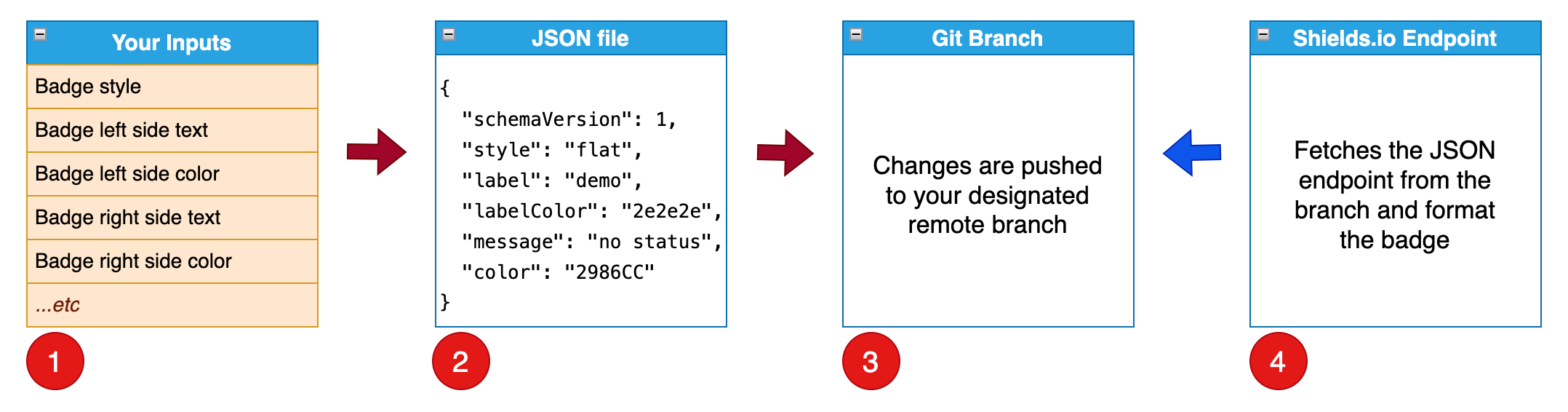
In this use case, you run our setup-badge-action in a workflow to create badge(s).
Please visit our GitHub action (setup-badge-action) on the GitHub Marketplace for details.
In this use case, you run setup-badge manually with the steps below:
- install setup-badge.
- run setup-badge.
In the example below, we first install setup-badge in a Python virtual environment.
~/work/badge-test $ workon badge-test
(badge-test) ~/work/badge-test $ pip install -U setup-badge
Next, we run setup-badge with different options and display the results.
🏃 Run to display command line options: --help
(badge-test) ~/work/badge-test $ setup-badge --help
Usage: setup-badge [OPTIONS]

Options:
  --badge-name TEXT       default: badge
  --badge-branch TEXT     default: badges
  --badge-url TEXT        default: ''
  --badge-style TEXT      default: flat (flat, flat-square, plastic, for-the-badge, social)
  --label TEXT            default: demo (badge left side text)
  --label-color TEXT      default: 2e2e2e (badge left side hex color)
  --message TEXT          default: no status (badge right side text)
  --message-color TEXT    default: 2986CC (badge right side hex color)
  --remote-name TEXT      default: origin
  --gitconfig-name TEXT   default: Mona Lisa
  --gitconfig-email TEXT  default: mona.lisa@github.com
  --version               Show the version and exit.
  --help                  Show this message and exit.
🏃 Run to create a demo badge: with default command line options
(badge-test) ~/work/badge-test $ setup-badge
🚀 Starting to create a badge.json in branch (badges)...
✅ validated inputs from command line options
✅ checkout local branch (badges)
✅ created badges/badge.json
✅ found changes ready to stage, commit, and push to origin
✅ pushed commit (f9c751c) to remote branch (badges)
🎉 Endpoint Badge: 
Endpoint Badge

🏃 Run to create a license badge: --badge-name license --label License --message MIT --message-color FFA500 --badge-url https://raw.githubusercontent.com/tagdots/setup-badge/refs/heads/main/LICENSE
(badge-test) ~/work/badge-test $ setup-badge --badge-name license --label License --message MIT --message-color FFA500 --badge-url https://raw.githubusercontent.com/tagdots/setup-badge/refs/heads/main/LICENSE
🚀 Starting to create a badge (license.json) in branch (badges)...
✅ validated inputs from command line options
✅ checkout local branch (badges)
✅ created badges/license.json
✅ found changes ready to stage, commit, and push to origin
✅ pushed commit (dd8906c) to remote branch (badges)
🎉 Endpoint Badge: [](https://raw.githubusercontent.com/tagdots/setup-badge/refs/heads/main/LICENSE)
Endpoint Badge

🏃 Run to create a marketplace badge: --badge-name marketplace --label Marketplace --message setup-badge-action --message-color FF6360 --badge-url https://github.com/marketplace/actions/setup-badge-action
(badge-test) ~/work/badge-test $ setup-badge --badge-name marketplace --label Marketplace --message setup-badge-action --message-color FF6360 --badge-url https://github.com/marketplace/actions/setup-badge-action
🚀 Starting to create a badge (marketplace.json) in branch (badges)...
✅ validated inputs from command line options
✅ checkout local branch (badges)
✅ created badges/marketplace.json
✅ found changes ready to stage, commit, and push to origin
✅ pushed commit (8991c28) to remote branch (badges)
🎉 Endpoint Badge: [](https://github.com/marketplace/actions/setup-badge-action)
Endpoint Badge
- badges branch can hold multiple JSON files.
- badges folder can hold json files from different branches.
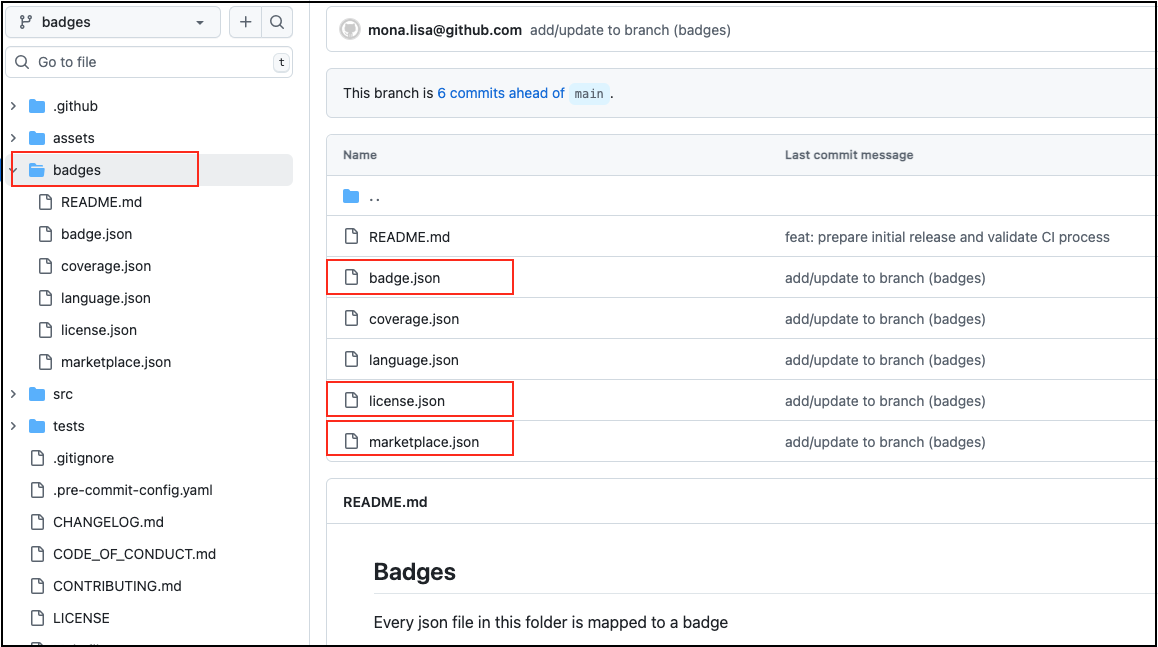
- copy and paste to your README file
- write a commit and merge your code
| Input | Description | Default | Notes |
|---|---|---|---|
badge-name |
JSON endpoint filename | badge |
JSON endpoint filename |
branch-name |
Branch to hold JSON endpoint | badges |
a single branch can hold multiple JSON endpoint files |
badge-style |
Badge style | flat |
other options: flat-square, plastic, for-the-badge, social |
badge-url |
Badge URL | '' |
no default value (enter a url if necessary) |
label |
Left side text | demo |
- |
label-color |
Left side background color | 2e2e2e |
hex color |
message |
Right side text | no status |
place dynamic/static data here |
message-color |
Right side background color | 2986CC |
hex color |
remote-name |
Git remote source branch | origin |
leave it as-is in general |
gitconfig-name |
Git config user name | Mona Lisa |
need this option for CI or GitHub action |
gitconfig-email |
Git config user email | mona.lisa@github.com |
need this option for CI or GitHub action |
Open an issue
For pull requests to be accepted on this project, you should follow PEP8 when creating/updating Python codes.
See Contributing
If you find this project helpful, please ⭐ star it. Thank you.