





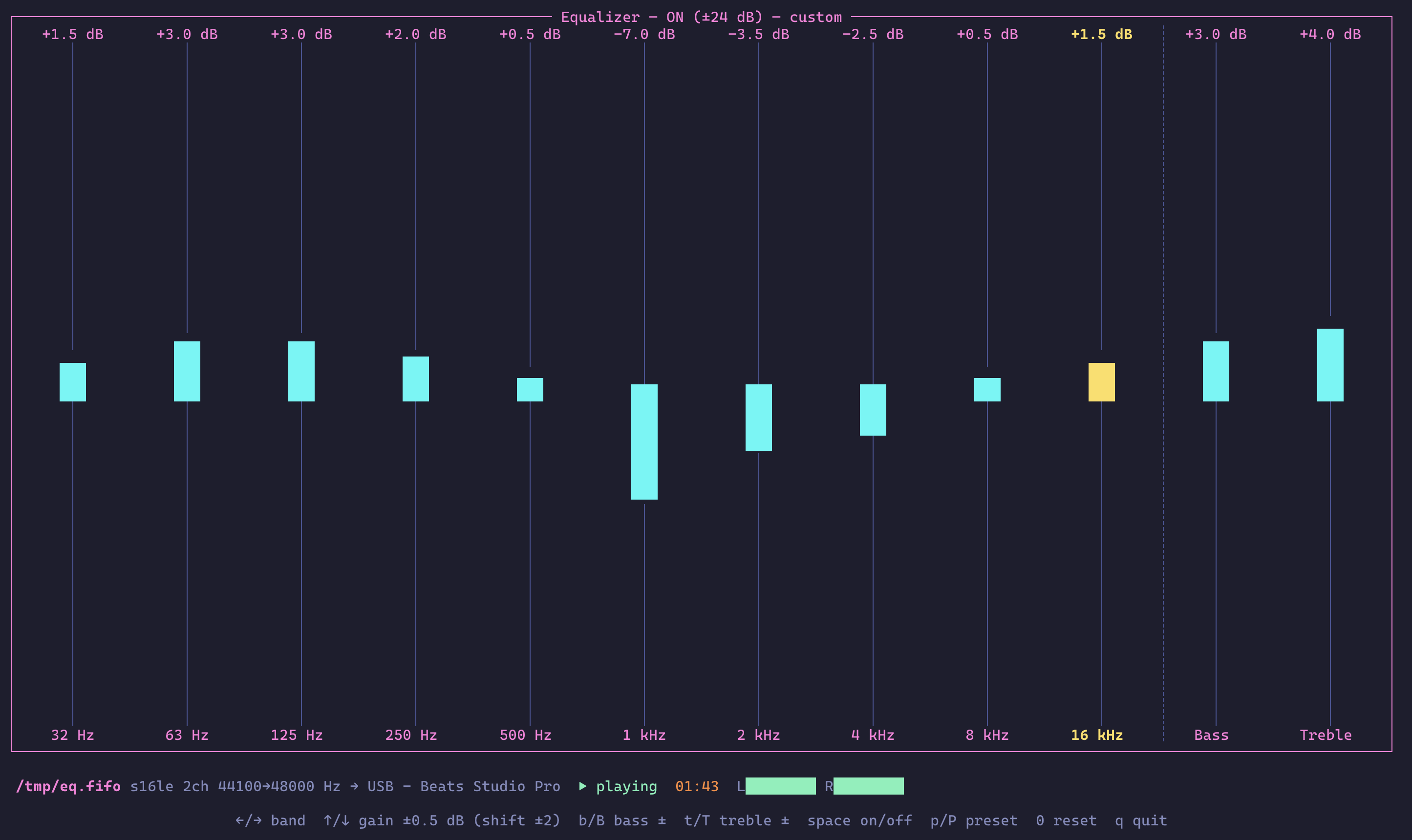
A real-time terminal equalizer for raw PCM pipes. It reads audio from stdin, a FIFO, or a unix socket, runs it through the Rockbox DSP (10-band EQ, bass/treble shelves, resampling) and plays the result on your sound card via cpal — while a ratatui interface lets you tweak the bands live.
- Features
- Installation
- Quick Start
- Input Sources
- Output Targets
- Spotify via spotifyd
- Remote Control (gRPC API)
- CLI Options
- Keybindings
- Presets
- Settings File
- How It Works
- Testing
- License
- 10-band equalizer — the actual Rockbox firmware DSP (low shelf, 8 peaking filters, high shelf), ±24 dB per band
- Bass & treble tone controls (±24 dB shelves at 200 Hz / 3.5 kHz), active independently of the EQ switch, just like Rockbox
- Live TUI — vertical sliders for every band plus Bass/Treble columns, a status line (input format, sample rates, output device, playback state, stereo level meter, elapsed time) and a key-hint bar at the bottom
- Any raw PCM source — stdin, FIFO, or unix socket;
s16le,s24le,s32le,f32le,f64le; mono/stereo/multichannel; any sample rate (resampled to the device rate by the DSP) - Configurable output — sound card by default, or run as a pure PCM
filter writing s16le to stdout / a FIFO (
--output) - Persistent settings — every change is saved to a TOML file and restored on the next run
- Presets — rock, pop, jazz, classical, electronic, vocal, bass-boost, treble-boost, flat
- Remote control — a gRPC API on a unix socket (and optionally TCP);
run
equalizeragain on the same machine and it becomes a remote TUI for the running instance, or use--connectfrom another machine
brew install tsirysndr/tap/equalizerAdd the Gemfury apt repo once and install normally:
echo "deb [trusted=yes] https://apt.fury.io/tsiry/ /" \
  | sudo tee /etc/apt/sources.list.d/tsiry.list
sudo apt update && sudo apt install equalizer
Or download the .deb for your architecture (amd64 / arm64) from the
latest release:
curl -LO https://github.com/tsirysndr/equalizer/releases/latest/download/equalizer_0.2.0_amd64.deb
sudo apt install ./equalizer_0.2.0_amd64.deb
apt pulls in libasound2 (the ALSA runtime cpal needs) automatically.
Via the Gemfury yum repo:
sudo tee /etc/yum.repos.d/tsiry.repo <<'EOF'
[tsiry]
name=tsiry
baseurl=https://yum.fury.io/tsiry/
enabled=1
gpgcheck=0
EOF
sudo dnf install equalizer
Or straight from the release asset:
sudo dnf install \
https://github.com/tsirysndr/equalizer/releases/latest/download/equalizer-0.2.0-1.x86_64.rpmTarballs for macOS (Intel / Apple Silicon) and Linux (amd64 / arm64) are on
the releases page, each
with a .sha256 alongside:
tar -xzf equalizer-<version>-<platform>.tar.gz
sudo mv equalizer /usr/local/bin/cachix use tsirysndr
nix run github:tsirysndr/equalizer # run directly
nix profile install github:tsirysndr/equalizer
nix develop # dev shell (in a checkout)git clone https://github.com/tsirysndr/equalizer
cd equalizer
cargo install --path .Requires a C compiler (the rockbox-dsp crate compiles the Rockbox DSP
sources with cc). On Linux you also need the ALSA development headers
and pkg-config for cpal's audio output —
sudo apt install libasound2-dev pkg-config (Debian/Ubuntu) or
sudo dnf install alsa-lib-devel pkgconf (Fedora); at runtime the
packages depend on libasound2 / alsa-lib. On macOS, CoreAudio is
used and nothing extra is needed.
Pipe anything through ffmpeg into the equalizer:
ffmpeg -i track.flac -f s16le -ac 2 -ar 44100 - 2>/dev/null | equalizerThe TUI opens on your terminal (it renders to stderr and reads keys from
/dev/tty, so stdin stays free for audio). Adjust bands with the arrow
keys — changes are audible immediately and saved automatically.
- (the default) reads raw PCM from stdin:
# ffmpeg
ffmpeg -i song.mp3 -f s16le -ac 2 -ar 44100 - 2>/dev/null | equalizer

# sox
sox song.wav -t raw -b 16 -e signed -c 2 -r 44100 - | equalizer

# float samples at 48 kHz
ffmpeg -i song.mp3 -f f32le -ac 2 -ar 48000 - 2>/dev/null | equalizer -f f32le -r 48000Point equalizer at a path — if it doesn't exist it is created as a
FIFO, and the equalizer waits for a writer:
equalizer /tmp/eq.fifothen from another process (repeatable — the FIFO is reopened after each writer disconnects):
ffmpeg -i first.flac  -f s16le -ac 2 -ar 44100 -y /tmp/eq.fifo
ffmpeg -i second.flac -f s16le -ac 2 -ar 44100 -y /tmp/eq.fifoIf the path is an existing unix domain socket, equalizer connects to it
and reads PCM from the peer:
equalizer /tmp/audio.sockBy default the processed audio plays on the sound card (--device picks
one). With --output the equalizer becomes a pure PCM filter instead —
raw interleaved stereo s16le at the input rate (no resampling), paced
by whatever consumes the pipe:
# stdout: chain into any player or encoder
ffmpeg -i track.flac -f s16le -ac 2 -ar 44100 - 2>/dev/null \
  | equalizer --output - \
  | ffplay -f s16le -ac 2 -ar 44100 -nodisp -   # or aplay, sox, ffmpeg …

# FIFO: created if missing; opening blocks until a reader connects
equalizer /tmp/in.fifo --output /tmp/out.fifo
The TUI still works on either (it renders to stderr, keys come from
/dev/tty), and so does the control API —
e.g. spotifyd → equalizer → FIFO, with the EQ tweaked from another
machine. In --no-tui mode with --output -, the auto-generated API
token is logged to stderr instead of stdout so it never corrupts the
PCM stream.
spotifyd can feed Spotify straight
into the equalizer through a FIFO. This is the only spotifyd setup that
works with equalizer — use exactly this config (~/.config/spotifyd/spotifyd.conf):
[global]
# Write raw PCM to a FIFO instead of stdout — spotifyd prints its log
# lines to stdout, so piping stdout into equalizer corrupts the stream.
backend = "pipe"
device = "/tmp/spotifyd.fifo"

# s16le 44100 Hz stereo — matches equalizer's defaults exactly.
audio_format = "S16"

device_name = "spotifyd"
bitrate = 320

# Spotify volume normalisation, so all tracks hit the EQ at a similar level.
volume_normalisation = true
normalisation_pregain = 0
Then start the equalizer on the FIFO and launch spotifyd:
equalizer /tmp/spotifyd.fifo   # creates the FIFO and waits for audio
spotifyd --no-daemon           # in another terminal
Pick spotifyd as the playback device in any Spotify client and the
audio flows through the EQ. No -f/-r flags are needed — S16 at
44100 Hz stereo is exactly what equalizer expects by default.
Every running instance serves a gRPC API
on a unix socket by default (per-user runtime path, e.g.
$XDG_RUNTIME_DIR/equalizer/equalizer.sock on Linux). Add --port to also
serve it over TCP on 0.0.0.0 for other machines:
# machine A: play audio headless, control API on unix socket + tcp :50051
ffmpeg -i track.flac -f s16le -ac 2 -ar 44100 - | equalizer --no-tui --port 50051
# prints:  api token: 67faefc3…   (stdout, capture it in scripts)

# machine A, another terminal: plain `equalizer` notices the running
# instance and opens the TUI connected to it via the socket
equalizer

# machine B: remote TUI over TCP (token from A's settings.toml or stdout)
equalizer --connect machine-a:50051 --token 67faefc3…
# or: EQUALIZER_TOKEN=67faefc3… equalizer --connect machine-a:50051
The remote TUI is the full interface — sliders, presets, meters and the
server's playback status; s/auto-save persist to the server's
settings file. Multiple clients can connect at once and stay in sync.
The TCP endpoint requires a bearer token; it is generated automatically,
stored as token under [api] in the settings file, and printed to
stdout in --no-tui mode. The unix socket needs no token (it is already
per-user). Server reflection is enabled, so scripting works with plain
grpcurl:
sock="unix://${TMPDIR:-/tmp}/equalizer-$(id -u).sock"   # macOS default path
grpcurl -plaintext $sock equalizer.v1.EqualizerService/GetState
grpcurl -plaintext -d '{"name":"rock"}' $sock equalizer.v1.EqualizerService/ApplyPreset
grpcurl -plaintext -d '{"band":5,"delta_tenths_db":20}' $sock equalizer.v1.EqualizerService/AdjustBand
grpcurl -plaintext -d '{"bass_delta_db":6}' $sock equalizer.v1.EqualizerService/AdjustTone
grpcurl -plaintext $sock equalizer.v1.EqualizerService/WatchState   # 10 Hz state stream
grpcurl -plaintext -H "authorization: Bearer $TOKEN" host:50051 \
        equalizer.v1.EqualizerService/GetState                     # over TCP
Configure it under [api] in the settings file or with
the CLI flags below; --no-api turns the whole thing off.
| Flag | Default | Description |
|---|---|---|
[INPUT] |
- |
Input path (- = stdin, missing path → FIFO is created) |
-r, --rate <HZ> |
44100 |
Input sample rate |
-c, --channels <N> |
2 |
Input channels (1 = upmixed, >2 = front pair) |
-f, --format <FMT> |
s16le |
s16le, s24le, s32le, f32le, f64le |
-d, --device <NAME> |
default | Output device (case-insensitive substring) |
-o, --output <TARGET> |
default |
default = sound card, - = raw s16le on stdout, else FIFO path |
--list-devices |
Print output devices and exit | |
-p, --preset <NAME> |
Apply a preset on startup (local or remote) | |
--config <PATH> |
user config dir | Settings file location |
--no-tui |
Headless: apply saved settings, no interface | |
--api-socket <PATH> |
runtime dir | Control-API unix socket path |
--port <PORT> |
off | Also serve the control API on 0.0.0.0:<PORT> |
--no-api |
Do not serve the control API | |
--connect [ADDR] |
local socket | Remote TUI: host:port, unix:PATH, or a socket path |
--token <TOKEN> |
$EQUALIZER_TOKEN |
Bearer token for a remote server's TCP API |
| Key | Action |
|---|---|
← / → (or h / l) |
Select column (10 bands, Bass, Treble) |
↑ / ↓ (or k / j, + / -) |
Adjust selected: bands ±0.5 dB, shelves ±1 dB |
Shift + ↑/↓ |
Coarse adjust: bands ±2 dB, shelves ±4 dB |
b / B |
Bass +1 / −1 dB (without moving the selection) |
t / T |
Treble +1 / −1 dB |
Space (or e) |
Toggle EQ on/off (bass/treble stay active) |
p / P |
Next / previous preset |
0 (or r) |
Reset all gains to flat |
s |
Save settings now (changes also auto-save after a short pause) |
q / Esc / Ctrl-C |
Quit |
flat, rock, pop, jazz, classical, electronic, vocal,
bass-boost, treble-boost
Apply one at startup with --preset rock, or cycle with p / P in the
TUI. A preset replaces the band gains (cutoffs and Q are kept); editing
any band afterwards marks the state as custom.
Settings live at ~/Library/Application Support/io.tsirysndr.equalizer/settings.toml
on macOS (~/.config/equalizer on Linux, override with --config) and use
Rockbox's [[eq_band_settings]] format — gain and q are stored ×10:
eq_enabled = true
bass = 2          # dB, low shelf @ 200 Hz (0 = off)
treble = 0        # dB, high shelf @ 3.5 kHz
bass_cutoff = 0   # Hz, 0 = default 200
treble_cutoff = 0 # Hz, 0 = default 3500

[[eq_band_settings]]
cutoff = 32   # Hz
q = 7         # Q 0.7
gain = 50     # +5.0 dB
# … 9 more bands: 63, 125, 250, 500, 1k, 2k, 4k, 8k, 16k

[api]
enabled = true      # unix-socket control API (default on)
# socket = "/path/to/equalizer.sock"   # override the default path
# port = 50051      # also serve on TCP (host:port) — same as --port
host = "0.0.0.0"    # TCP bind address
# token = "…"       # TCP bearer token, auto-generated on first TCP use
Every change in the TUI is persisted immediately, so the next run starts where you left off.
stdin / FIFO / socket ──▶ reader thread ──▶ bounded channel ──▶ cpal callback ──▶ 🔊
      raw PCM             decode to s16          3 × ~10 ms         output device
                          fold to stereo
                          Rockbox DSP:
                          EQ → tone → resample
                                ▲
                          version counter
                                │
                          ratatui TUI (your keystrokes)
The Rockbox DSP instance is not Send, so it lives entirely on the reader
thread. The TUI mutates a shared Equalizer state and bumps an atomic
version counter; the reader notices the change on the next chunk and
reapplies the settings — the small post-DSP buffer keeps the latency of an
EQ tweak around 50 ms.
cargo testCovers PCM decoding (all five formats, sign extension, clamping), channel folding, TOML settings round-trips, meter rendering, and an end-to-end DSP test that verifies a −12 dB band cut actually attenuates a sine tone.
For a quick listen without a media file:
# 30 s of pink-ish noise through a bass-boost
ffmpeg -f lavfi -i "anoisesrc=color=pink:duration=30" \
-f s16le -ac 2 -ar 44100 - 2>/dev/null | equalizer --preset bass-boostGPL-2.0-or-later — the rockbox-dsp crate compiles Rockbox
firmware code, which is GPL-2.0-or-later, so this project is too.