We believe that learning should be open and free source for everyone . "Anything can be learned, if you are truely enthusiastic about it . All things are possible because anything can be learned ". Anyone who is curious about learning the linux commands can see this project and get practical knowledge .
This project is about the linux commands . In this course, we include frequently used commands from basic to intermidate level of linux . For each command , the explaination and frequently used variations are included with its practical use in the CLI operating system . The interface of the project is user friendly. For giving the user practical knowledge in this course for each command , the screenshots ,gifs ,lablinks and cheat sheet are attached. This project's home page has included the index of commands so that user can easily go that particular page where user want to go .
click the below link to start your linux course
https://github.com/muneeb-mbytes/linux_course/wiki
This Home page includes Introduction to Linux and the cheatsheet for most frequently used commands in linux were mentioned . For learning a command click on the command in cheatseet which will be directed to detailed explanation and its variations .
The lab links execution is for the practical purpose . Below there are the easy steps for how to execute the lab links . Steps for lab execution-
-
Go to your CLI system . Log in to the CLI system .
-
Make a directory for the course in your CLI system . Use the "mkdir <NEW_DIR_Name> " . Now the directory is created . This directory is empty . This can be check by using the "ls" command . We will clone our course into it . Below image clearly show it .

-
After this , go to the git hub repository . Here you can see the "code" icon click on it , copy the link from it .Below figure show it properly .

-
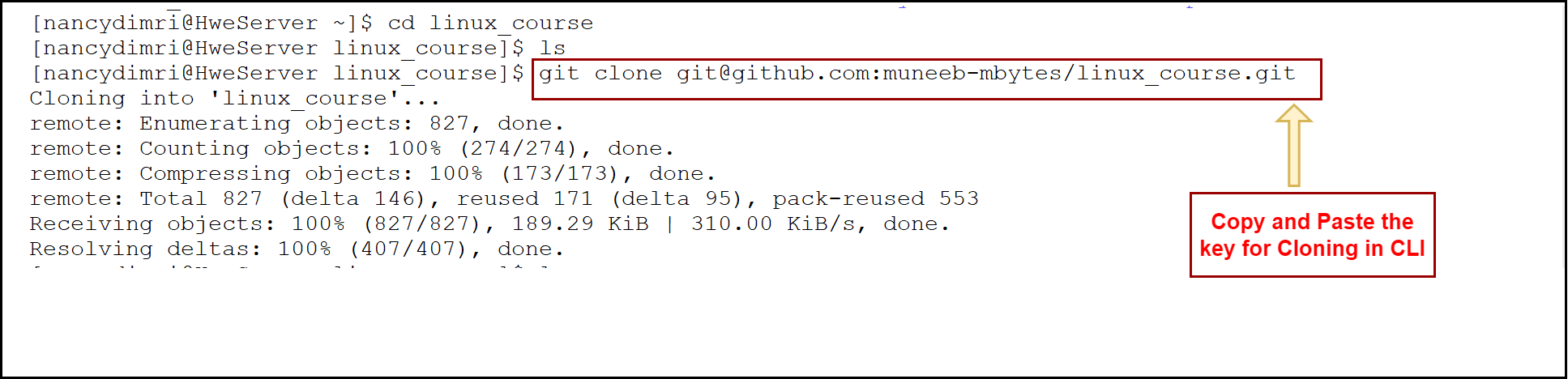
After this , go to the CLI system . Use "git clone <COPY_THE_LINK>" .Now you can see cloning process is done . Below image show it clearly.
-
After cloning all the content of project is clone into your empty directory . You can see it by using the "ls" command . It will show the files of repo .
-
You can check your branch where you are by using the command "git branch" and for checking the all branches use the command "git branch --all" . Here you can see a star mark , it shows in which you are into .

-
For practicing different commands , you can switch to any branch by using the command "git checkout <branch_name>" . For example - User want to go to branch <b7_Team_SiliconCrew> and try to use any command . Below image showing this process .
