A minimal Chrome extension that lets hosted HTTP(S) pages proxy requests to a local Unreal Engine 5 Remote Control HTTP API running on http://127.0.0.1:30010.
Browsers do not allow remote websites to directly call your local Unreal Engine Remote Control endpoint on localhost. Unreal Engine Bridge solves that by:
- injecting a content script into HTTP(S) pages,
- forwarding page messages to the extension service worker,
- proxying approved local HTTP requests to Unreal Engine, and
- returning the response back to the page.
The hosted demo page is available at examples/index.html.
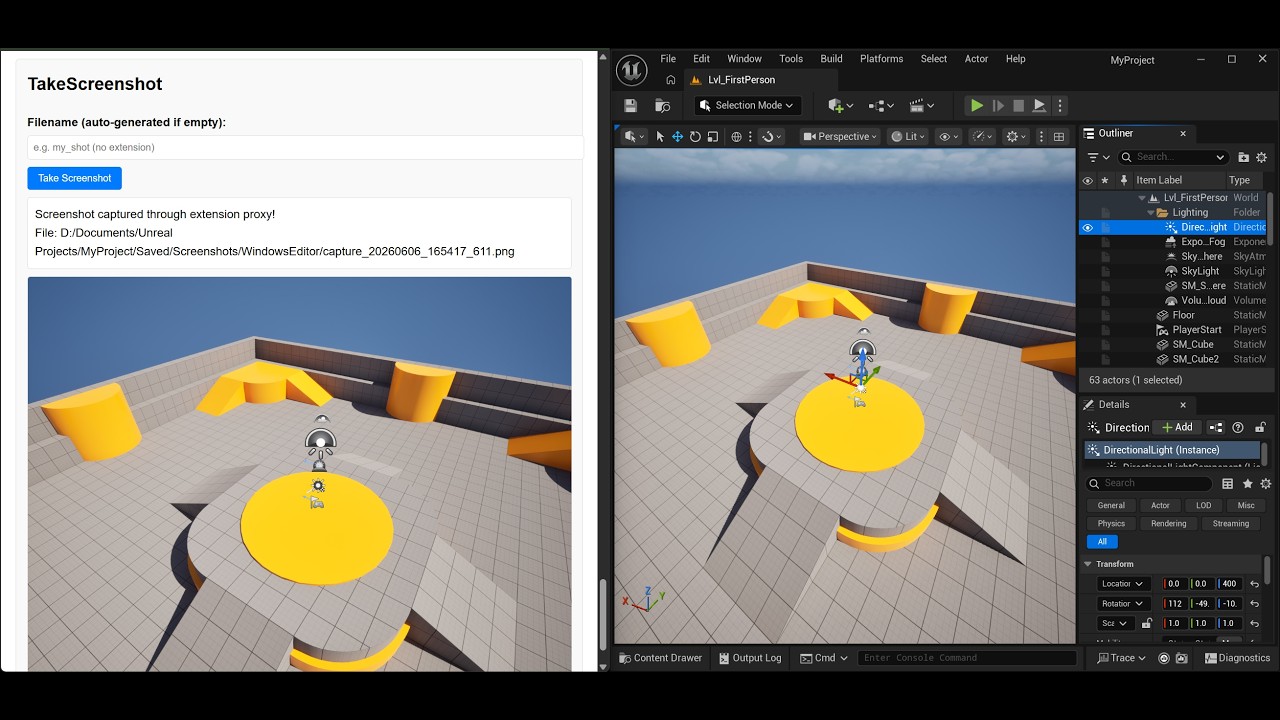


- Chrome extension:
examples/unreal-engine-bridge.zip - Use cases: manual QA, bridge verification, and a starting point for your own hosted Unreal tools
- Bypass browser CORS and Private Network Access (PNA) restrictions when accessing the UE5 Remote Control API from a web page
- Call Unreal Engine Blueprint-exposed functions and Console Commands from a web page
- Run Unreal Engine Python scripts from a web page for automation, tooling, and content workflows
- Combine the fast iteration speed of web tools with Unreal Engine's powerful game creation capabilities
- Get started quickly with the hosted demo page in
examples/index.htmland the extension package inexamples/unreal-engine-bridge.zip - Learn more advanced Remote Control workflows in the official Unreal Engine documentation
this extension has published to Chrome Webstore: https://chromewebstore.google.com/detail/unreal-engine-bridge/oofjaldaobmdaeelhikfipjibmfniedi
- Open
chrome://extensions - Enable Developer mode
- Click Load unpacked
- Select the
src/folder in this repository
Chrome requires
manifest.jsonto be at the root of the selected folder, so when developing locally you should loadsrc/, not the repository root.
- Unzip
examples/unreal-engine-bridge.zip - Open
chrome://extensions - Enable Developer mode
- Click Load unpacked
- Select the extracted
unreal-engine-bridgefolder
Before using the bridge, enable the Remote Control API plugin in Unreal Engine.
Then make sure Unreal Engine exposes the Remote Control HTTP API locally:
- Base URL:
http://127.0.0.1:30010 - Protocol: HTTP
- Allowed hosts:
127.0.0.1,localhost - Allowed port:
30010
For the bridge and the example page to work reliably, configure the following Unreal settings.


bRestrictServerAccess=True
bEnableRemotePythonExecution=True
Optional for screenshot flows only:
bAllowConsoleCommandRemoteExecution=TruebThrottleCPUWhenNotForeground=FalseThese settings are important because:
bRestrictServerAccess=Truekeeps the Remote Control server limited to local access.bEnableRemotePythonExecution=Trueis required by screenshot and other Python-driven helper flows used byexamples/index.html.bAllowConsoleCommandRemoteExecution=Trueis only needed for flows that trigger Unreal console commands, such as the screenshot example that callsHighResShot.bThrottleCPUWhenNotForeground=Falsehelps avoid background-editor throttling when Chrome and Unreal are open side by side.
If your Unreal instance uses a different port, update both:
src/manifest.jsonhost permissions- the validation logic in
src/background.js - any calling page such as
examples/index.html
- Start Unreal Engine with Remote Control HTTP API enabled on
127.0.0.1:30010 - Install the extension in Chrome
- Host or open an HTTP(S) page that speaks the bridge protocol
- Open
examples/index.htmlfrom a local web server or copy its bridge logic into your own tool page - Call
UE_BRIDGE_PINGto confirm the extension is available - Call
UE_LOCAL_FETCHto proxy local requests through the extension
Important: Chrome extensions do not run on
file://pages in this setup. Use an HTTP(S) page.
src/background.js intentionally keeps the proxy narrow:
- only
http://URLs are allowed - only
127.0.0.1andlocalhostare allowed - only port
30010is allowed - unsupported message types are rejected
This prevents arbitrary cross-network proxying from remote pages.
Because this project is plain JavaScript, there is no build step.
After editing src/manifest.json, src/background.js, or src/content.js:
- go to
chrome://extensions - find Unreal Engine Bridge
- click Reload
- refresh your tool page
From the repository root:
mkdir -p examples
rm -f examples/unreal-engine-bridge.zip
tmpdir=$(mktemp -d)
mkdir -p "$tmpdir/unreal-engine-bridge"
cp src/manifest.json src/background.js src/content.js "$tmpdir/unreal-engine-bridge/"
(cd "$tmpdir" && zip -rq /path/to/this/repo/examples/unreal-engine-bridge.zip unreal-engine-bridge)
rm -rf "$tmpdir"
This keeps the repository source under src/ while producing a release zip whose extracted folder has manifest.json at the root, which is what Chrome expects.