

A React Native component that renders a TextInput with a
delayed onChangeText. It fires once the user stops typing — not on every keystroke.
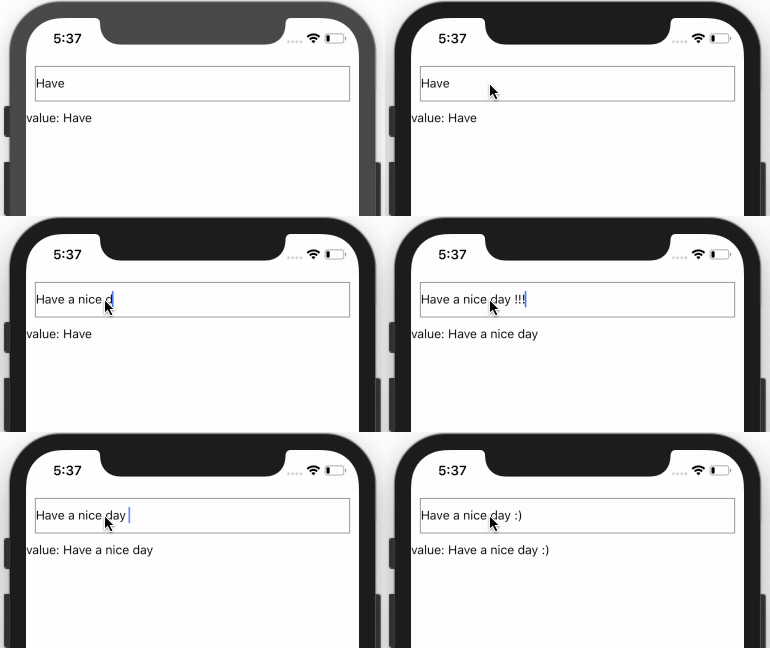
- 🪶 Zero runtime dependencies
- ⚛️ Functional component,
forwardRef,React.memo - 🟦 First-class TypeScript types
- 📱 Works on iOS, Android, and the web (react-native-web)
npm install react-native-debounce-input
# or
pnpm add react-native-debounce-input
# or
yarn add react-native-debounce-input
react (>=18) and react-native (>=0.74) are peer dependencies.
import { useEffect, useState } from "react";
import { DelayInput } from "react-native-debounce-input";

function Search() {
  const [query, setQuery] = useState("react native");

  useEffect(() => {
    // Runs only after the user pauses typing — not on every keystroke.
    if (query) fetch(`/api/search?q=${query}`);
  }, [query]);

  return (
    <DelayInput
      value={query} // initial text, also synced if you change it externally
      placeholder="Search…"
      delay={500}
      minLength={3}
      onChangeText={setQuery}
    />
  );
}
DelayInput forwards every standard TextInput prop (placeholder, style, keyboardType,
ref, …).
| Prop | Type | Default | Description |
|---|---|---|---|
onChangeText |
(value: string) => void |
— | Required. Called with the debounced text, or "" when shorter than minLength. |
delay |
number |
600 |
Debounce delay in milliseconds. |
minLength |
number |
3 |
Minimum length before a non-empty value is emitted. |
value |
string |
"" |
Initial value; also synced into the input when changed externally. |
ref |
Ref<TextInput> |
— | Forwarded to the underlying TextInput. |
…TextInputProps |
— | — | Any other React Native TextInput prop. |
- Instant feedback, debounced callback. The input reflects every keystroke immediately;
only
onChangeTextis debounced. - Blur commits immediately. Leaving the field flushes the current text without waiting for the timer.
- External
valuewins. Changing thevalueprop from the parent (e.g. a "clear" button) syncs the input and cancels any pending debounce.
This repository is a pnpm workspace (requires Node >=20.11):
| Path | What |
|---|---|
packages/debounce-input |
The published library. |
apps/demo |
A private Vite + react-native-web playground for local development. |
pnpm install      # install the whole workspace
pnpm dev          # run the react-native-web demo (Vite)
pnpm test         # run the library test suite (Vitest)
pnpm typecheck    # type-check every package
pnpm lint         # ESLint across the repo
pnpm build        # build the library (tsup → ESM + CJS + d.ts)
The demo consumes the library source directly via workspace:*, so edits to the library
hot-reload with no build step. README.md, CHANGELOG.md, and LICENSE live at the repo
root as the single source of truth and are copied into the package on publish.
To release: bump the version in packages/debounce-input/package.json, update CHANGELOG.md,
then run pnpm release (requires an npm login) to build and publish to npm.
MIT © Yurii Khvyshchuk