


A universal VPN client that manages multiple VPN connections with rule-based routing.
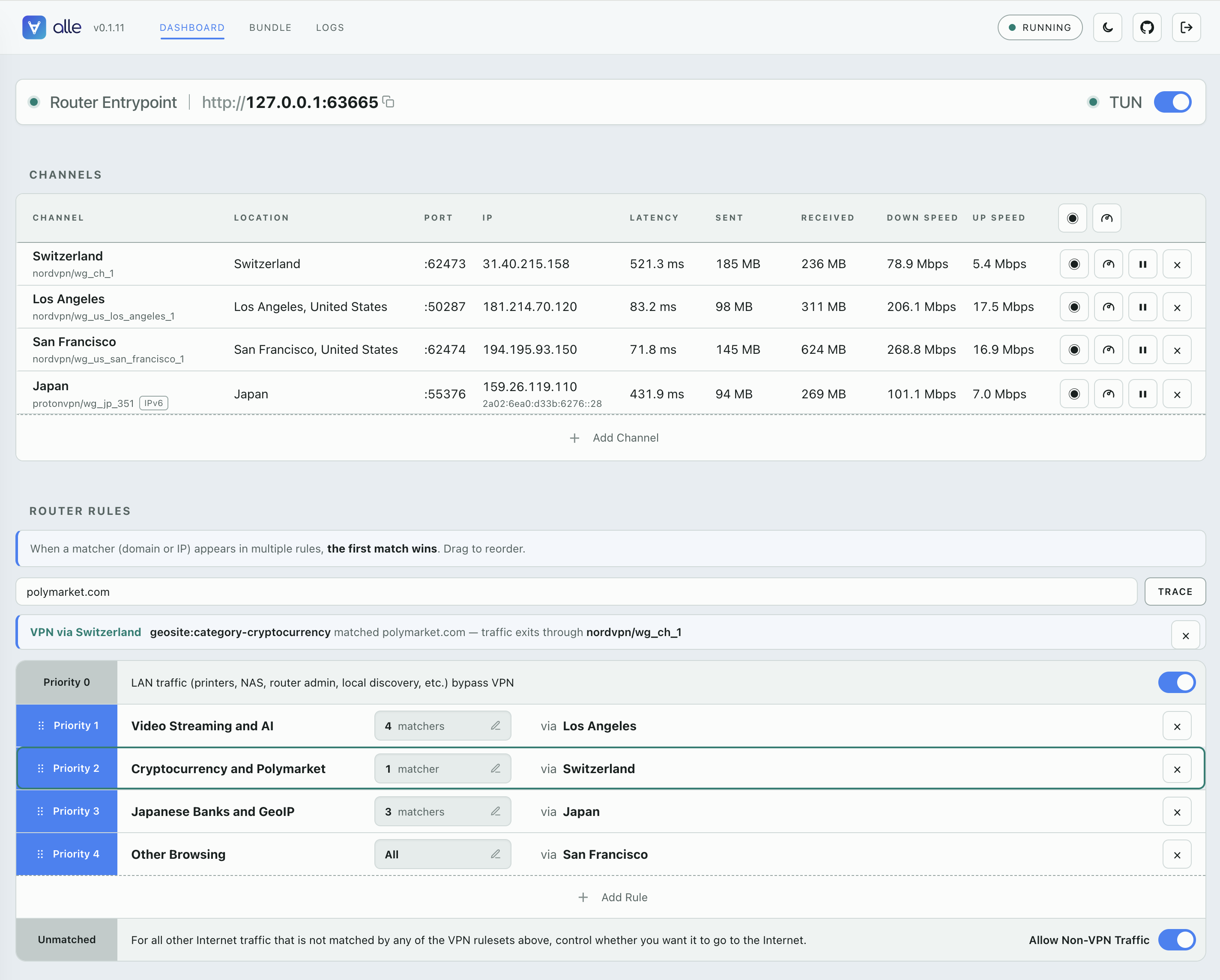
Most VPN clients are built around one global idea: connect this device to a single VPN server, then send everything through it until you disconnect or switch.
That is not enough when different resources need to appear from different regions — a geo-fenced stream, a bank that blocks foreign IPs, a region-locked test environment. Switching origins means disconnecting from one server and reconnecting to another, and the official client on one machine usually cannot keep several locations active at once anyway.
alle keeps multiple VPN exits live at the same time, from one provider or mixed
across several. Say you want a US exit, a UK exit, and a Japan exit at once —
NordVPN for the US and Japan, ProtonVPN for the UK:
   streaming + admin   ──►  alle  ──►  United States   (NordVPN)
   test runner         ──►  alle  ──►  Japan           (NordVPN)
   bank login          ──►  alle  ──►  United Kingdom  (Proton VPN)
Each app points at the exit it needs; they run concurrently and independently, so opening the bank never disturbs the stream.
In short: not one global location you keep switching, but several exits alive at once, each used where it is needed.
alle runs multiple VPN exits side by side. Each exit is exposed as its own
local HTTP+SOCKS proxy on 127.0.0.1:<port>. A single HTTP+SOCKS router
entrypoint routes traffic by rule (domain, IP) to a VPN exit, to direct
outbound, or blocks it. Instead of changing your whole machine's VPN location,
you point each app, browser profile, script, or test job at the path it needs.
Under the hood, alle manages one
sing-box process. Each channel becomes
one local proxy inbound routed through one WireGuard VPN peer. Channels can come
from different providers, so a NordVPN exit and a Proton VPN .conf import can
run at the same time.
For a whole-machine VPN that captures all traffic through the same routing
rules, there is an optional TUN mode (alle tun on, one-time privilege
grant) — see the CLI reference and
the runbook.
alle is usable today as a CLI-first client for per-app/per-workflow VPN exits.
Providers
| Provider | Support |
|---|---|
| NordVPN | Token/API setup, location selection, automatic WireGuard channel creation |
| Proton VPN | WireGuard .conf import |
Platforms
| Platform | Support |
|---|---|
| macOS | Supported |
| Windows | Planned |
| Linux | Supported |
| Docker | Supported — ziyudo/alle |
Features
| Area | Status |
|---|---|
| Core CLI | Providers, channels, per-channel proxies, status, tests (probe + speed + traffic), logs |
| Routing | Ruleset-based router entrypoint with domain/CIDR/all matchers, kill-switch, CLI shadow lint, built-in LAN bypass |
| Web UI | Dashboard (channels, probe/speed, routes, kill-switch) + Bundle + Logs pages |
| REST API | Everything the CLI does over /api/v1 (Bearer auth) — for scripts and compose siblings |
| Docker | Container profile: proxy hub for compose networks, VPN gateway container (tun), declarative boot config |
| Desktop companion | Planned |
| Distribution | PyPI CLI package and Docker Hub image; native installers planned |
| Choice | Supervisor | Traffic captured | Host-wide VPN |
|---|---|---|---|
uv host install |
launchd / systemd --user |
Host apps or host TUN | Yes |
pipx host install |
launchd / systemd --user |
Host apps or host TUN | Yes |
| Docker proxy hub | Docker restart policy | Proxy-aware containers/apps | No |
| Docker gateway | Docker restart policy | alle netns + explicitly joined containers | No |
# Host, with uv
uv tool install alle-proxy

# Host, with pipx
pipx install alle-proxy

# Docker proxy hub (persistent state; no proxy/API ports published)
docker run -d --name alle --restart unless-stopped \
  --mount type=volume,src=alle-state,dst=/var/lib/alle \
  ziyudo/alle:latest
docker exec alle alle status
Host installs may add alle daemon install to start at login, and later
upgrade with alle upgrade (it delegates to whichever of uv/pipx installed
alle, then restarts the daemon; alle upgrade --check just asks PyPI for the
latest version). Containers use alle run as PID 1 and Docker's restart
policy instead; those lifecycle commands are intentionally inapplicable there,
and a container upgrades by pulling a new image tag. See
Getting started for all three choices and
Docker for bundles and gateway scope.
alle providers add nordvpn
alle channels add nordvpn --country "United States"
alle start
alle channels ls                # prints each channel's local proxy port
Point anything proxy-aware at a channel's port:
curl -x http://127.0.0.1:53124 https://api.ipify.orgThe full walkthrough — provider setup styles (token vs .conf import),
labels, everyday commands, holding more channels than your plan's connection
cap — is in Getting started.
Using alle
- Getting started — install, quick start, provider setup, everyday commands, channel enable/disable.
- Rule-based routing — the router entrypoint: rulesets, first-match priority, kill-switch, built-in LAN bypass.
- Web UI — the browser dashboard (
alle ui): pages, sign-in, remote access over SSH. - CLI reference — every command, flag, and environment variable.
Automating alle
- REST API — the
/api/v1contract: everything the CLI can do, over HTTP with Bearer auth. Loopback by default; opt-in network exposure for compose siblings. Machine-readable spec: openapi.yaml. - Declarative setup and the bundle format — the whole setup (providers, channels, rules) as one YAML file: backup/restore, startup config, secret indirection.
Deploying alle
- Docker — image design, proxy hub, VPN gateway container (tun), trust boundaries.
- Docker Compose walkthrough — bundle authoring, secrets, managing alle from a sibling container, day-2 operations, troubleshooting.
- TUN runbook — whole-machine capture: privilege models per platform, verification, rollback.
Understanding alle
- How it works — the runtime model: one sing-box, state, ports, probes.
- Security model — trust boundaries, credential handling, Web UI/API hardening, fail-closed routing.
- VPN provider research — which providers can be supported next, and why some can't.
- Credentials and WireGuard keys stay local (
~/.alle, owner-only permissions); tokens are never read from the environment implicitly. - Proxy ports bind to loopback on hosts; the Docker image opts into the container network as its trust boundary.
- The loopback proxies are unauthenticated (alle assumes a single-user machine); the control API — Web UI and REST — is always authenticated.
sing-boxis a pinned upstream release, checksum-verified before every run.
The full threat model lives in docs/security.md.
Planned next steps:
- More WireGuard-capable VPN providers. See VPN Provider Research.
- Homebrew distribution of the CLI and bundled Web UI on macOS and Linux.
- A one-command uv-based CLI/Web UI installation on macOS and Linux.
- Desktop companion with OS-level VPN integration.
- Windows support and broader distribution.
Non-goals:
- OpenVPN or IKEv2/IPsec support.
- VPN providers without usable WireGuard support, such as ExpressVPN, HideMyAss, Perfect Privacy, Privado, SlickVPN, VPN.ac/VPNSecure, and Giganews.
- SOCKS5-only or unencrypted proxy providers.
- Bundling
sing-boxinside the Python package.
MIT